Interoperability Runs on Open Source, Not Standards
While open standards set the rules, open source gets the work done. Discuss choosing tools, handling semantics and making health systems interoperable.
February 18, 2026
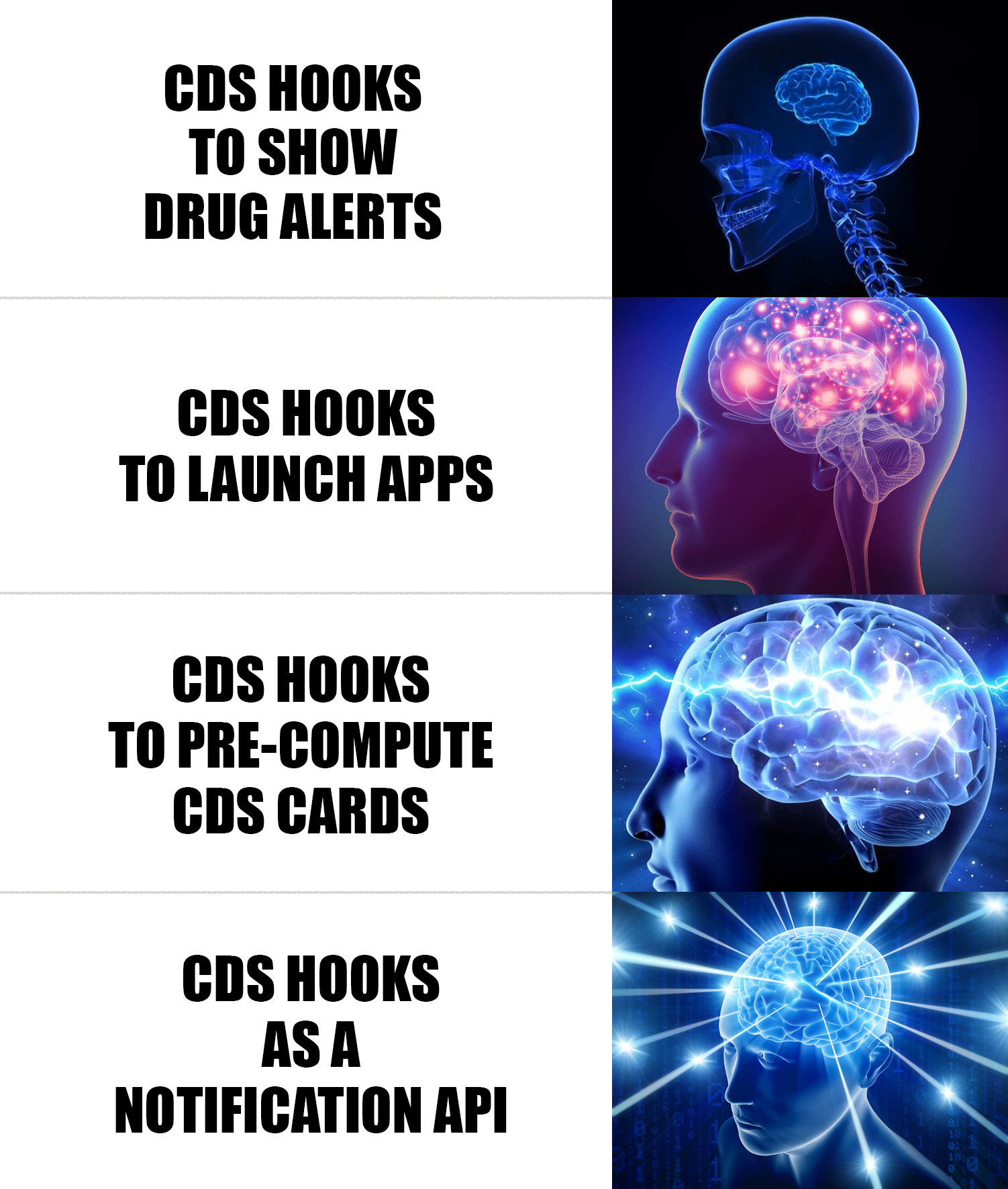
Most people think CDS Hooks are just for showing drug interaction alerts. Maybe a practitioner is about to prescribe a brand-name drug, the EHR nudges them toward the generic, saving the patient thousands of dollars a year. That’s the classic demo.
But after building with CDS Hooks for over a year, I think they’re something much bigger.
They’re a gateway into the practitioner’s workflow.
Not just for alerts. For launching apps, precomputing data, and shifting entire workflows outside of the EHR.
Let me break down why.
CDS Hooks is an HL7 standard that lets external services react to events inside an EHR in real time.
Here’s how it works. A practitioner does something in the EHR, like opening a patient chart or selecting a medication. That action triggers a webhook to one or more external servers you’ve registered. Each server can respond with a bunch of “cards” that shows up right inside the EHR’s UI.
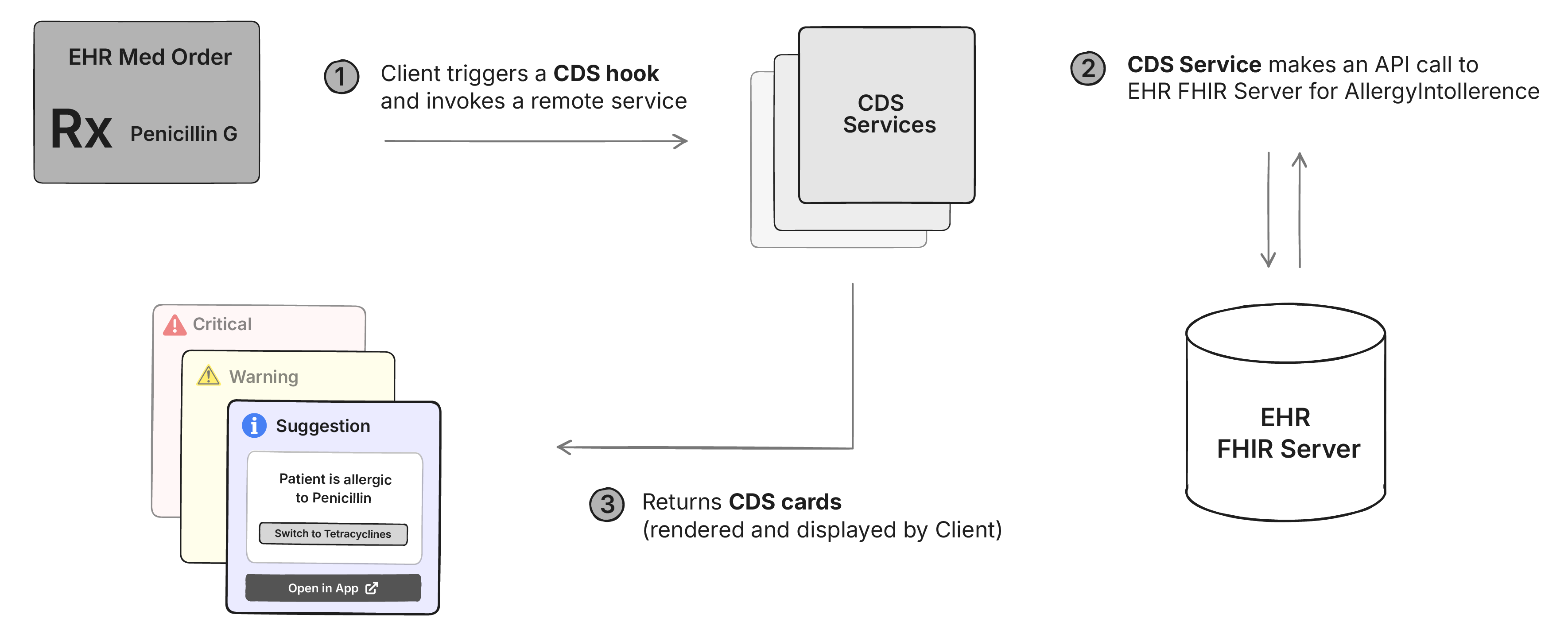
Cards have three severity levels: info, warning, and critical. But that’s just the packaging. A card can link out to clinical references like UpToDate or OpenEvidence, suggest changes to the medication being prescribed, or launch a full SMART on FHIR app inside the EHR (more on this later).
There are 2 mature hooks that most EHRs support today: patient-view (fires when a patient chart is opened) and order-sign (fires when a medication or order is about to be signed).
Here’s what most people miss: the card doesn’t have to be the destination. It can be the entry point to a full SMART on FHIR app that opens right inside the EHR.
The CDS Hooks specification lets you add a link in your card response that launches a SMART on FHIR app. Here’s what that looks like in the response:
{
  "summary": "Consider launching Bilirubin SMART app",
  "indicator": "info",
  "links": [
    {
      "label": "Bilirubin SMART app",
      "url": "https://example.com/launch",
      "type": "smart"
    }
  ]
}
When the practitioner sees this card in their EHR, it looks something like this:
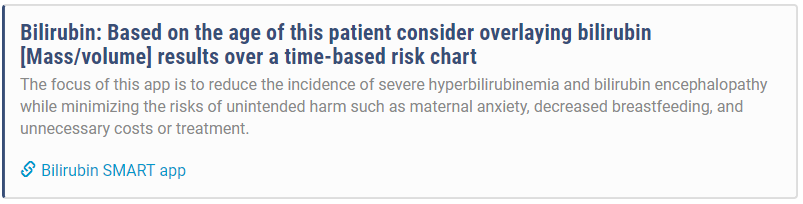
This changes everything.
Instead of showing a static alert about a drug interaction, you can launch a full prescribing app. Instead of a warning about a missing lab result, you can open an app that lets the practitioner order the test right there. The card is just the hook. The app is where the actual work happens.
Now there is an “autolaunch” option that some EHRs support - where your CDS card can automatically launch the full app when the hook is fired Almost every EHR, including Epic blocks it by default, and for good reason - these are almost the same as pop-up ads. Practitioners are already drowning in alerts. An app that opens itself uninvited is just going to get disabled.
In our experience, we’ve noticed that showing a card with just enough information to be useful on its own is the best way to get the practitioner’s attention. And most of them use the link to launch the full app.
And once they do, you can shift entire workflows out of the EHR.
Here’s a real example. Say you’re a startup offering a specialized pharmacogenomic test panel. The test helps practitioners choose the right antidepressant based on genetic markers. It requires specific patient counseling, a saliva kit sent to the patient’s home, lab processing, and a detailed interpretation report.
Normally, this would require deep EHR integration. You’d add your test to each EHR’s order catalog, listen for HL7 v2 ORM messages when someone orders it, then send back ORU messages with the results. And you’d need to do this separately for each of your customers.
With CDS Hooks + SMART apps, here’s what happens instead:
A practitioner opens a patient chart. Your CDS service sees the patient has a diagnosis of depression and is about to start their third antidepressant trial. You fire a patient-view hook and show a card: “Consider pharmacogenomic testing to guide antidepressant selection.”
They click “Order Test.” Your SMART app opens in a sidebar. They fill out a brief form with patient consent and preferred contact method. Done. They close the app and go back to the EHR workflow.
In the background, your system receives the order, calls the patient, ships the kit, processes the sample, and generates the report.
Two weeks later, the practitioner opens the same patient’s chart again. Another patient-view fires. This time, your card says “Pharmacogenomic results ready.”
They click “View Results.” Your app opens. Shows the genetic markers, which medications to avoid, which ones are likely to work, and a summary they can discuss with the patient.

The entire workflow happened outside the EHR. No faxes. No separate logins. No custom HL7 v2 integrations. Just a standard webhook and a SMART app that can be installed everywhere.
Sounds perfect, right? There’s a catch.
Here’s the problem: you’re not the only one firing CDS Hooks. Every clinical decision support service the hospital has enabled is competing for the same screen space. Drug interaction checkers. Prior auth tools. Sepsis alerts. Quality measure reminders.
When a practitioner opens a patient chart, their EHR might fire webhooks to 10 different services simultaneously. Each one has a few hundred milliseconds to respond before the EHR gives up and moves on. If your card shows up 2 seconds after the others, it’s invisible. The practitioner has already moved on.
And even if you’re fast, you need to be relevant. Practitioners suffer from alarm fatigue. Show too many low-value cards and they’ll learn to dismiss your alerts without reading them.
You might think: “I’ll just set my card severity to ‘critical’ so it shows up at the top.” That works once. Critical cards do show up first. But if your critical alerts aren’t actually critical, practitioners will ignore everything from your service. Permanently.
So you’re competing on two dimensions: be fast enough to show up, and be valuable enough that they don’t tune you out.
Attention = Relevance + Latency
Now relevance is a subjective thing. And it takes a lot of clinical intuition to know what’s relevant and what’s not.
Let’s talk about the easier part - latency.
Here’s something most people don’t realize about patient-view hooks: they fire every time anyone opens the chart. Not just the attending physician. The nurse checking vitals before rounds. The intern reviewing labs. The medical assistant updating demographics.
This is free compute time.
We learned this the hard way. When we first built our CDS service, we tried to make the API response as fast as possible. We optimized database queries. We cached FHIR resources. We threw more servers at it. But sometimes the computation just takes time. A payer API that needs 800ms to respond. A machine learning model that needs to process 6 months of lab results.
Then we sat down with our customers and watched how they actually used the EHR. The pattern was obvious once we saw it: a nurse or medical assistant would open the patient chart 10-30 minutes before the practitioner. They’d review vitals, update the problem list, check medications. Every time, a patient-view hook would fire. We were wasting that opportunity.
Here’s the trick: use the first patient-view call to trigger the computation, but don’t return a card. Just start the work in the background and return an empty response immediately. Cache the results when they’re ready.
When the practitioner opens the chart 10 minutes later (or 10 hours later), your data is already computed. You return the card instantly. While everyone else is still fetching FHIR resources and running their logic, you’ve already won the latency race.
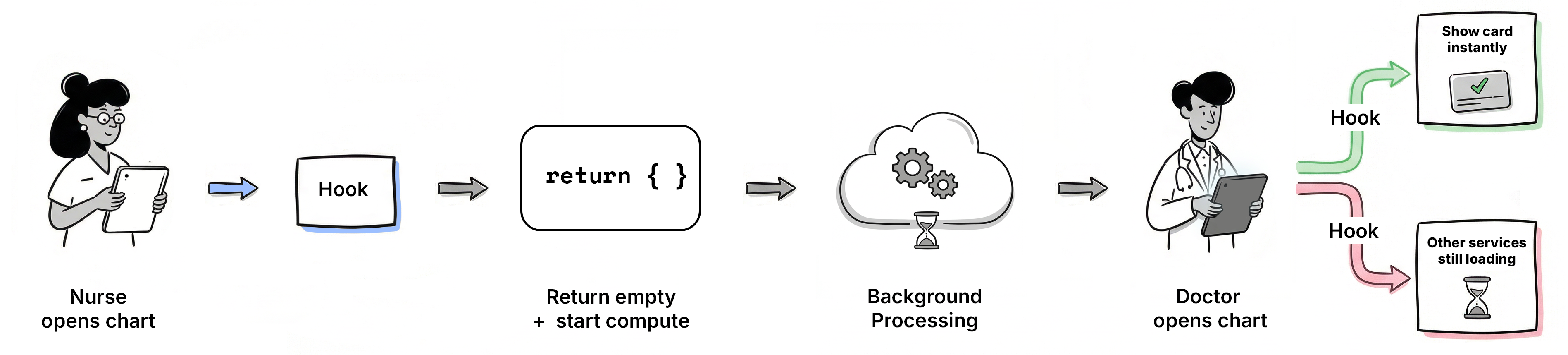
This works especially well in teaching hospitals where an intern or resident reviews the chart before the attending. By the time the decision-maker arrives, you’re ready.
Now the CDS Hooks spec has a “prefetch” feature where the EHR can send you FHIR resources with the hook request. Don’t use it. It slows down the EHR’s request and still doesn’t give you enough time to compute. Fetch what you need asynchronously after you’ve returned your response.
If we can use patient-view hooks to trigger background computation for showing cards later, can’t we use them to trigger background work even when we’re not planning to show a card at all?
Yes. That’s exactly what you can do.
Most people think about getting real-time patient data from EHRs through HL7 v2 ADT messages or FHIR Bulk Data exports. HL7 v2 has massive implementation variation and only notifies you when data changes, not when someone views a chart. FHIR Bulk Data requires patients to be in a pre-configured Group and usually only runs once every 24 hours. There’s also FHIRCast, a newer standard for real-time synchronization, but adoption is still limited compared to CDS Hooks.
CDS Hooks gives you something different: a webhook that fires when anyone views a patient chart. Not when data changes. When someone looks.
You can use this as a notification API. Your backend gets a webhook every time a patient is opened. Fetch FHIR resources using a Backend Service, update your database, run models, sync data. You don’t have to return a card every time. Just return an empty response and do the work asynchronously.
Epic’s documentation explicitly says not to do this:
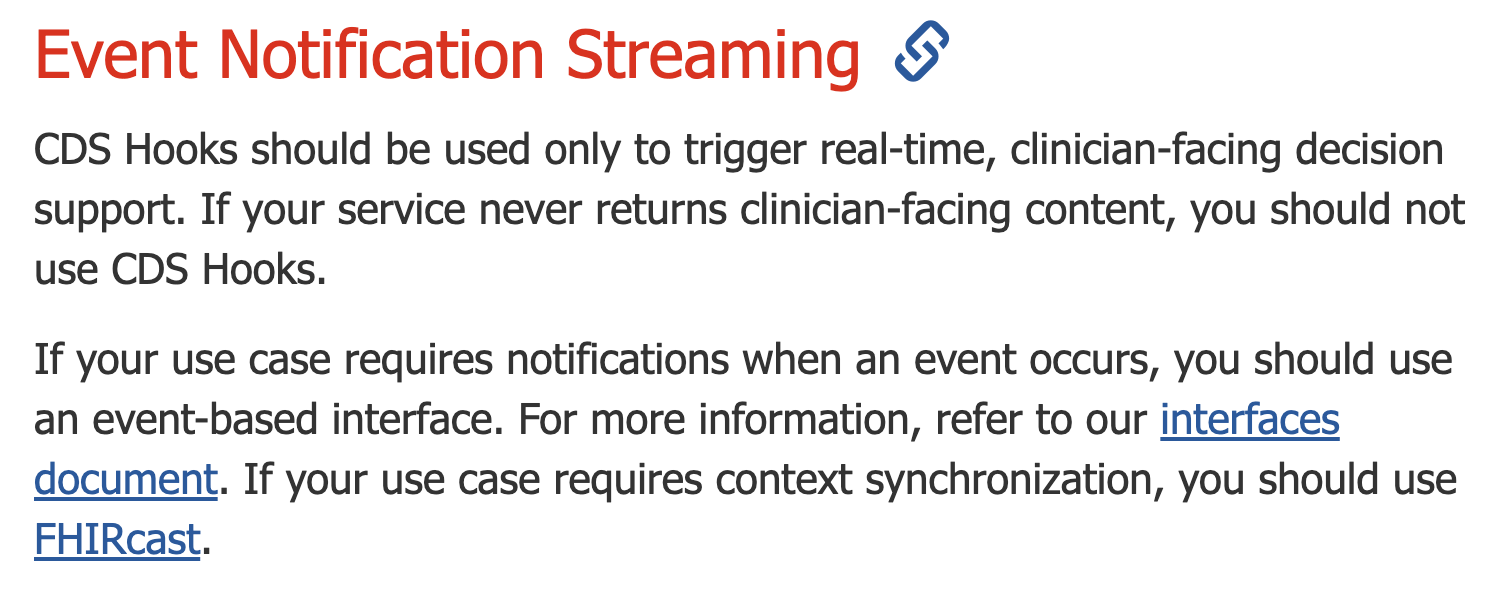
But most apps that benefit from this notification pattern have legitimate reasons to show cards at least some of the time. If you’re building a prior auth service, you need to know when patients are being seen (to prefetch payer data), and you also need to show cards (when prior auth is actually required). Same for clinical decision support, care gap alerts, or specialty test ordering.
Most data changes in the EHR are preceded by someone opening the chart. A nurse opens the patient, takes vitals, updates medications. A lab tech opens the chart, attaches results. A practitioner opens the chart, writes a note, places an order. The patient-view hook fires before almost any meaningful activity happens.
You still need a backup mechanism like FHIR Bulk Data or periodic polling. Not every patient will be opened every day. But for patients who are actively being seen, CDS Hooks gives you real-time visibility. And that coverage is about to get a lot better.
CDS Hooks isn’t technically mandatory yet. But the ecosystem is pushing hard toward it.
The CMS Interoperability and Prior Authorization Final Rule requires payers to implement a Prior Authorization API by January 1, 2027. While CMS doesn’t mandate a specific technology, they strongly recommend the Da Vinci Coverage Requirements Discovery (CRD) implementation guide, which is built entirely on CDS Hooks.
Da Vinci CRD defines six CDS Hooks for different points in the workflow: appointment booking, encounter start, order selection, order signing, encounter discharge, and order dispatch. When a practitioner is about to order something that needs prior authorization, the payer’s CDS service fires, shows coverage requirements, and can even return a prior authorization approval right there in the card. No X12 278 transaction. No separate portal.
CMS issued enforcement discretion in February 2024 saying they won’t enforce the X12 278 requirement if payers are using the FHIR-based Prior Authorization API. When CMS gives you a regulatory escape hatch from legacy standards, adoption usually follows.
CDS Hooks isn’t universally supported yet. But Epic has an excellent implementation, and with CMS pushing payers toward Da Vinci CRD by 2027, adoption is accelerating.
If you’re building clinical software, this is worth paying attention to. It’s the closest thing we have to a standardized distribution channel for getting apps into practitioner workflows without custom integrations.
I’d love to hear what you think about CDS Hooks. Are you already using it? Considering it? Book a call with me if you want to discuss.
While open standards set the rules, open source gets the work done. Discuss choosing tools, handling semantics and making health systems interoperable.
Stop drowning in FHIR docs. From HAPI FHIR & Simplifier to Inferno & validators - 10 tools that save hours. Covers servers, testing & profiling. Updated 2026.
Compare openEHR, FHIR, HL7 V2, CDA, DICOM, OMOP, SNOMED CT and more with practical comparison tables, use cases and choose the right healthcare IT standard.
No comments yet. Be the first to comment!