
Medblocks x SPARSH Hospitals: Building an Analytics Pipeline on Iceberg and Trino
150 GB of hospital data was enough to make Postgres hang for 50 minutes. Here’s how we rebuilt SPARSH’s analytics pipeline to handle it.
March 3, 2026
You’re probably here because you need to choose a FHIR server for your hospital or healthcare platform. And you want to know which one can actually handle real load when millions of patient records are being saved and retrieved through your EHR. If you’ve ever tried to navigate the world of FHIR servers, you already know how overwhelming it can get.
The healthcare interoperability landscape is crowded. Cloud vendors like Microsoft (Azure Health Data Services), Google (Cloud Healthcare API), and Amazon Web Services (AWS HealthLake) each come with tradeoffs, pricing quirks, and lock-in concerns.
But what if you want to host your own? Whether you’re looking to keep infrastructure on-premises or simply wanting a server tailored to your specific needs, the self-hosted route is a compelling option. On the open source side, you have choices like HAPI FHIR by Smile Digital Health and Medplum’s CDR. And more recently, Couchbase partnered with us to create a FHIR server, based on their document-oriented database.
Self-hosting still raises hard questions, especially around performance. In this deep dive, we compare HAPI FHIR and Couchbase FHIR through a set of benchmarks designed to find where each one starts to bend.
Real healthcare systems don’t operate in a vacuum. Multiple systems querying FHIR servers simultaneously, EHRs, aggregators, analytics platforms, mobile apps, they all hit the same endpoints.
When a doctor is pulling up a patient’s history mid-consult, waiting 10 seconds for data to load isn’t just annoying, it affects care quality. So, the question isn’t only “does it work?” but “how far can we push it before something breaks?”
That’s where performance testing comes in. Without rigorous benchmarking, you’re essentially flying blind, hoping your FHIR server can handle intense load until the day it suddenly can’t. And in healthcare, that day tends to arrive at the worst possible moment.
In this article, we’re going to systematically stress-test the FHIR servers from Couchbase and HAPI, identify their breaking points, and give you the data you need to make an informed decision. We’ll cover read/write performance, concurrency, resource-specific bottlenecks, and real-world failure scenarios that keeps your DevOps team up at night, so you can sleep soundly knowing your infrastructure can scale.
By the end of this article, you’ll have clear answers to:
To set up the FHIR servers and ensure fully reproducibility, we used AWS Cloud Development Kit (CDK) with Typescript to spin up the AWS EC2 instances. All the code used to deploy the instances is well documented and available in this repo. To make this a fair fight, we ran both FHIR servers on identical AWS infrastructure.
The Hardware:
We picked c6i.xlarge because it’s a compute-optimized instance that gives us consistent performance without breaking the bank. Both servers have the exact same compute resources.
One important thing to note is to avoid using burstable instances for load testing as they operate on the CPU credit system. This means when CPU usage increases after a threshold, CPU Credits will be used. Once depleted, the instance gets throttled down to a baseline performance level, which makes the results unreliable for benchmarking purposes.
We deployed two separate EC2 instances of type c6i.xlarge within a VPC with a public subnet: one for HAPI FHIR and one PostgreSQL.
The PostgreSQL instance runs PostgreSQL 16 with the below configuration:
max_connections = 200
shared_buffers = 2GB
effective_cache_size = 6GB
work_mem = 32MB
wal_buffers = 64MB
HAPI JVM Settings:
-Xms4096m
-XX:MaxRAMPercentage=85.0
-Dserver.tomcat.threads.max=200
-Dserver.tomcat.threads.min-spare=50
-Dserver.tomcat.accept-count=500
-Dserver.tomcat.max-connections=8192
-Dspring.datasource.hikari.maximum-pool-size=10
-Dspring.datasource.hikari.minimum-idle=5
-Dspring.jpa.properties.hibernate.jdbc.batch_size=50
The HAPI FHIR server itself is built from the official hapi-fhir-jpaserver-starter repository using Maven with the Spring Boot profile. The JVM is configured with 4GB initial heap (-Xms 4096m) and 85% max RAM usage. Tomcat is tuned for high concurrency with 200 max threads, 50 spare threads, and 8192 max connections. HikariCP manages the database connection pool with 10 connections. Both instances include OpenTelemetry instrumentation for observability and CloudWatch agents for metrics collection.
The Couchbase FHIR setup also uses two c6i.xlarge instances. The Couchbase database instance runs Couchbase Server Community Edition with the following configuration:
The FHIR server runs Couchbase FHIR CE v0.9.201, a Spring Boot application built with Java 21. It uses HAProxy as a reverse proxy to route requests between the frontend dashboard and the backend API. We have discussed in detail on how and why we built the Couchbase FHIR server in this article. The JVM is configured identical to HAPI with 4GB minimum memory and 6.5 GB max memory. All other JVM parameters were kept consistent with the HAPI setup to ensure fairness across the performance tests.
Now that FHIR servers are set up with their respective configuration and deployed, we need to generate realistic healthcare data for our benchmark. We used Synthea to generate 1,000 synthetic patients which are complete patient records with medical histories, encounters, conditions, observations, medications, and care plans and other FHIR resources.
./run_synthea -p 1000 -o synthea-data/Along with individual patient FHIR R4 bundles, it also generates hospitalInformation*.json which contains Organization resources and practitionerInformation*.json which has the Practitioner resources.
The patient data upload to the FHIR servers was handled in two parts. First, we uploaded the Organization and Practitioner bundles followed by patient data itself. This was because the Patient resources reference back to the organizations and the practitioners.
Organization and Practitioner bundle upload:
cd ~/synthea-data
./upload_hospital_orgs_synthea.sh
Patient upload:
./upload_patients.shThe patient upload script processes files in batches of 50 with a 10-second pause between batches to avoid overwhelming the server during initial data loading. For HAPI FHIR, no authentication is required. For Couchbase FHIR, you need to set a bearer token via the FHIR_AUTH_TOKEN environment variable before running the upload scripts.
During data upload, we monitored the CPU usage of the EC2 instances. Both servers showed high CPU utilization as they processed and indexed the incoming bundles.. The upload phase is particularly revealing because it shows how each server handles write-heavy workloads. This is where you start to see architectural differences. PostgreSQL-backed HAPI manages transactions and indexing synchronously, while Couchbase’s document model handles writes differently.
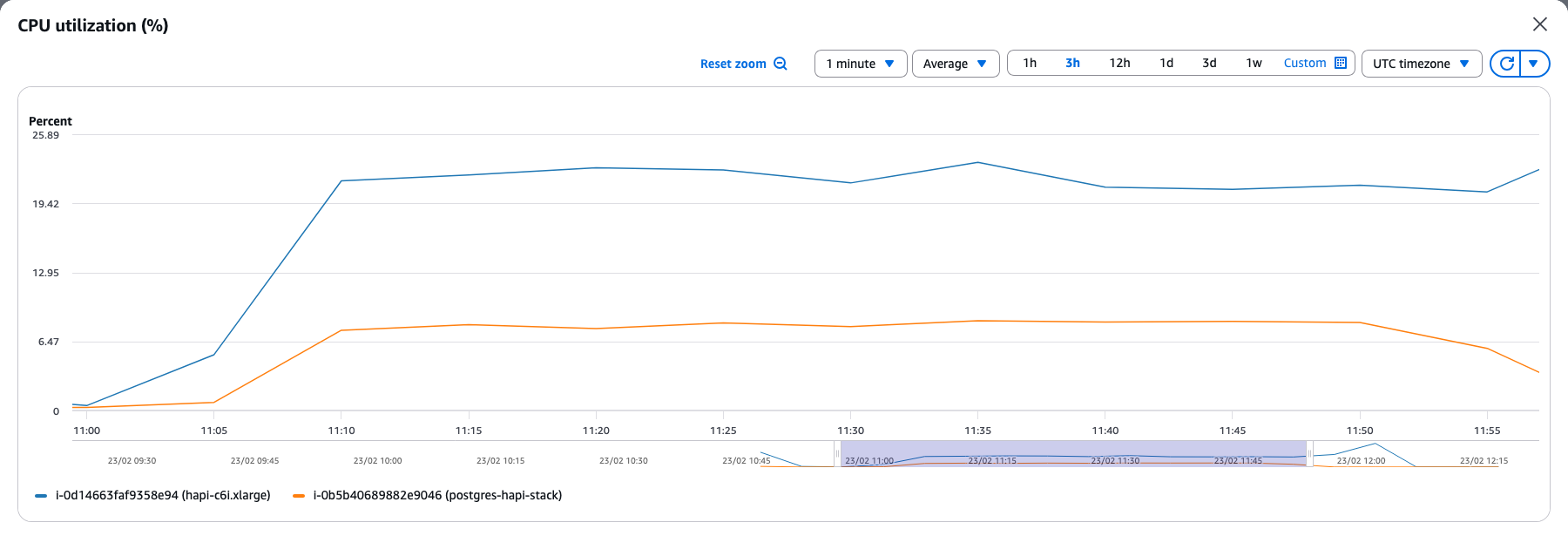
HAPI FHIR showed a steady climb in CPU usage from around 6% to 23% as the upload progressed and eventually levelled off at that point. Since patients were uploaded in batches of 50 with a 10-second pause between batches, the server reached a sustained load. This is what is being seen as the plateau in the CPU usage as well.
Another interesting observation is the difference in the CPU usage between the two instances. The HAPI FHIR instance peaked at 23% CPU usage while the PostgreSQL instance reached only 6.5%, indicating that most of the heavy lifting happens at the application layer rather than the database. This makes sense given how HAPI works under the hood. Every FHIR resource being uploaded goes through JSON deserialization and gets decomposed into multiple relational tables through Hibernate ORM. Search indexes, reference links, and token indexes all need to be computed and updated in real-time.
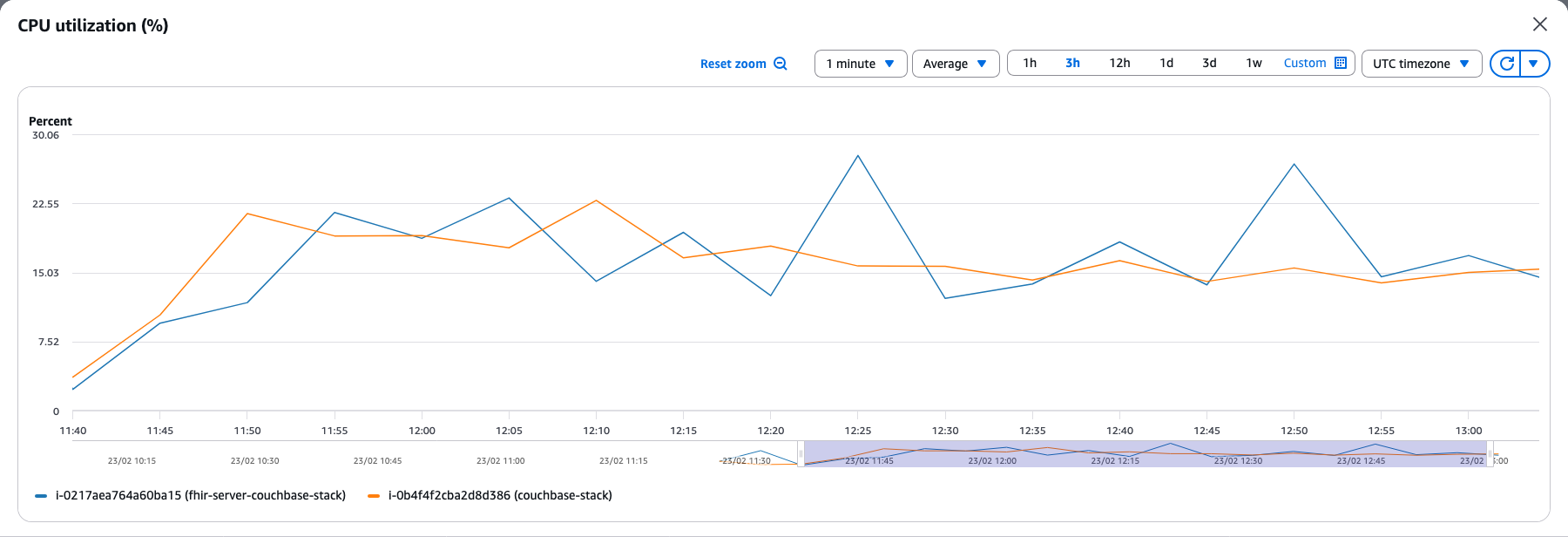
With the Couchbase stack, we can see similar CPU usage for both the instances hovering around 15 - 25%. This contrasts sharply with HAPI where the FHIR server consumed 4x more CPU than the database.
The FHIR server receives incoming FHIR bundles and translates them into SQL++ (N1QL) statements for Couchbase. It also performs FHIR validation, which involves checking resource conformance, resolving references, and processing transaction bundles. This validation and query translation work accounts for the 20-25% CPU usage on the FHIR server. Meanwhile, Couchbase database operates with a memory-first architecture where documents get written to memory quickly and flushed to disk in batches. The database also parses and indexes these documents for its SQL++ and full-text search capabilities, resulting in the consistent 18% CPU usage on the Couchbase instance.
For load testing, we used Locust, a Python-based load testing framework that makes it easy to define the load testing scenarios. Locust runs from your local machine (or any host that can reach the FHIR server) and simulates concurrent users hitting the FHIR endpoints.
Setting up Locust is straightforward — more details are available in the repo.
cd locust
python -m venv .venv
source .venv/bin/activate
pip install -r requirements.txtThe performance tests involved two scenarios. The first is a basic healthcheck using the /Patient endpoint; the second simulates typical clinical application queries across five equally-weighted tasks. For both the scenarios, we ran the test for 5 minutes across three concurrency levels to see how each server handles increasing load: 100, 250, 500, and 1,000 concurrent users. This lets us see not just baseline performance, but also observe how the servers scale as load increases and where they start to break down.
Healthcheck: This scenario tests raw throughput and server stability over time. Each virtual user makes 200 sequential requests to /Patient?_count=10, with a 1-2 second wait between requests.
General Queries: This scenario simulates typical clinical application queries. A doctor pulling up patient records, a nurse checking lab results, an analytics dashboard fetching condition data. We created five equally-weighted query types.
| Query | What it does | Endpoint |
|---|---|---|
| Patient + Observations | Fetches a patient by identifier and uses _revinclude=Observation:subject to pull all related Observations in a single request. This is how apps typically load a patient’s vital signs or lab values. | GET /Patient?identifier=xxx&_revinclude=Observation:subject |
| Patient + Observations + DiagnosticReports | Same as above but adds _revinclude=DiagnosticReport:patient. Simulates loading a comprehensive patient view with labs and imaging reports. | GET /Patient?identifier=xxx&_revinclude=Observation:subject&_revinclude=DiagnosticReport:patient |
| Patient by name | Simple search using /Patient?name=Felisa186. Tests the server’s string search and indexing performance. | GET /Patient?name=Felisa186 |
| Patient by name and birthdate | Combined search with /Patient?name=Fabian647&birthdate=ge1970. Tests composite query handling with date range filters. | GET /Patient?name=Fabian647&birthdate=ge1970 |
| All Conditions | Fetches /Condition without filters. Returns a large result set, testing how the server handles bulk data retrieval. | GET /Condition |
source .env
locust --host=$TARGET_HOST -f healthcheck.py
This opens the Locust web UI at http://localhost:8089 where you can configure the number of users and spawn rate.
The healthcheck scenario is hitting a single endpoint (/Patient) with concurrency pushed to its limits. Due to the simplicity of the query itself, it is almost a direct measure of how well each server manages concurrent connections and sustains throughput under load.
| Couchbase FHIR | HAPI FHIR | |||
|---|---|---|---|---|
| Users | RPS | p95 (ms) | RPS | p95 (ms) |
| 100 | 64 | 34 | 63 | 60 |
| 250 | 155 | 60 | 152 | 110 |
| 500 | 300 | 42 | 252 | 420 |
| 1000 | 536 | 110 | 265 | 2500 |
A quick note on the two metrics: RPS (requests per second) measures throughput which is how many requests the server can process every second across all concurrent users. A higher RPS means the server is doing more work in the same amount of time, which directly translates to the ability to serve more users without adding infrastructure.
p95 is the 95th percentile response time, meaning 95% of all requests completed within that duration. A lower p95 means the server is responding quickly and consistently for the 95% of total incoming requests.
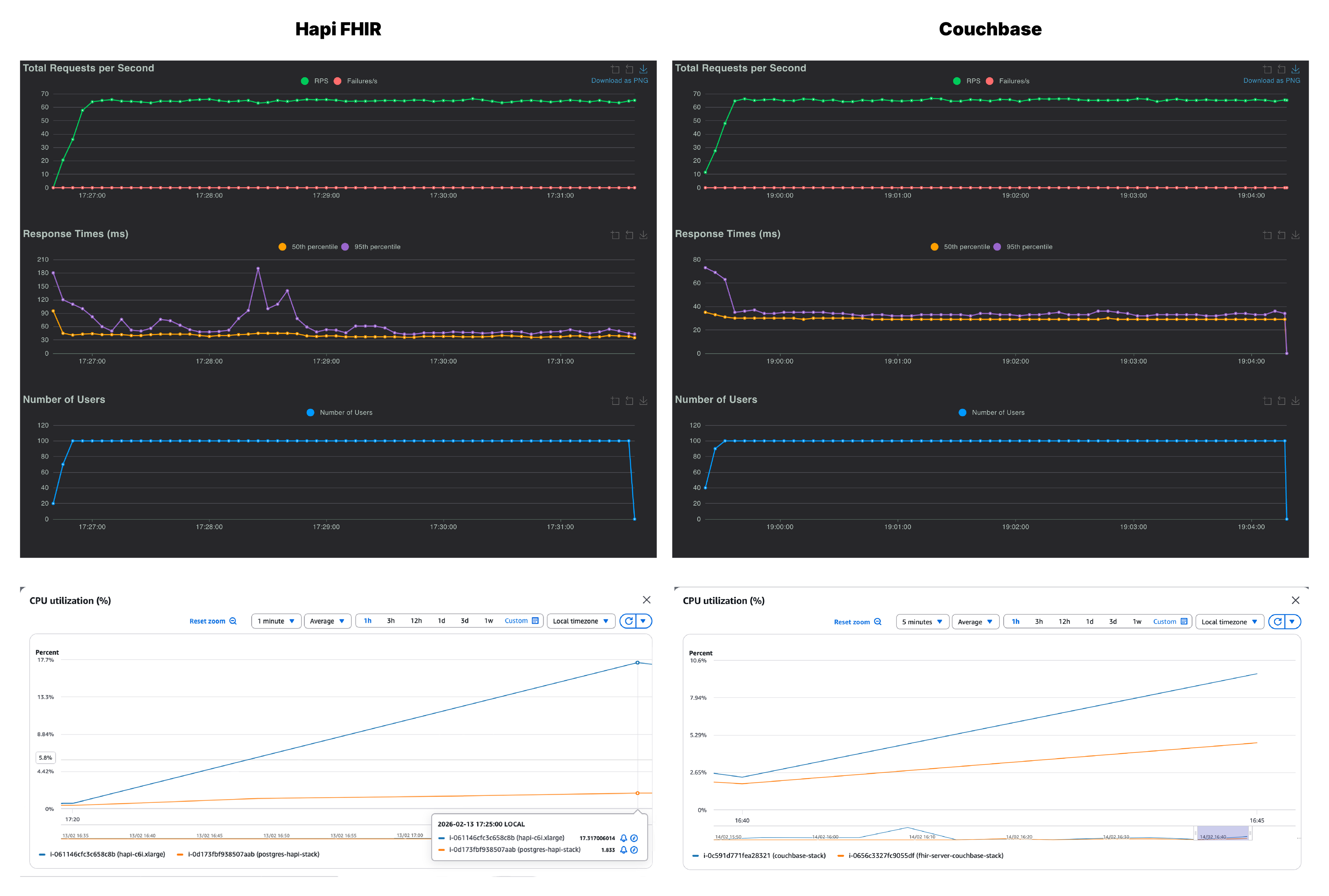
We recorded RPS (green), p50 (yellow) and p95 (purple) across all the users. On first glance, both Couchbase and HAPI FHIR look nearly identical at 100 concurrent users. Couchbase settled at 64 RPS with a p95 of 34ms and HAPI FHIR matched it almost exactly at 63 RPS, but it had a noticeably higher p95 of 60ms. Although both servers handled 100 users without a single failure, Couchbase was already running cooler and more consistently than HAPI FHIR.
Along with the throughput and latency, we also monitored the CPU utilization across both, the FHIR server instance and the database instance, for each stack. As seen on the CPU graphs, on the Couchbase side, it is the database instance which is being put to work while the FHIR server barely registers any load. However, with HAPI FHIR, the pattern is reversed. Any increase in users lands on the application server, while the database instance stays relatively idle.
This reflects a fundamental architectural difference in how the two servers handle data. HAPI FHIR deserializes resources from PostgreSQL, processes them in the Java application layer, and re-serializes them as FHIR JSON on the way out. All of that compute lives in the FHIR server, and it grows with every additional user. On the other hand, since Couchbase stores everything natively as JSON, there is no serialization overhead at all. The data goes in as JSON and comes out as JSON, with the database doing the heavy lifting.
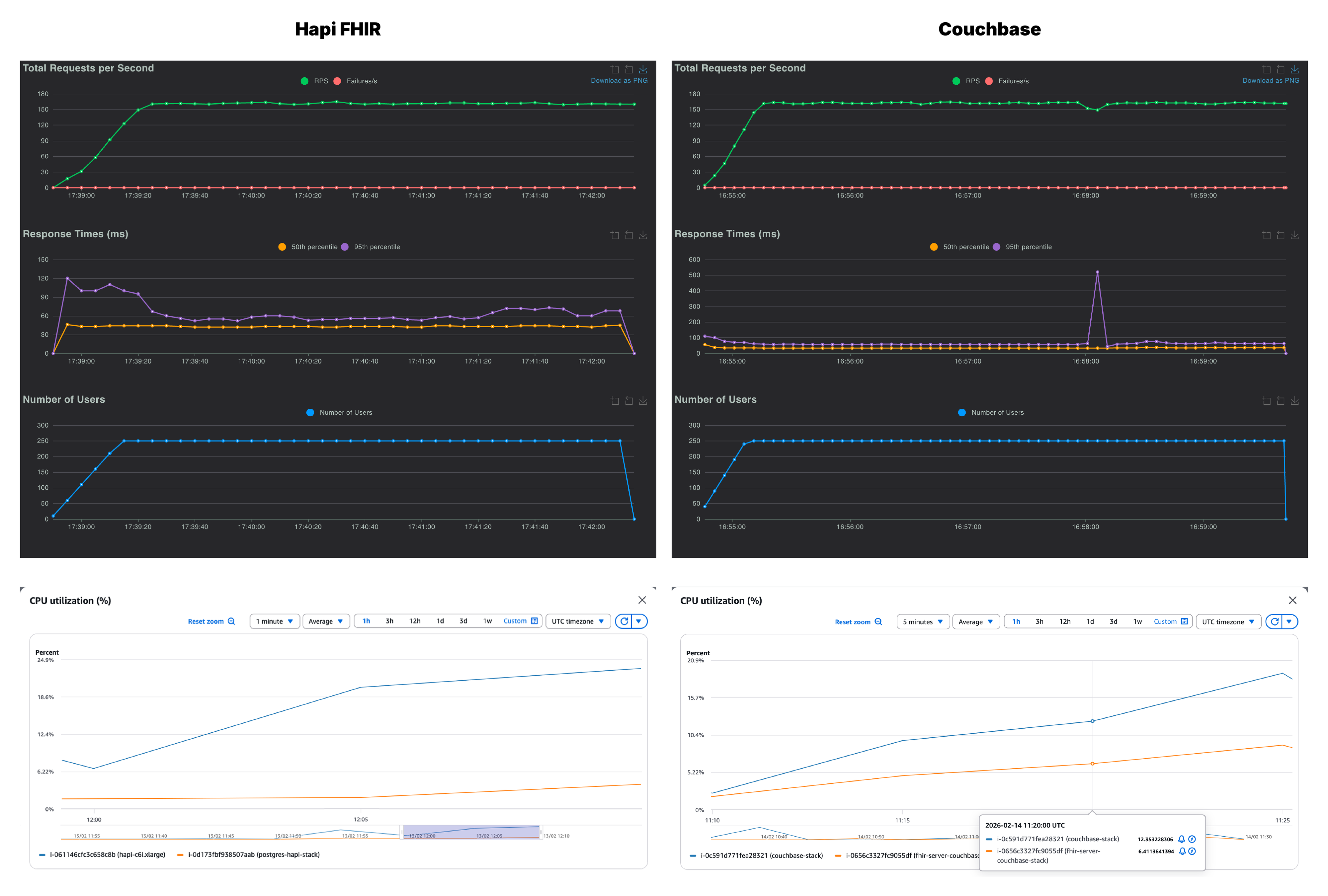
At 250 users, the throughput is again very similar in both stacks. But there is quite a difference in the p95, Couchbase held consistently at 60ms while HAPI FHIR climbed to 110ms with variability throughout the run. The CPU divergence also becomes more pronounced here. For Couchbase, the increase in users is again reflected in the database CPU utilization while the PostgreSQL instance doesn’t break a sweat. Moreover, due to the increase in serialization overhead, CPU usage of the HAPI FHIR instance has surpassed the CPU usage of the Couchbase database.
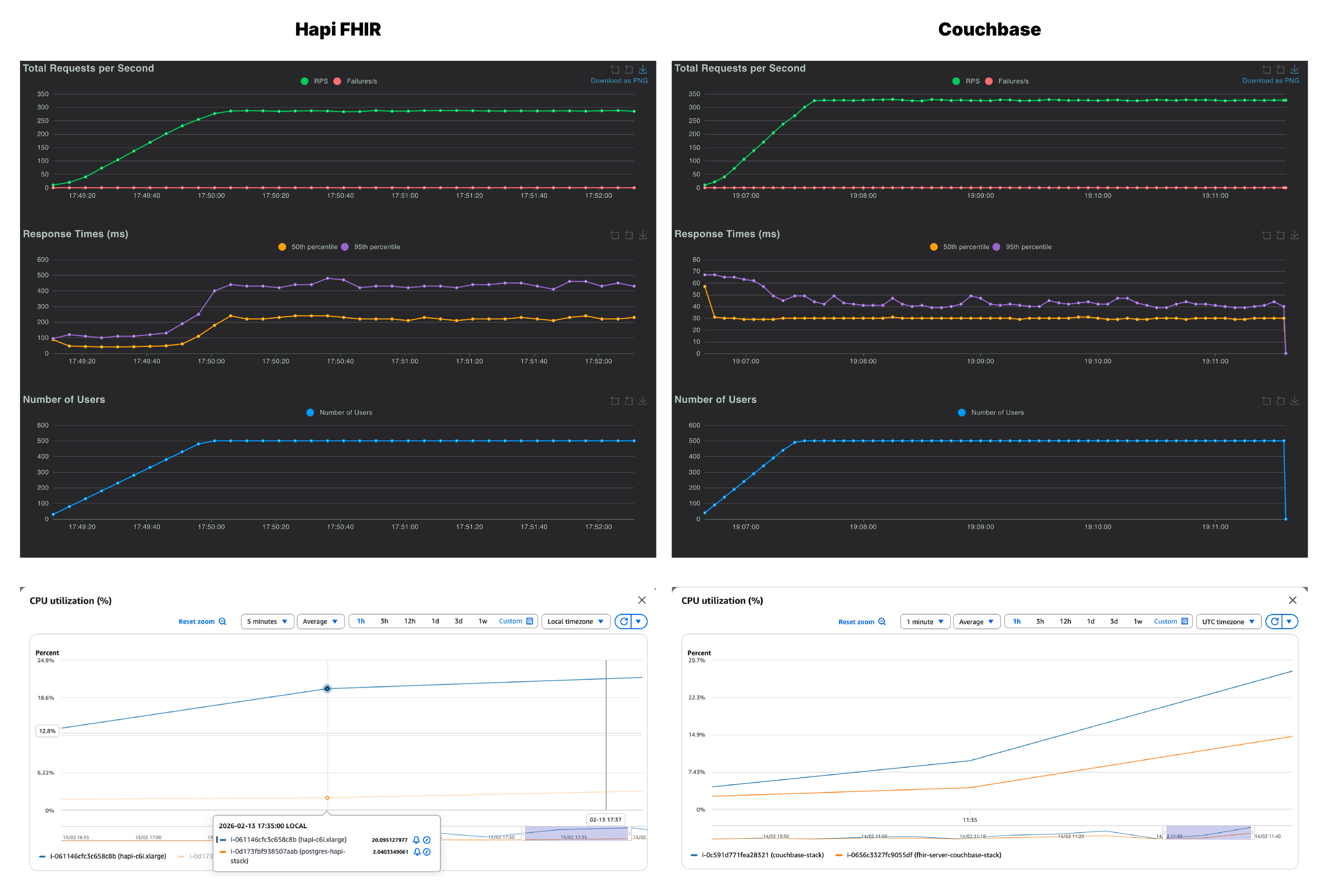
We are at the 500 users mark and this is where the two servers start to diverge meaningfully. Couchbase reached ~300 RPS with a p95 of 42ms while HAPI FHIR managed 252 RPS but with p95 of 420ms. That is a 10x latency gap at the 95th percentile. With the CPU usage graphs for Couchbase, we can see that the database is under increasing load to provide these stunning latencies
On the flip side, on looking at HAPI FHIR’s response time graph, the 95th percentile curve climbs during ramp-up and stays elevated throughout the entire test window, never recovering to baseline. Couchbase’s equivalent graph barely flickers. The JVM-layer serialization burden, which was a background concern at lower concurrency, is now the dominant bottleneck. And this is where we can confidently say that we are pushing the FHIR server to its limits and see where it is breaking. Let’s push it to its limits with 1000 concurrent users and see how both the servers fair.
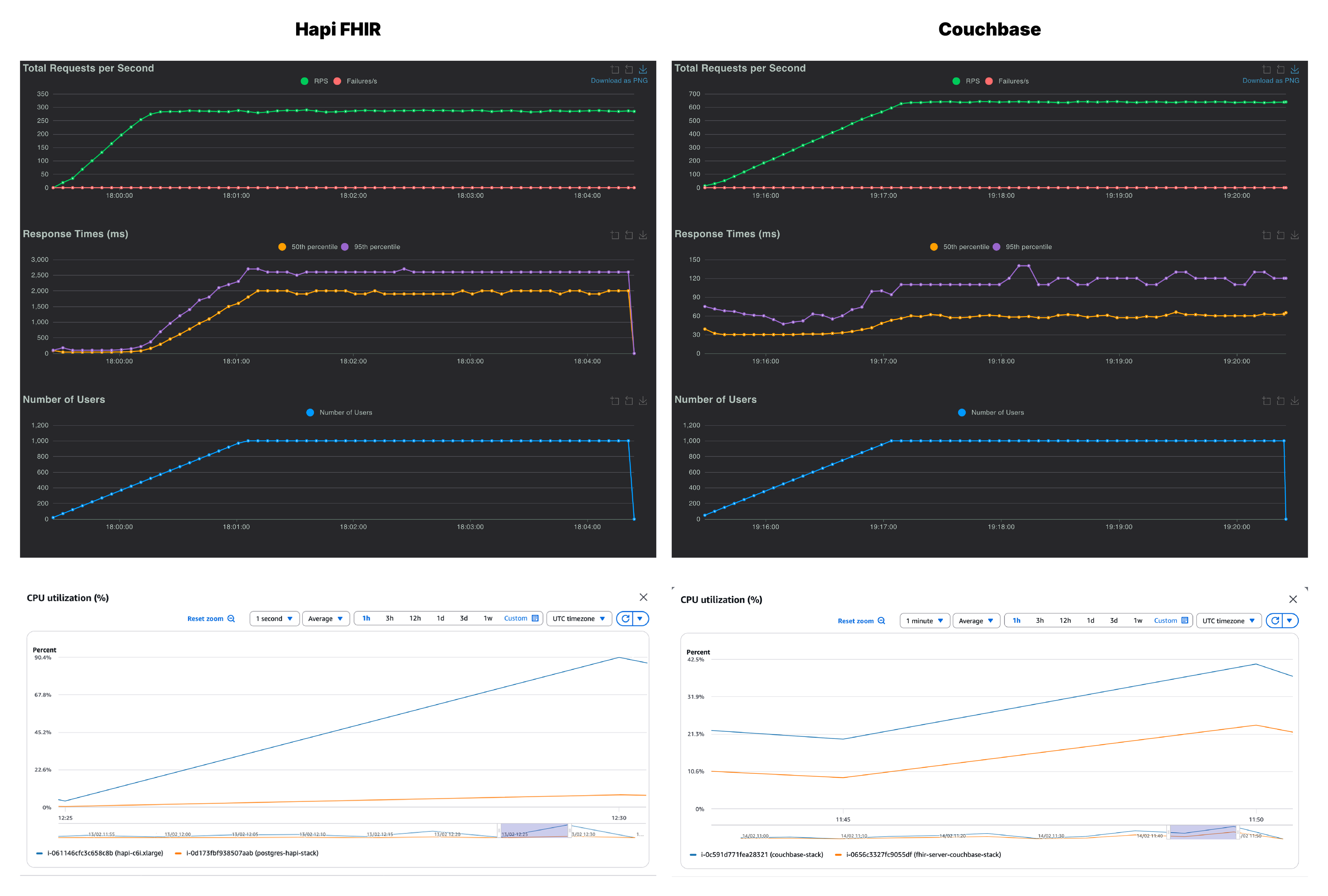
At 1,000 users, Couchbase is doing phenomenally well and continues to lead on both throughput and latency. The p95 has climbed from ~45ms at lower concurrency to 110ms, a sign that the server is working harder, but still well within an acceptable range for production workloads. HAPI FHIR, by this point, has clearly hit its ceiling with a p95 of 2500ms. The throughput of HAPI FHIR stalls at 265 RPS against Couchbase’s 536 RPS.
Across all Couchbase healthcheck runs, the p95 stayed well below 150ms irrespective of load, which speaks to how consistent the architecture is under pressure. The CPU utilization tells a similar story as well. HAPI FHIR’s application instance is pushed to ~90%, leaving virtually no headroom for any additional load. However, the Couchbase stack peaks only at 42.5% on the database instance and 24% on the FHIR server.
If the healthcheck is a sprint, the general query scenario is a marathon through varied terrain. Each virtual user randomly picks from five query types of different complexity. This is the closest approximation to real production FHIR traffic in the test suite, and it is where the architectural differences between the two servers show up most clearly.
The mixed query workload puts more pressure on both servers. Throughput stays competitive at low concurrency, but the latency gaps can be seen with lower level of concurrencies and more aggressively than in the healthcheck.
| Couchbase FHIR | HAPI FHIR | |||
|---|---|---|---|---|
| Users | RPS | p95 (ms) | RPS | p95 (ms) |
| 100 | 48 | 55 | 47 | 97 |
| 250 | 118 | 66 | 109 | 590 |
| 500 | 225 | 120 | 181 | 1300 |
| 1000 | 292 | 4200 | 180 | 4500 |
Let’s dive deeper and find how the FHIR servers faired.
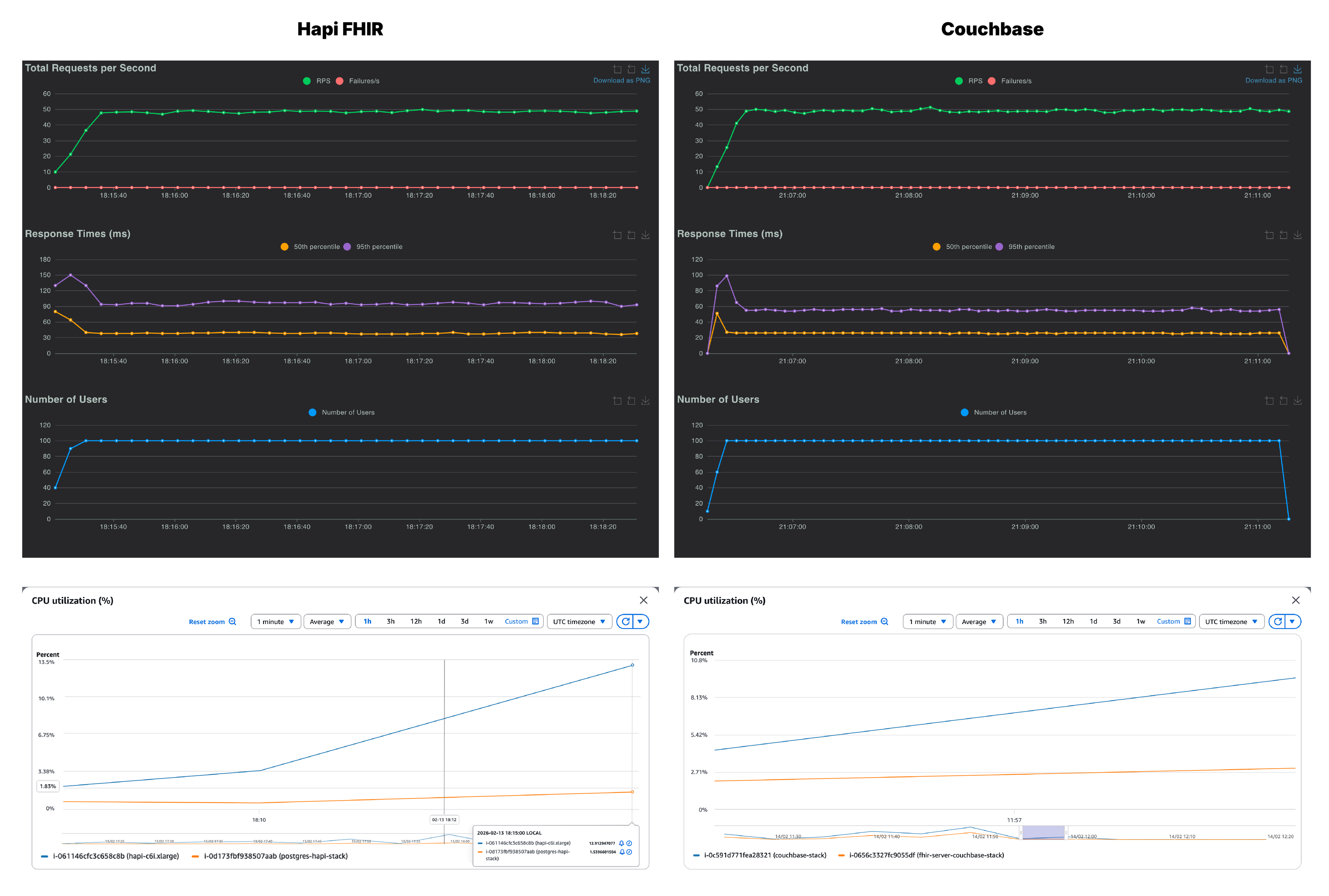
At 100 users, the two systems appear similar with Couchbase at 48 RPS and HAPI FHIR at 47 RPS. But latency already diverges. Couchbase’s p95 sits at approximately 55 ms while HAPI FHIR’s is around 97ms. The HAPI FHIR response time graph shows a sharp spike in the first minute before settling, suggesting JVM warm-up. But, Couchbase starts fast and stays consistent.
CPU usage behavior mirrors what was seen in the healthcheck. The Couchbase database instance is doing the bulk of the work, while the FHIR instance is largely unburdened. On the other hand, HAPI FHIR server is already carrying a higher CPU load relative to the amount of work being done.
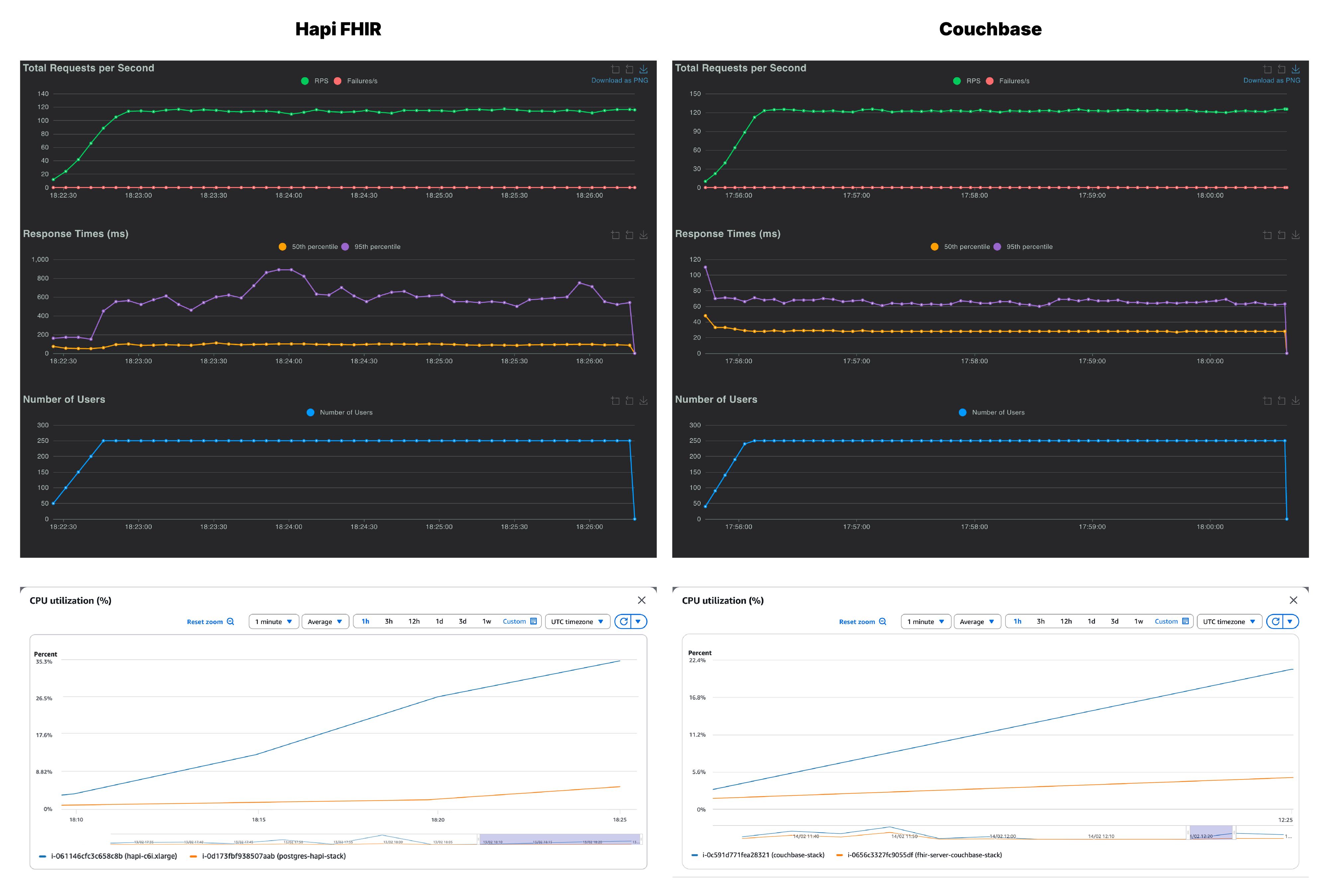
At 250 users, Couchbase scales to 118 RPS with p95 at 66ms, a smooth and predictable increase. However, HAPI FHIR reaches 109 RPS with a p95 of 590ms. That is nearly a 9x latency difference at the tail. The mixed query nature of this scenario amplifies the serialization overhead on the HAPI FHIR side, since each of the five query types triggers a different processing path through the JVM layer. Looking at the HAPI FHIR response time chart, the p95 climbs sharply and never fully stabilizes across the 5-minute run.
Moreover, HAPI FHIR server instance is peaking around 35% of CPU usage which is high for a system that is still under moderate load. And, Couchbase’s database instance is showing an increase while the FHIR server CPU usage remains lean.
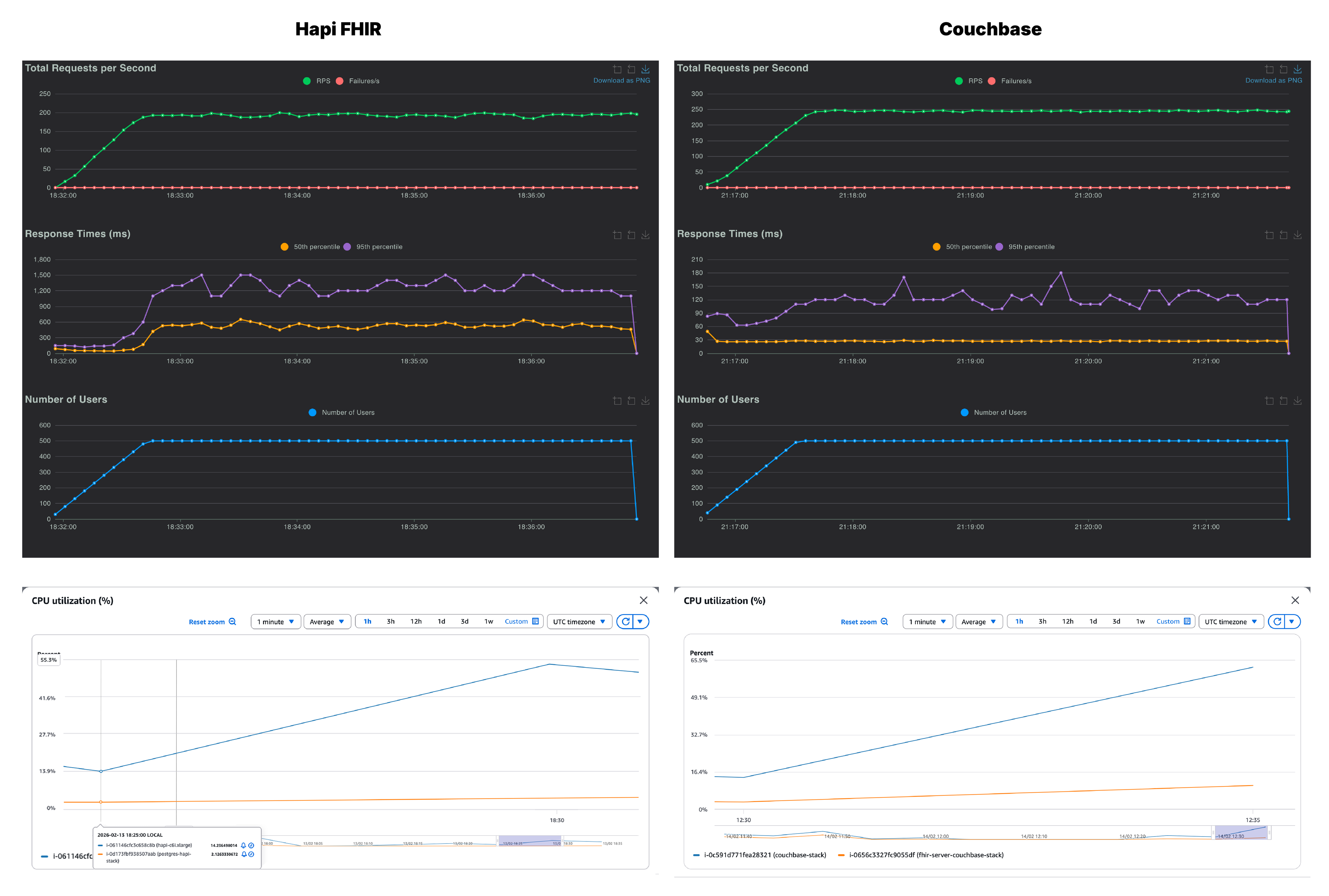
At 500 users, Couchbase delivers 225 RPS with a p95 comfortably under 150ms. HAPI FHIR manages 181 RPS but with a p95 of 1,300ms. The system is now taking over a second at the 95th percentile for mixed clinical queries, the kind of latency a user would notice immediately in a real application. CPU usage reflects this strain, with the Couchbase database instance climbing to 65.5% while the HAPI FHIR instance sits slightly lower at around 54%.
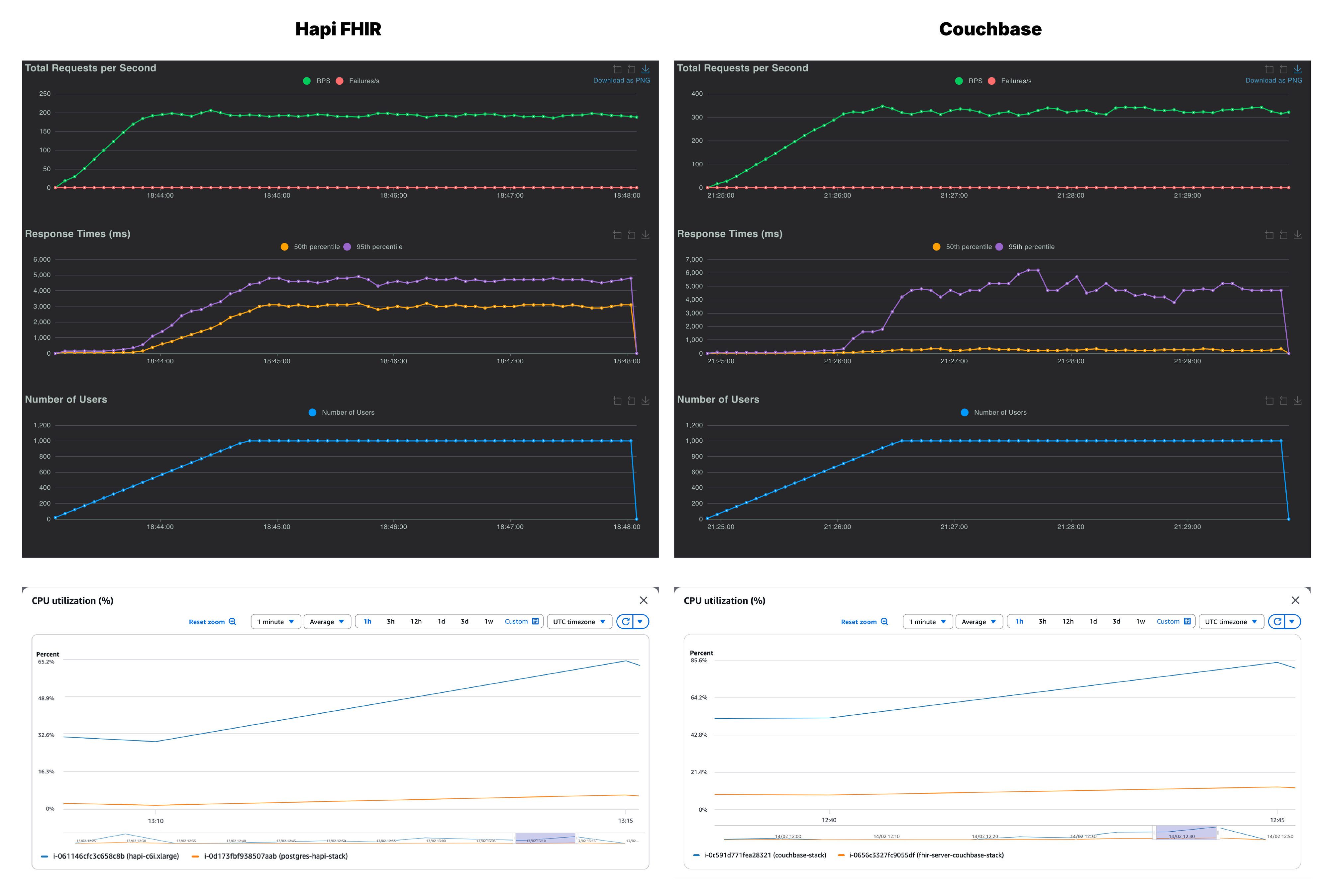
At 1,000 users, both servers are under significant strain,but they fail in different ways. Couchbase pushes to 292 RPS with p95 climbing to approximately 4200ms. Throughput continues to scale but latency degrades sharply, consistent with a server approaching its single-node ceiling. The response time graph becomes volatile, with the p95 graph spiking and oscillating. The server is working at its limit and it is starting to show.
HAPI FHIR at 180 RPS has essentially stopped scaling from 500 users so doubling the concurrency added zero additional throughput, and eventually the p95 reached 4,500ms. The JVM application layer is fully saturated.
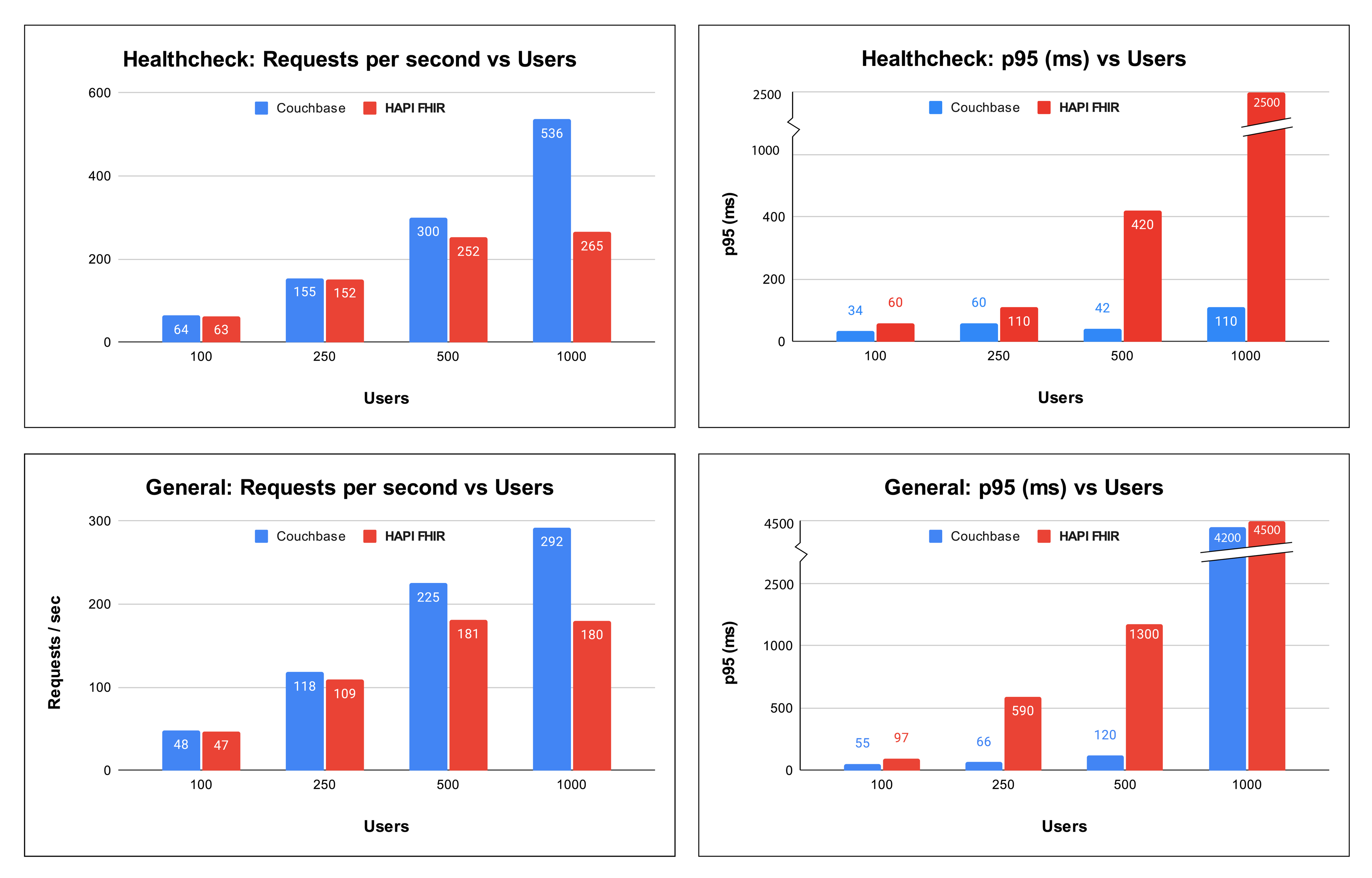
Looking across both the Healthcheck and General workloads, the trends are consistent.
1. Couchbase sustains higher throughput and lower latency across most concurrency levels
In the Healthcheck tests:
At 100 users, the two systems perform almost identically. Beyond that point, Couchbase steadily separates itself in both throughput and tail latency control.
In the General query workload, which represents a heavier and more realistic access pattern, the difference becomes even more pronounced:
Across both workloads, Couchbase maintains a consistent advantage as concurrency increases.
2. At 1000 users, latency begins to converge, but throughput remains clearly higher
At 1000 concurrent users, both systems experience elevated tail latency in the General workload, reaching similar multi second p95 values. In the Healthcheck test, the gap narrows as well.
However, the throughput story does not change:
When both systems are under extreme stress, Couchbase is still completing more work in the same amount of time.
That difference is not cosmetic. It reflects underlying architectural behavior, and it is central to determining which platform better fits high concurrency production workloads.
Two consistent patterns explain these results.
First is where the compute work happens. HAPI FHIR retrieves data from PostgreSQL and transforms it into FHIR JSON in the application tier. At low concurrency this overhead is manageable. As concurrency increases, serialization and transformation consume application CPU and become the bottleneck.
Couchbase stores data natively as JSON. That removes the repeated transformation step and shifts the workload to the database layer. Under load, the database instance carries more of the compute burden while the application layer remains comparatively lighter.
Second is the scaling model. HAPI FHIR benefits from vertical scaling, where adding CPU and memory to a single instance improves performance. Couchbase is designed to scale horizontally across nodes. The 1000 user results here reflect the limits of a single node rather than an architectural ceiling. In a multi node deployment, throughput would continue to scale outward instead of compressing upward.
For targeted queries and mixed clinical workloads at production concurrency, Couchbase shows a clear and repeatable performance advantage, particularly in sustained throughput and tail latency control.
HAPI FHIR remains a mature and capable platform. For teams standardizing on vertically scaled infrastructure, it is a practical and well supported option.
If the goal is maximizing throughput while keeping tail latency predictable under increasing concurrency, Couchbase leads in this test suite.
The final choice depends on workload shape, scaling strategy, and how much tail latency your clinical applications can tolerate.
150 GB of hospital data was enough to make Postgres hang for 50 minutes. Here’s how we rebuilt SPARSH’s analytics pipeline to handle it.

A developer guide to the HTI-4 final rule, covering the (g)(31) to (g)(33) criteria, SVAP versions, Real World Testing and a certification checklist.
A technical reference for the FHIR prior authorization APIs. What CRD, DTR, and PAS each exchange, how one hands off to the next, and the authentication, versioning, performance, and testing rules underneath them.
No comments yet. Be the first to comment!