Couchbase x Medblocks - Building a NoSQL FHIR Server
We walk you through building a FHIR server on top of Couchbase's NoSQL database, covering challenges, technical decisions, architecture, and local setup.
December 21, 2025
What happens when the data of 8 million patients needs to flow between hundreds of hospitals?
In 2023, Catalonia launched Spain’s first federated openEHR platform. The Catalan Health Service (CatSalut) wasn’t just procuring another EHR, they were completely rethinking how health data could be shared across their entire region.
This was the first of its kind in Europe, probably the only openEHR deployment of this scale in the world. Medblocks was part of the consortium that won the tender for this project, alongside vitagroup and IBM.
Our challenge was simple: make sure patient data flows between different EHRs when patients move from one hospital to another.
Catalonia has a rich history in digital health that dates back centuries. Healthcare organizations have been operating in this wealthy Spanish region since the 1400s. When digital health technology emerged, these organizations were among the first to adopt and promote digitization.
This early adoption of Health IT created both opportunities and challenges. While Spain’s unified primary healthcare system offers significant advantages through centralized EMRs for all General Practitioners, hospital care presents a fragmented landscape.
In our podcast, Jordi Piera Jiménez, Director of Digital Health Strategy for Catalonia, describes the challenge: There are 29 different EMR systems in use across hospitals, ranging from European vendor products to custom-built systems.
A federated healthcare technology model has been in development since the 2000s. The foundation was the Shared Electronic Health Record of Catalonia, built in 2007 and scaled nationally in 2011. However, the fragmented hospital systems meant patient data still couldn’t flow between different care providers.
In recent years, Catalonia decided to build an open platform centered around openEHR as the next generation of healthcare technology. But this raised a critical architectural question: should they deploy a single central CDR for all of Catalonia, or adopt a federated approach where each hospital maintains its own CDR?
They chose federation for two key reasons:
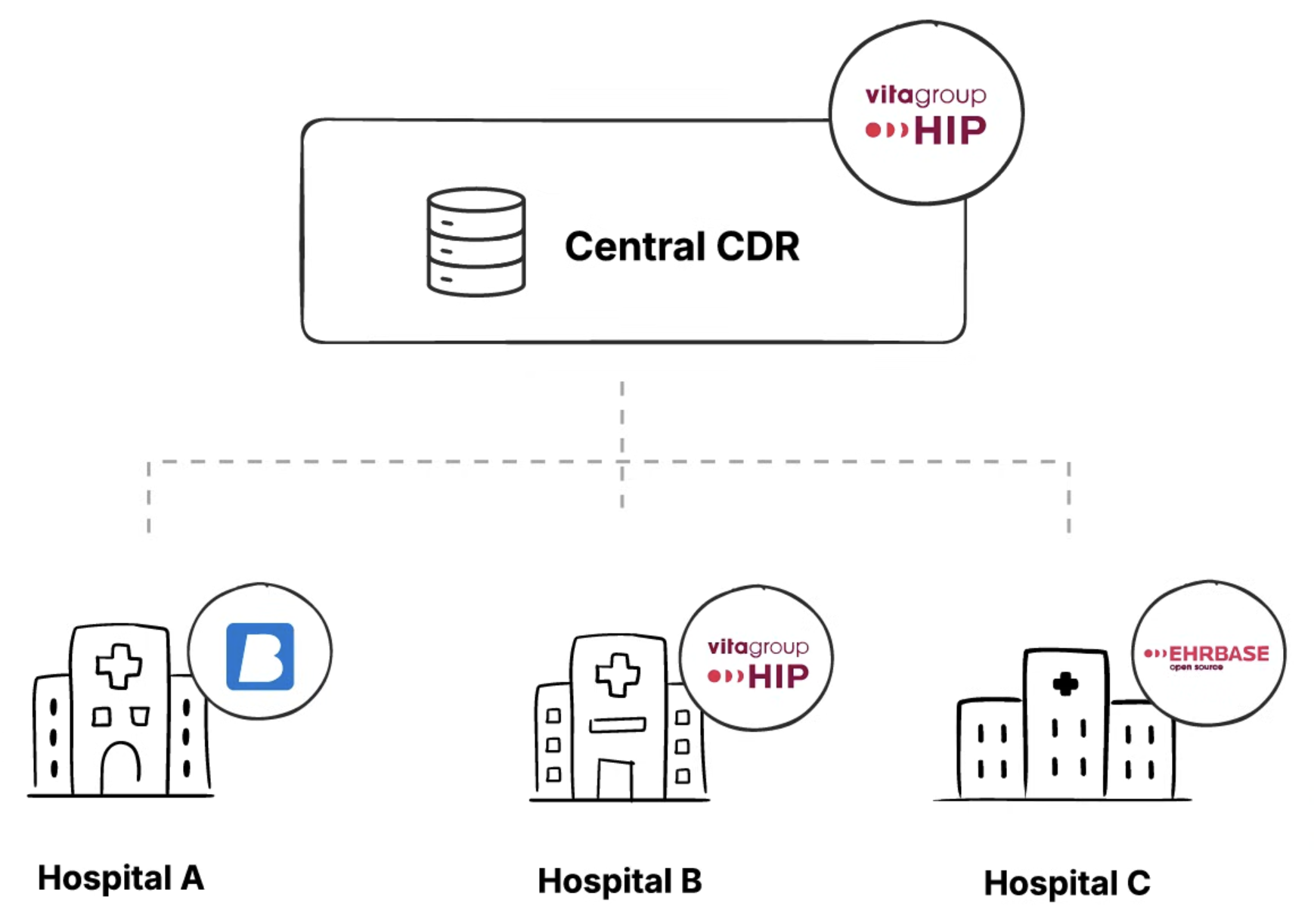
The central CDR was deployed using vitagroup’s HIP CDR platform. Each hospital was free to choose its own EHR as long as it conformed to the openEHR standard.
While the federated approach allows each hospital to maintain local control, the problem we had to solve was when a patient travels from Hospital A to Hospital B, how to make sure their data is synced and available at both hospitals.
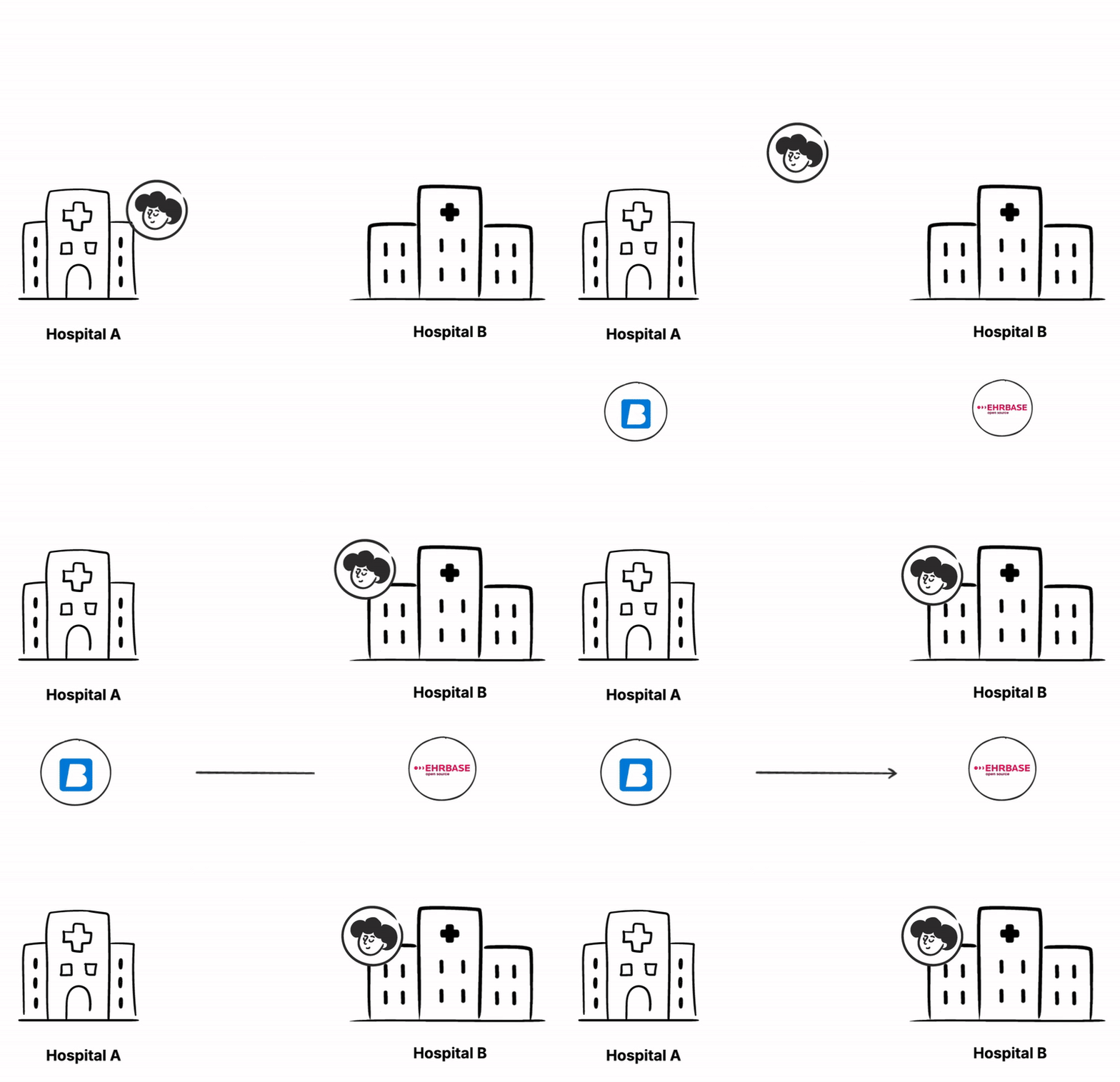
To solve this problem, we had to face three critical challenges:
Let’s go through each of these challenges to understand them better and also how we solved them.
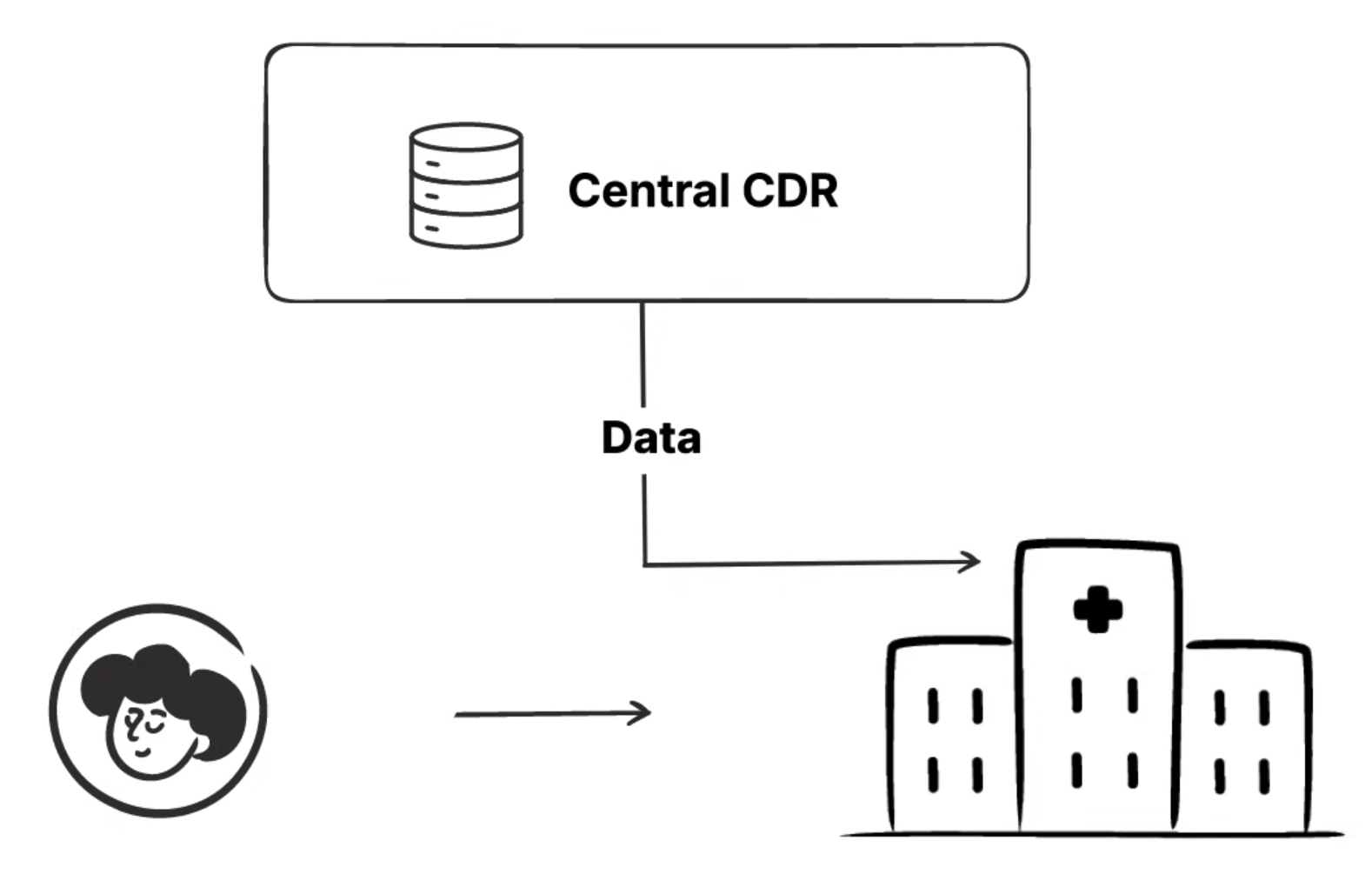
When a patient arrives at Hospital A for surgery, the hospital needs access to all relevant medical history from other facilities. Hospital A’s local CDR must pull the latest patient data from the Central CDR, including blood tests from Hospital B, imaging from Hospital C, and any other relevant records.
This needs to happen quickly enough to support real-time clinical decisions. A surgeon can’t wait 30 minutes for data to sync before an emergency procedure. But pulling all data for every patient could overwhelm local systems.
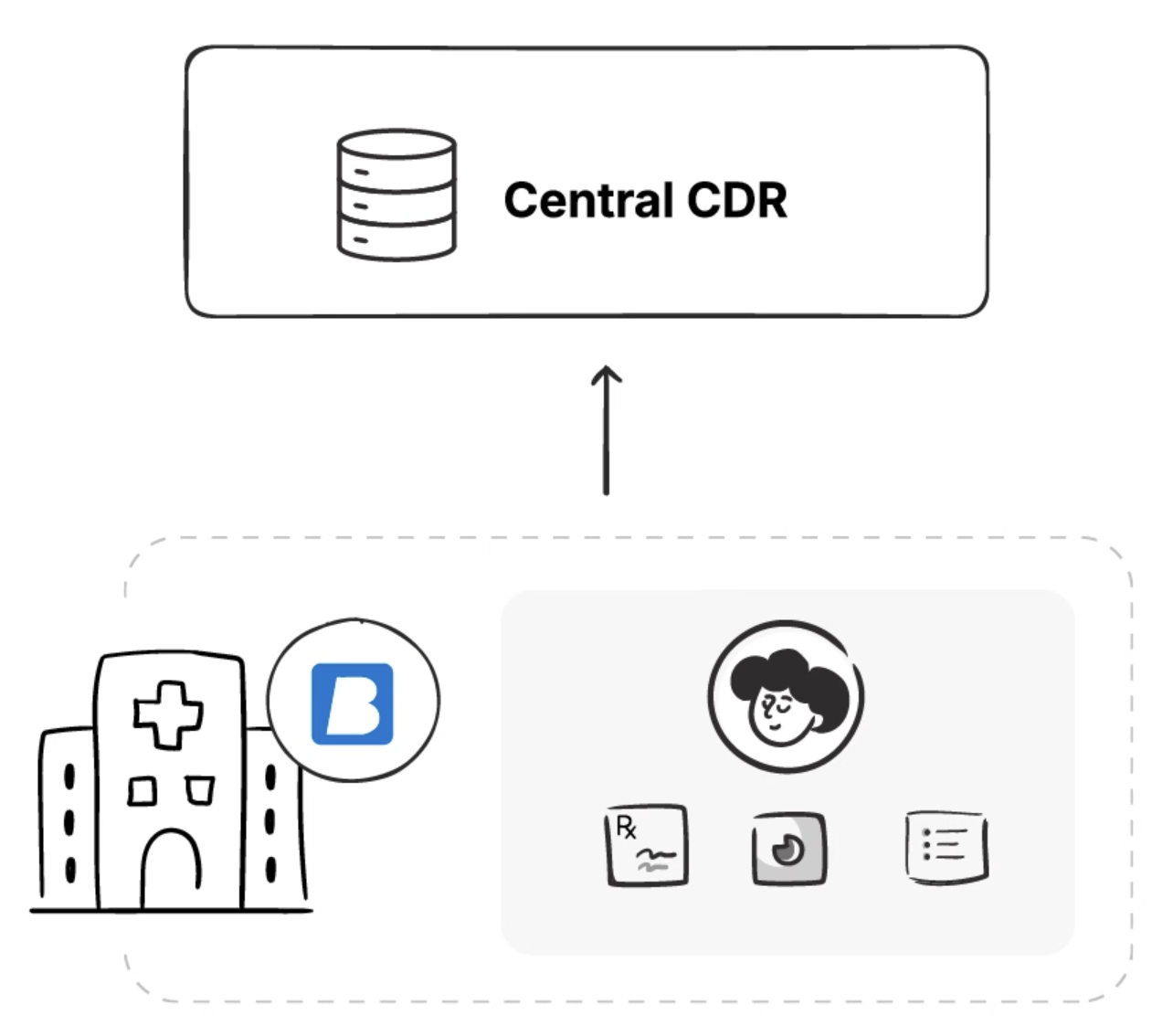
When a doctor at Hospital A records a blood test result or updates a patient’s medication, this data needs to flow from the local CDR to the Central CDR. But this creates a tension between data freshness and system performance.
Syncing data immediately after every change ensures the Central CDR always has the latest information. But with hundreds of hospitals and thousands of concurrent changes, this would create a massive load on the central system.
Batching updates reduces system load but means the Central CDR might be hours behind. A critical allergy added at 9 AM might not be visible at other hospitals until noon.
Some medical records, like managed medication lists or problem lists that get continuously updated rather than replaced, are called persistent compositions. Unlike event compositions (like a single blood test result), these documents evolve over time with input from multiple healthcare providers.
Consider this scenario: A patient with multiple chronic conditions has their medication list updated by an endocrinologist at Hospital A in the morning, adding new insulin dosing instructions. That afternoon, their cardiologist at Hospital B updates the same medication list, discontinuing a beta blocker and adding a different heart medication. Both updates are medically necessary and correct.
What happens when these changes sync to the Central CDR? Simply accepting the last update would lose the endocrinologist’s insulin changes. But automatically merging both updates could create dangerous drug interactions that neither doctor was aware of.
The system needs sophisticated conflict detection and resolution. Some conflicts might merge automatically (adding different medications to the list). Others require clinical review (conflicting dosage changes for the same medication). And the system must track who made what changes and when, maintaining a complete audit trail for patient safety.
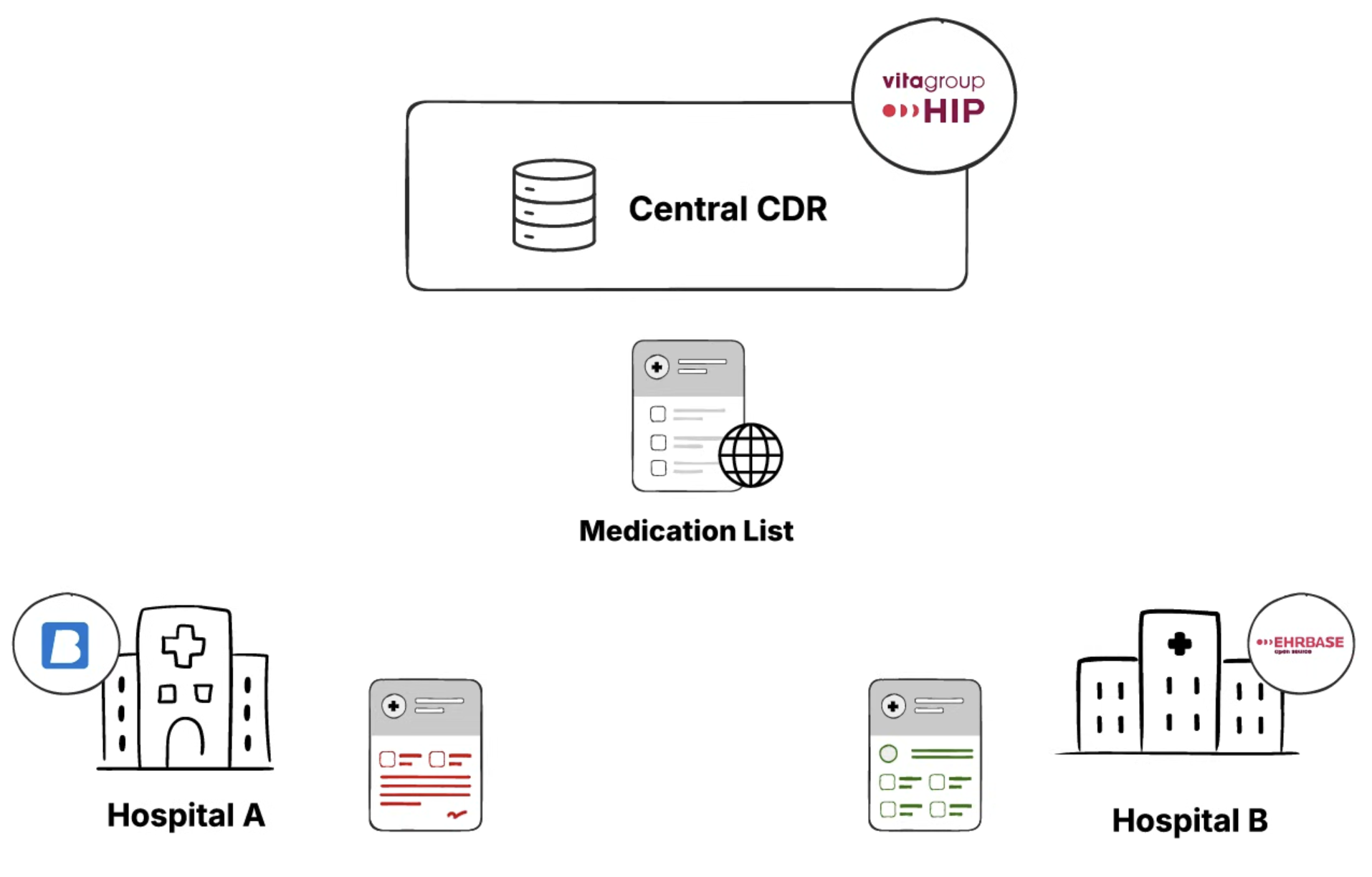
This mirrors how modern software development handles code reviews and merge conflicts, but with the added complexity of medical governance and patient safety requirements.
The minor difference being - A bug in code might crash an application. A bug in medical data conflict resolution could kill patients.
To solve these issues, we needed an eventing layer to track the events happening in the local or the central CDR. Events like a new patient being added, medication list being updated, or new blood pressure readings for any patient.
After tracking these events, we could emit the changes to the other CDRs and synchronize the data between them.
We decided to use Apache Kafka for our event layer. It is an event streaming platform used to collect, process, and store streaming event data.
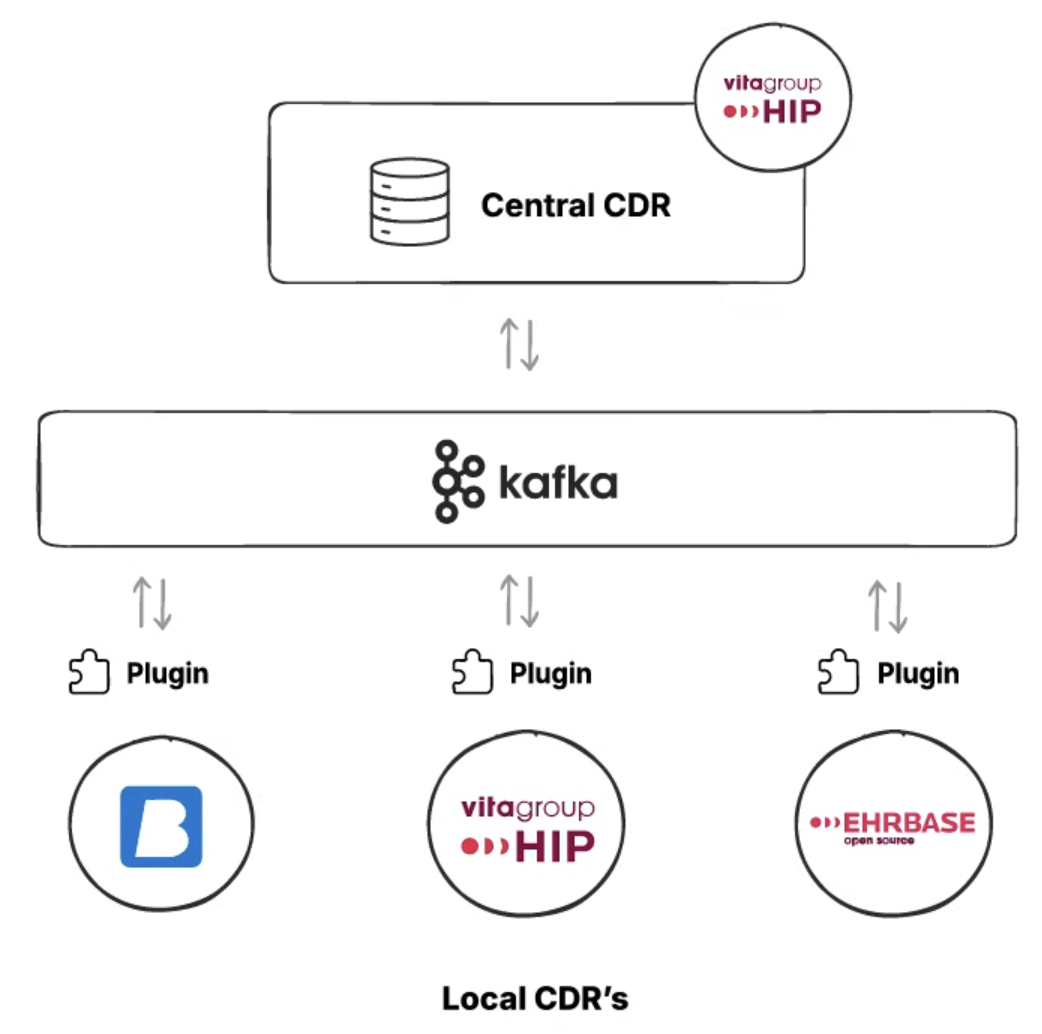
We installed plugins that connect to both CDRs, and any event that occurred was pushed to Kafka.
After setting up the Event Layer (Kafka), the next step was to find a way to synchronize the data.
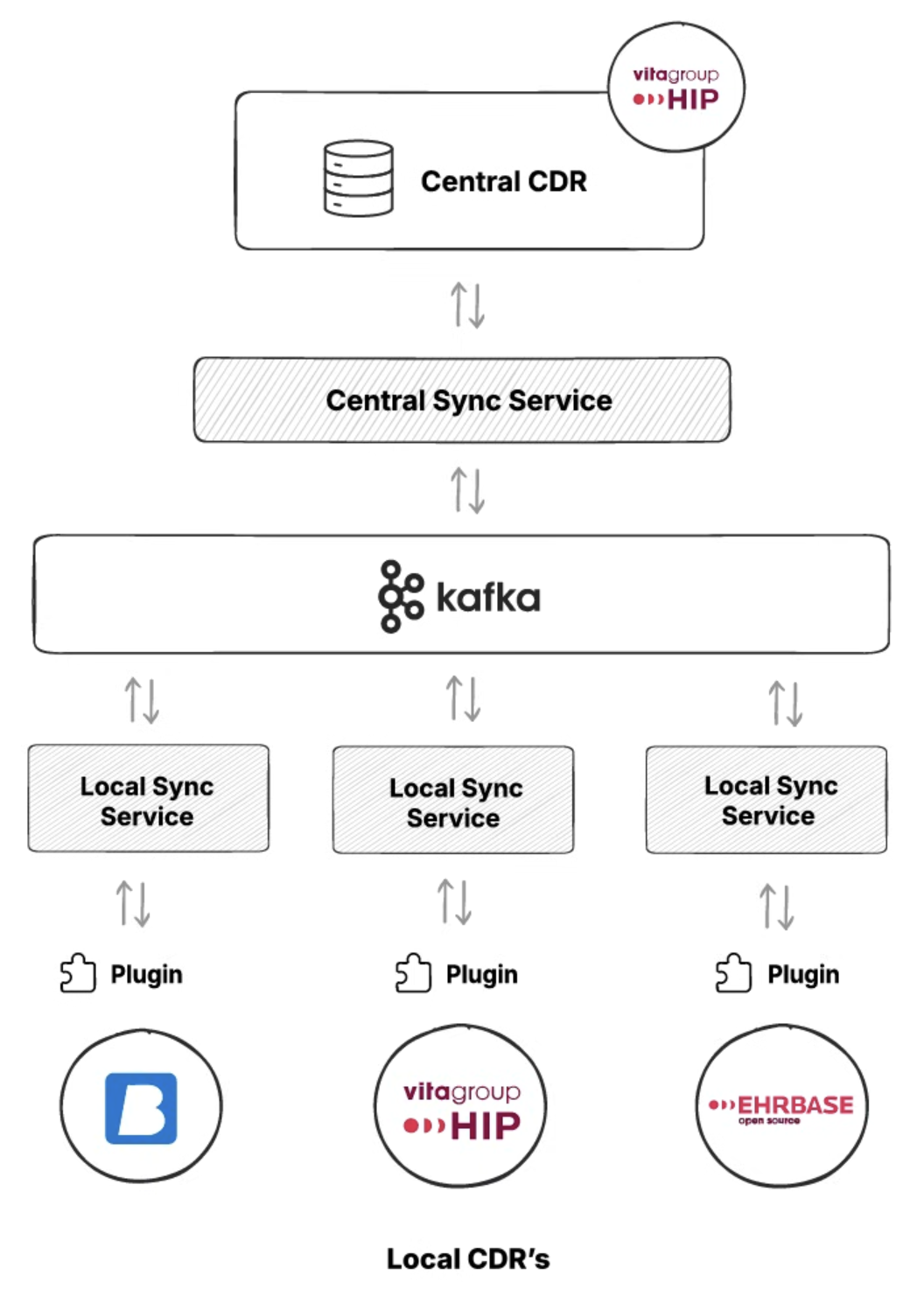
We added a synchronization service, deployed as a Java microservice. The synchronization service handles the drift between the data after every event and handles merge conflicts.
The concept of federation only works if every system speaks the same clinical language. In Catalonia, this meant agreeing not just on openEHR as a standard, but also on how it would be used across hundreds of systems.
At the core of this was a shared set of openEHR templates. Templates defined the structure of clinical data, and each CDR stored data using the same templates. This ensured that a blood pressure recorded in Hospital A looked exactly the same, structurally, as one recorded in Hospital B.
To make federation practical, every CDR needed a predictable way to query clinical data.
The central platform exposed a common set of AQL queries that local systems could rely on to fetch patient summaries, medication lists, recent observations, or specific clinical documents. These queries were written once and reused everywhere because the underlying templates were shared.
In environments where real-time eventing was not possible, AQL also served as a fallback mechanism. Local CDRs could periodically run targeted AQL queries against the central CDR to detect changes and pull updated data. This wasn’t as efficient as event-driven sync, but it ensured that federation still worked even for legacy systems.
It’s tempting to think Kafka, sync services, and microservices were the hard part of this system. In reality, the most important work happened much earlier.
Agreeing on common templates forced clinical alignment across the region. It required clinicians, informaticians, and architects to decide what “a medication list” actually meant, how updates should be represented, and which fields were mandatory versus optional. Once those decisions were made, the technical federation became possible.
Without shared templates, federation would have meant endless mappings, fragile transformations, and data loss at every boundary. With them, openEHR compositions themselves became safe units of exchange.
Federating clinical data introduced a list of problems that traditional EHRs rarely face: two clinicians, in two hospitals, updating the same clinical record at roughly the same time.
In openEHR, this is most visible with persistent compositions such as medication lists, problem lists, or care plans. These documents are not single events. They evolve over time and are intentionally designed to be updated repeatedly.
We initially explored automatic merge strategies, including research around CRDTs (Conflict-free Replicated Data Types) and other algorithmic approaches used in distributed systems. These techniques work well for technical data structures such as counters, sets, text documents, or configuration files. But clinical data is different.
A medication list is not just a list of items. Each entry carries intent, clinical context, and risk. Two changes that are technically compatible may be clinically dangerous when combined.
For example:
An algorithm can merge both changes without conflict. A clinician might not.
The problem isn’t that the system lacks the ability to merge. The problem is that the system lacks clinical judgment. Automatically resolving these conflicts risks creating combinations of data that no single clinician has reviewed or approved.
We learned that essential complexity must be surfaced, not abstracted away. If two clinicians made overlapping changes, the system should make that visible, not guess which one was “right.”
Rather than auto-merging, conflicts surfaced explicitly in the Central CDR.
Clinicians and authorized reviewers could see:
From there, merge can be handled manually through a dedicated UI. Users could accept one version, merge selected parts, or defer the decision until additional clinical context was available.
This was also supported by a governance structure that defines clearly who can resolve conflicts, how decisions are reviewed, and how the changes are audited.
The synchronization service developed for Catalonia has been released as open source under the Apache 2.0 license and is publicly available on GitHub:https://github.com/medblocks/openehr-sync-service
The repository contains the core synchronization logic used to track changes, package openEHR data, and coordinate data movement between local and central CDRs. While the production deployment integrates with regional infrastructure, the open-source version focuses on the reusable building blocks rather than Catalonia-specific configuration.
To make the system easier to understand and adopt, the repository also includes a Postman collection. This allows developers to explore the APIs, simulate sync scenarios, and understand how events, payloads, and conflict cases are handled without setting up a full environment upfront.
Now that we have learned everything about Catalonia’s virtual EHR, let’s take a look at how we can run it in our local environment.
We’ll start with cloning the Github repository. Open a Terminal or a Code Editor like VSCode or Cursor in your PC and run the given command.
git clone https://github.com/medblocks/openehr-sync-service
We’ll build the Sync Microservice that is used to synchronize between CDR’s by using the following command:
mvn clean install
This command will build the Sync service. We can also run this command by skipping the tests to make it run faster by using -DSkipTests=true at the end of the given command. But for the purposes of this tutorial, we’ll follow along with the tests.
After we’ve built the sync service, we need to run it. We have sync services at two different levels - central and local. So we have separate commands to run each of them.
To run the Central Sync Service, run the following command in the terminal:
nohup java -jar target/sync-service-*.jar \
--spring.profiles.active=centralSync,centralSync-local \
> /tmp/css.log 2>&1 &
This will spin up the Central Sync service. Next we run the Local Sync Service using the following command:
nohup java -jar target/sync-service-*.jar \
--spring.profiles.active=localSync,localSync-local \
> /tmp/lss.log 2>&1 &
After we’ve run both the commands to start the sync services. Let’s test if both these services are up and running with these commands
curl http://localhost:8086/lss/actuator/health
curl http://localhost:8087/css/actuator/health
For both these commands, you should see a {“status”:”UP”} message which means both the sync services are up and running as intended.
We have also provided a Postman collection and Postman environment file which will provide you a list of API’s and environment fields so you can get started with the tests requiring minimal setup from your end.
So make sure you have postman downloaded in your system and import both the Postman Collection and Postman Environment.
After the setup is complete, we now want to test how the data moves around between the CDRs. First we need to make sure that we have the same template uploaded in both the CDRs. You can create your own openEHR templates from Archetype Designer . We also have a lesson on our openEHR Fundamentals course where we walk you through the process of creating a template, you can check it out here.
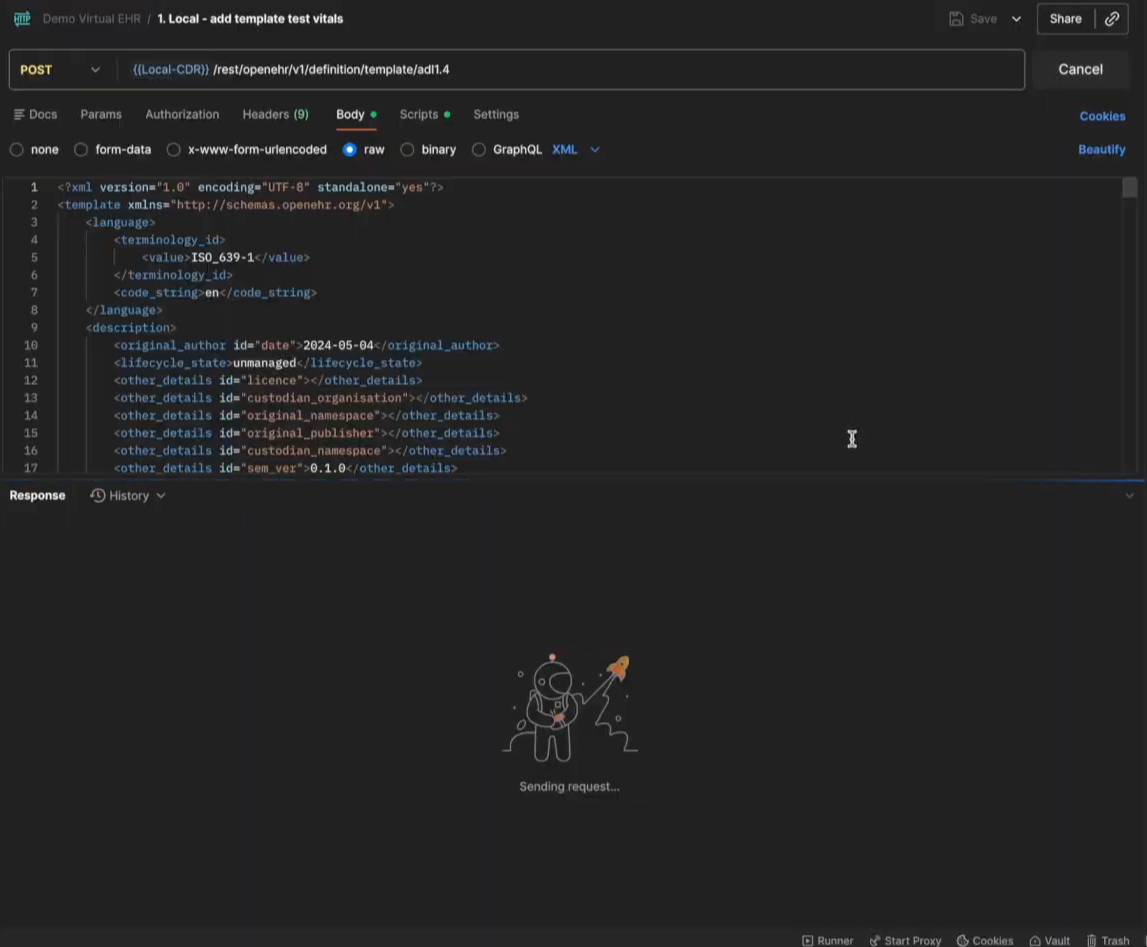
After you create your own template and export it as an OPT file, you can upload it to both the CDRs. We already have the routes set up in the Postman Collection and the local template upload route will be named as 1.Local - add template test vitals and the central template route will be named 1.Central - add template test vitals. You can refer the image below
After we’ve created the template, let’s move towards creating an EHR ID for the Central CDR first. Open the 3.Central- ehrbase central create ehrid file in your Postman collection and just hit Send. This will create an EHR ID in your Central Repository.
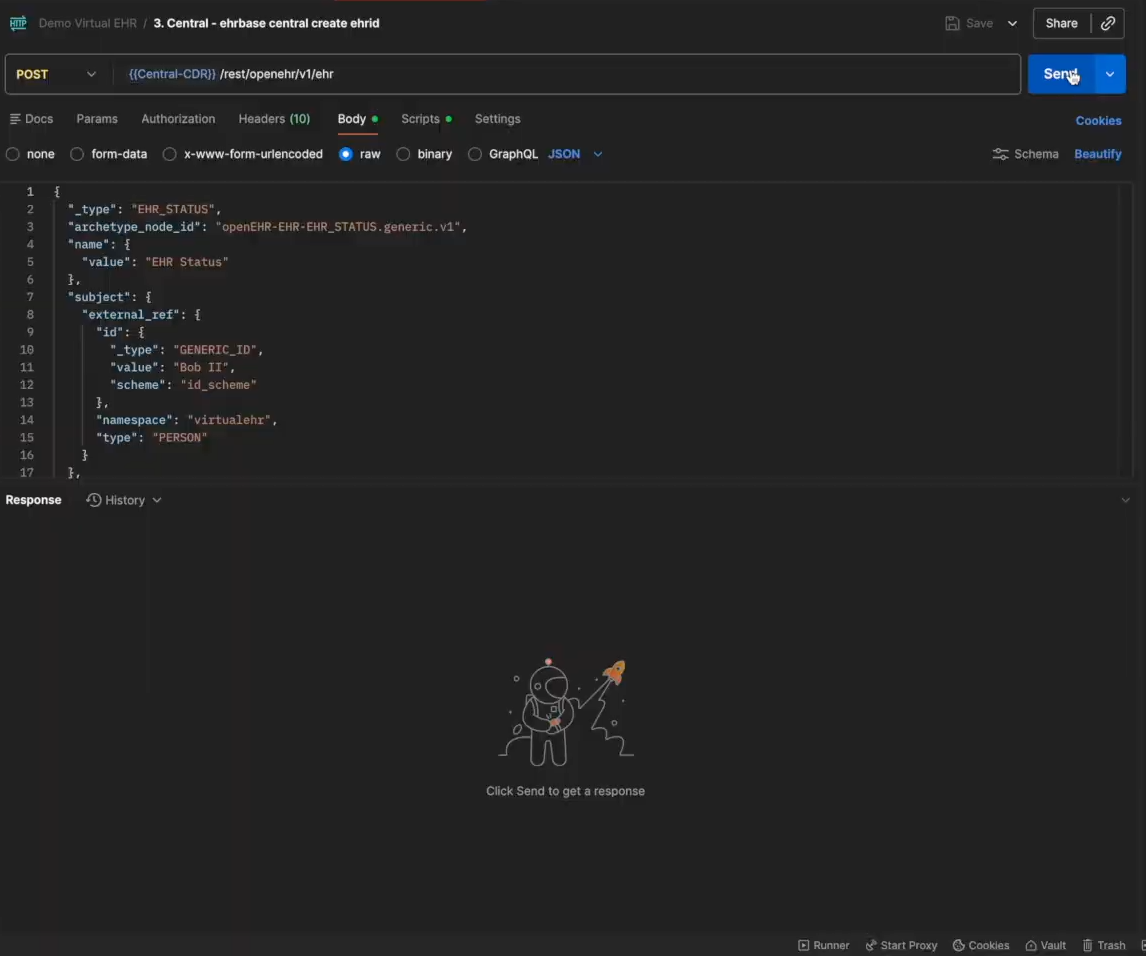
After we create an EHR ID, we need to make sure we save the ID for later use because we need to create the same EHR ID in the Local CDR to test if it syncs with the Central CDR.
Now we will post a composition in the Central CDR for the template that we uploaded in the previous steps. Open the 4,9.Central - ehrbase central create composition flat file in your Postman collection and then edit the composition details based on the template and hit Send.
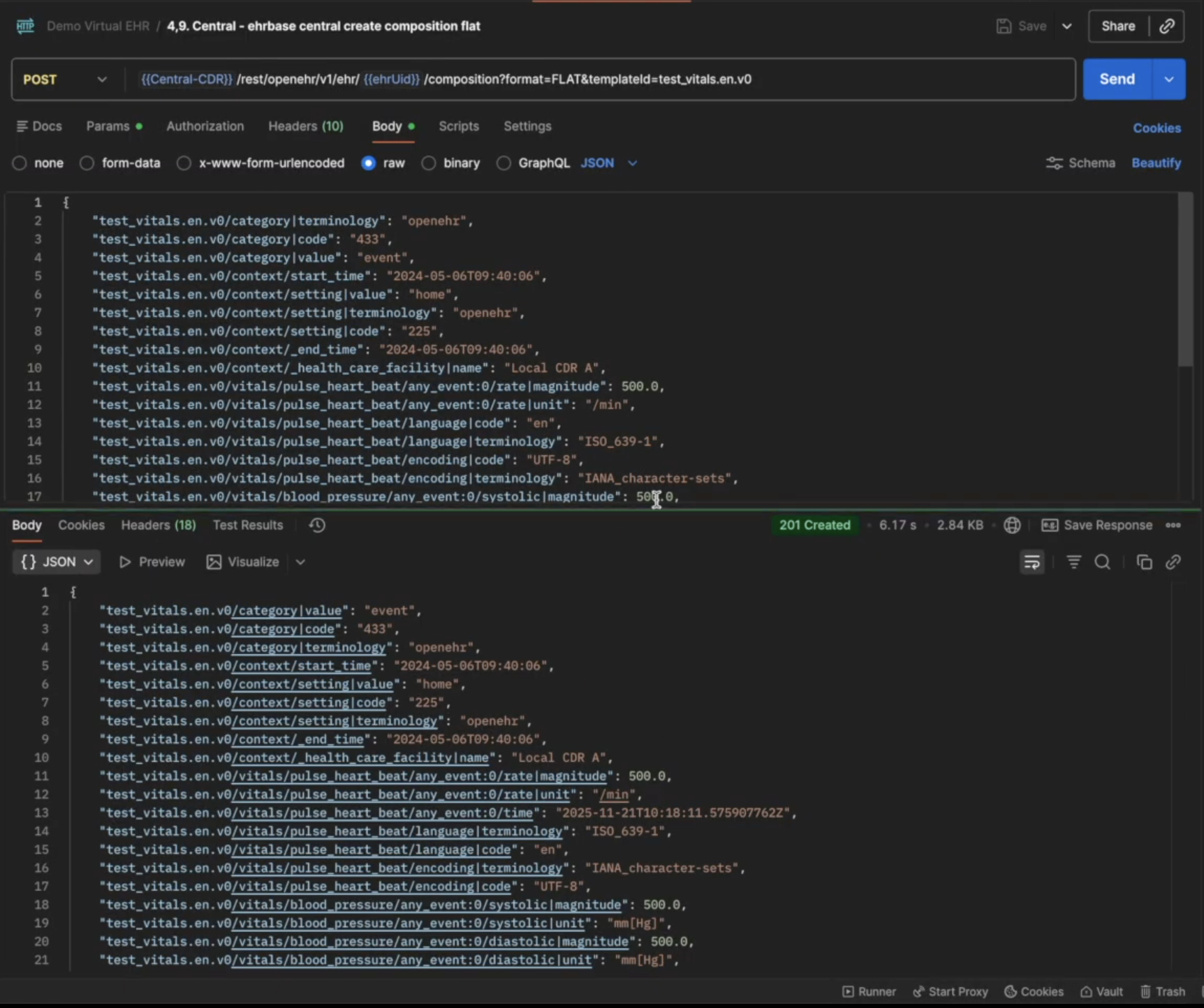
You should see a 201 Created response after the request is successful. If you want to test if the composition has been created, open the 5,12.Central - ehrbase central aql file from the Postman Collection and click on Send, you should see the created composition
Now we will create the same EHR ID on the local CDR. Open the 7.Local - ehrbase local create ehrid and use the EHR ID we created before on the Central CDR.
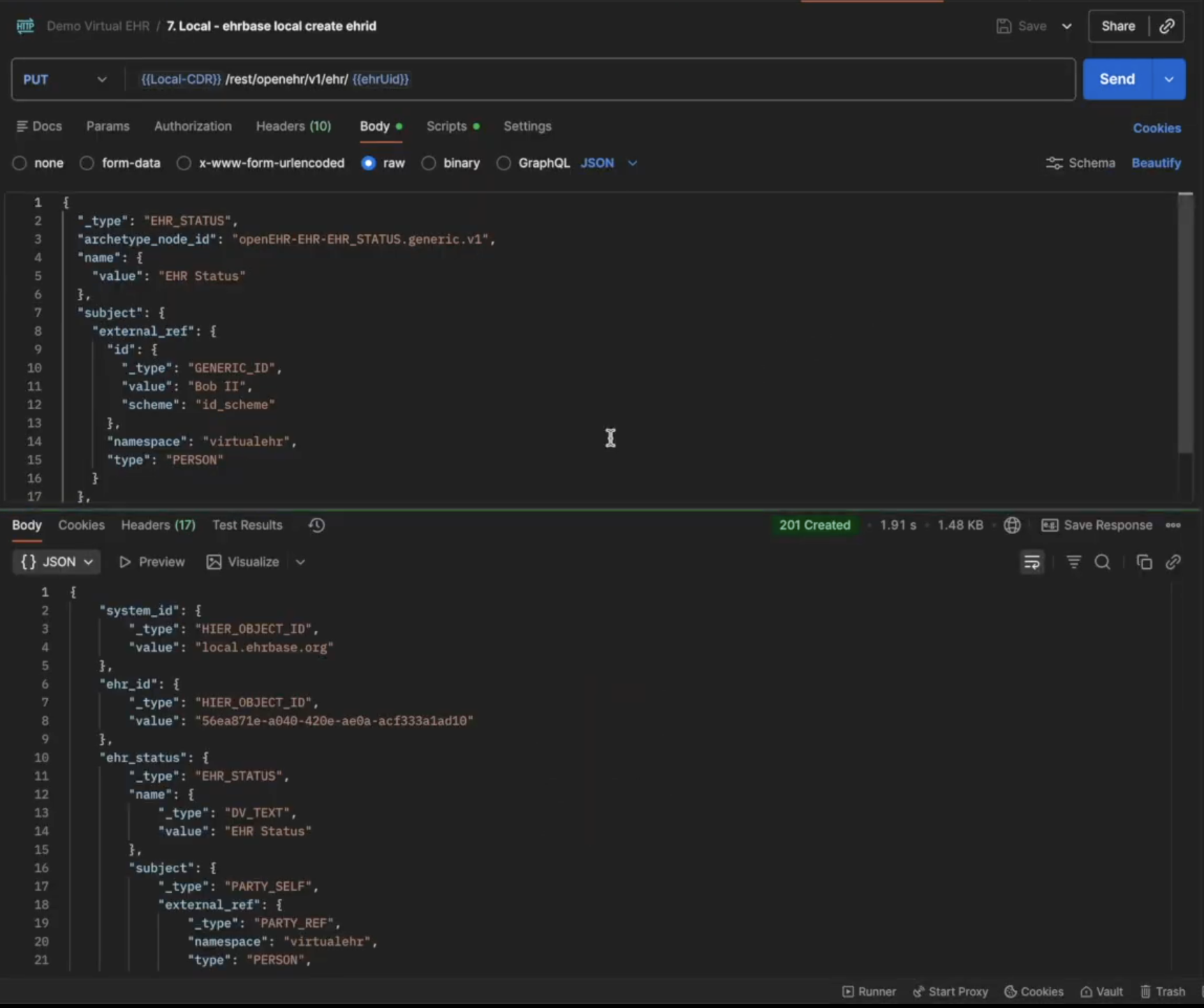
Once the EHR ID is created on the Local CDR, the sync service uses Kafka in the background to detect if the same EHR ID already exists in the Central CDR and syncs the data if it does.
The next step is to test if the sync works and for that we will fetch the composition from the Local CDR. We have not created any composition in the Local CDR, so we assume that since the local and central CDR are now synced, we should be able to access the composition created on the central CDR via the local CDR.
Open the 6,8,12.Local - check the ehr synced in local via aql file in your postman collection and click on Send.
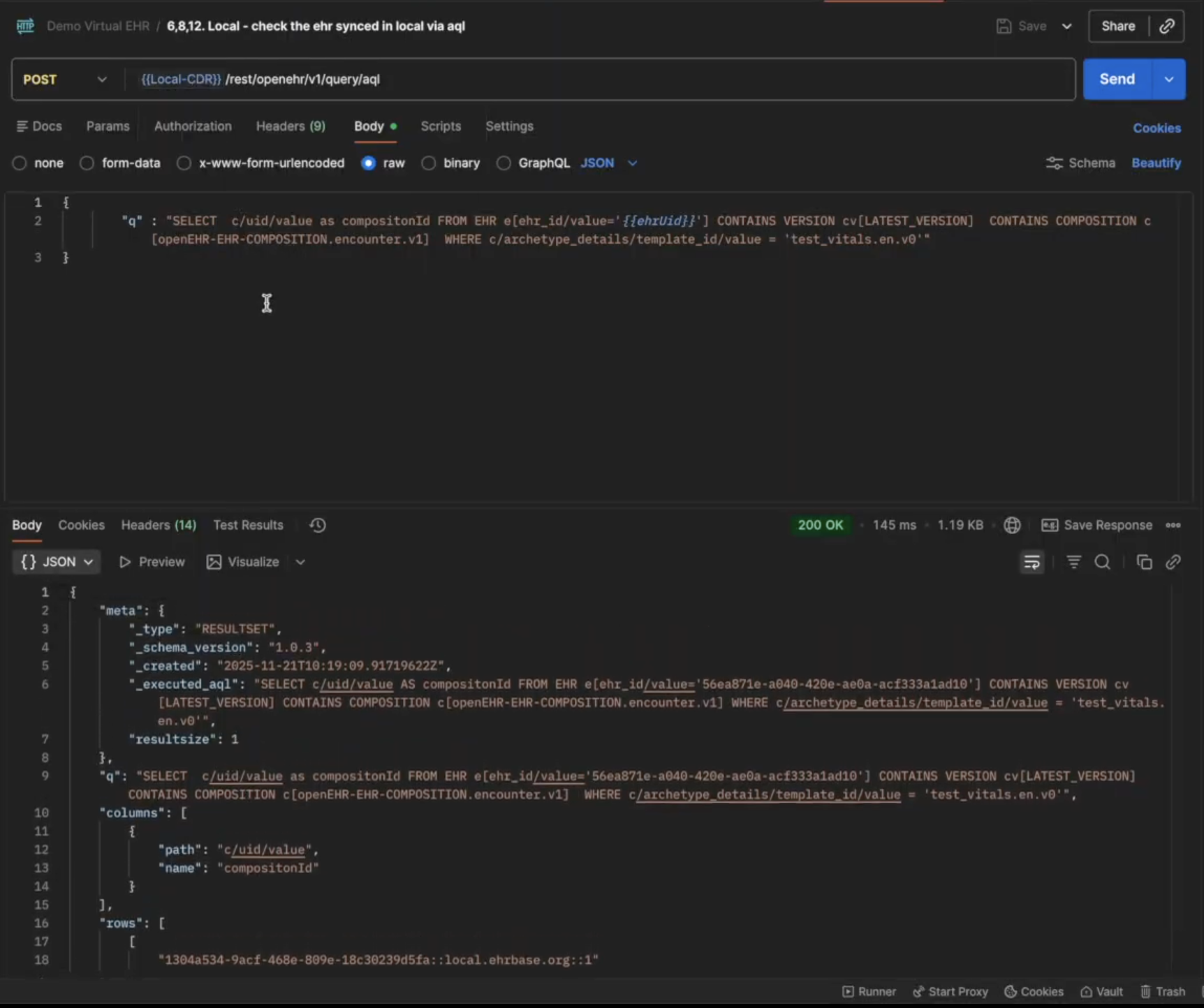
The composition created on the Central CDR will now show up in your local CDR, which means the sync service is working as intended.
We also have requests where you can see the jobs status and subscriptions created that were running in the background.
You can test out different combinations of requests to test the sync service like creating a composition on the Local CDR and fetching it on the Central CDR as well.
Over the course of building this project, we learned a lot of new things, not just technical but also how the organizational structure plays a role in the implementation of the technologies.
We also discovered some hidden use cases of openEHR that are not really highlighted enough, but we believe they should be discussed. Let’s go through some of the things we learned while working on this project:
The choice between centralized and federated architectures wasn’t about technology capabilities. It was about governance. Local hospitals needed autonomy over their technology choices and clinical workflows. A single central CDR serving 8 million patients would have been technically possible, but organizationally it creates a lot of bottleneck. The federated approach we opted for mirrors the actual decision-making structure of Catalonia’s healthcare system, a reflection of Conway’s Law
We discovered a critical gap in the openEHR ecosystem. While openEHR excels at storing and querying clinical data, it lacks native support for real-time data streaming. We had to build custom change data capture on top of Kafka to enable federation. And this isn’t a one-off need; any large-scale openEHR deployment will face this same limitation.
openEHR was designed as a persistence and querying standard, not a messaging protocol. Yet we found ourselves using openEHR compositions as the transport mechanism between CDRs. This Data standard leakage happens because once you’ve invested in modeling data in openEHR, it becomes the path of least resistance for everything else. The alternative - translating to a different format (like FHIR) for transport and translating back again to openEHR introduces unnecessary complexity and potential data loss.
When two doctors update the same medication list, that’s a real clinical conflict that needs human judgment. We initially explored CRDTs and automatic merge algorithms, but they couldn’t handle the medical nuances. A dosage conflict is not a technical merge problem, it’s a patient safety issue. The system must surface these conflicts to clinicians with full context, not silently guess at resolutions.
Each hospital could choose its EHR and adapt to local needs while still participating in the regional health network. This balance between autonomy and interoperability is powerful. Hospitals weren’t forced into a one-size-fits-all solution, yet patients’ data could still follow them anywhere in Catalonia.
The success of this project has broader implications. Spain recently completed a Delphi consensus process confirming openEHR as the foundation for the national health infrastructure. Catalonia’s federated platform isn’t just a regional solution - it’s becoming the blueprint for how modern health systems can balance local flexibility with population-scale coordination.
Building health data platforms at this scale requires rethinking traditional architectures. The combination of openEHR’s clinical modeling, federated deployment patterns, and explicit conflict management creates a sustainable foundation for population health. But success depends on acknowledging the organizational and clinical realities, not just solving technical problems.
Health IT becomes meaningful when it deals with real constraints.
If you’re facing similar challenges in your organization, we’d be glad to hear from you and explore what a practical solution could look like.
We walk you through building a FHIR server on top of Couchbase's NoSQL database, covering challenges, technical decisions, architecture, and local setup.
This article provides a step-by-step guide to hosting an authenticated EHRbase server in the cloud and exposing its REST APIs over HTTPS using Traefik.
Learn how to build an EHRbase plugin using Spring Boot, JDBC and openEHR. Intercept composition events, implement transactions and deploy custom plugins easily.
No comments yet. Be the first to comment!