
Continuity of Care Document (CCD) Explained for Developers
What a Continuity of Care Document (CCD) contains, how it relates to CDA and C-CDA, how it moves between EHRs, and how it maps to FHIR.
November 20, 2026
Every digital health product starts with a form. A signup screen, a symptom questionnaire, a HIPAA authorization, a medication history field. Forms are cheap to build and easy to change, and the data looks clean the moment it’s saved.
That clean look is easy to mistake for a patient record. A form, however well validated and however carefully mapped to FHIR, only holds what the patient remembered or chose to share that day. It has no view of the encounter history in another health system’s EHR, the lab result from a clinic the patient visited two years ago, or the prescription the pharmacy filled that the patient forgot to list.
This article covers where digital medical forms sit in a healthcare data stack, what it takes to turn form answers into clinical data, and what else you need to build a record that holds up over time.
From a health IT point of view, a digital medical form is an interface that turns human input into a schema other systems can read.
How useful the output is depends on how structured it is. A free-text answer like “chest pain since last week, worse when climbing stairs” is documentation. The same answer captured as a symptom, an onset date, a severity and an aggravating factor, each bound to a code system, is data that clinical logic can query.
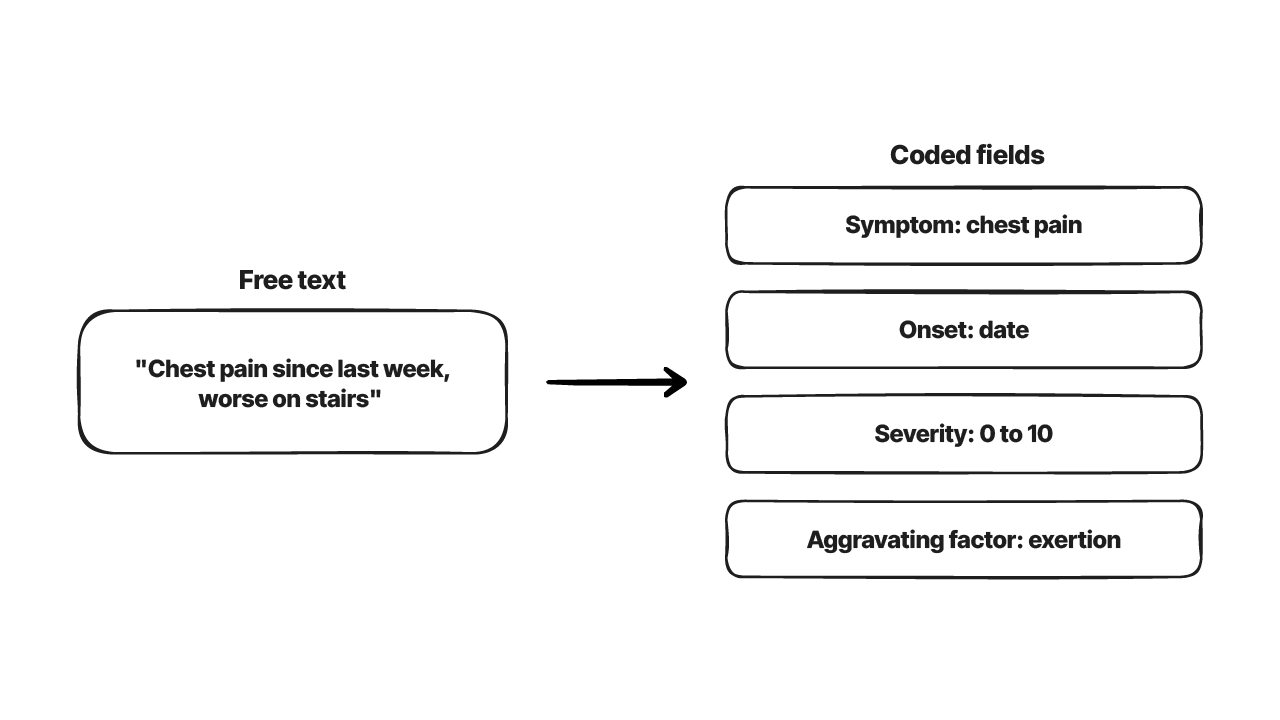
Most digital forms mix three kinds of fields. Structured fields include dropdowns, checkboxes and coded value sets from ICD-10-CM, SNOMED CT or RxNorm. Semi-structured fields include date pickers, numeric ranges and validated formats like NPI numbers and insurance member IDs. Free-text fields cover notes and narrative history.
That mix decides how much engineering sits between submission and use. A form that’s mostly free text needs NLP extraction or manual review before it can populate structured clinical fields. A form built from FHIR Questionnaire items with bound value sets can produce coded answers directly, though those answers still have to be extracted into clinical resources, which we’ll get to below.
In most products, forms appear at a handful of points. Onboarding collects demographics, insurance and identity details. Pre-visit history forms collect past conditions, medications, allergies and family history. Consent and HIPAA authorization forms record treatment consent and data-sharing permissions. During ongoing care, questionnaires collect patient-reported outcomes, symptom scores and screening results, and specialty workflows add their own forms, such as pre-surgical questionnaires.
Each of these captures what the patient reported at that moment. None of them checks the answers against what already exists elsewhere. Reconciliation is a separate job, and teams often underbuild it.
A common mistake is treating form submission as the end of the pipeline. What happens after submission (validation, coding, identity matching, merging into the record) decides whether the answers become usable clinical data or sit as a JSON blob in a forms table.
Getting from a submitted form to usable data takes four steps.
Normalization comes first. A typed medication name like “tylenol” needs to map to an RxNorm concept. A date of birth needs format and range checks. A self-reported condition needs a SNOMED CT or ICD-10-CM code if anything downstream is going to query it.
Next, structured and unstructured content get separated. Fields that map cleanly to coded resources should stay apart from narrative text that needs extra processing. Products that skip this end up storing a lot of free text that clinical logic never reads.
Identity matching decides which patient the answers belong to. Before form data can join an existing record, the system has to work out whether this person already exists in the EHR, a payer system or a previous intake. Name variations, demographic typos and multiple MRNs across systems produce both missed matches and wrong merges, and a wrong merge is the harder of the two to undo.
Finally, data quality checks. UI validation catches missing required fields and bad formats. It won’t catch an implausible value, a contradiction between fields (a pediatric patient reporting an adult dose, for example) or a duplicate submission. Those checks usually live in a separate layer after the form.
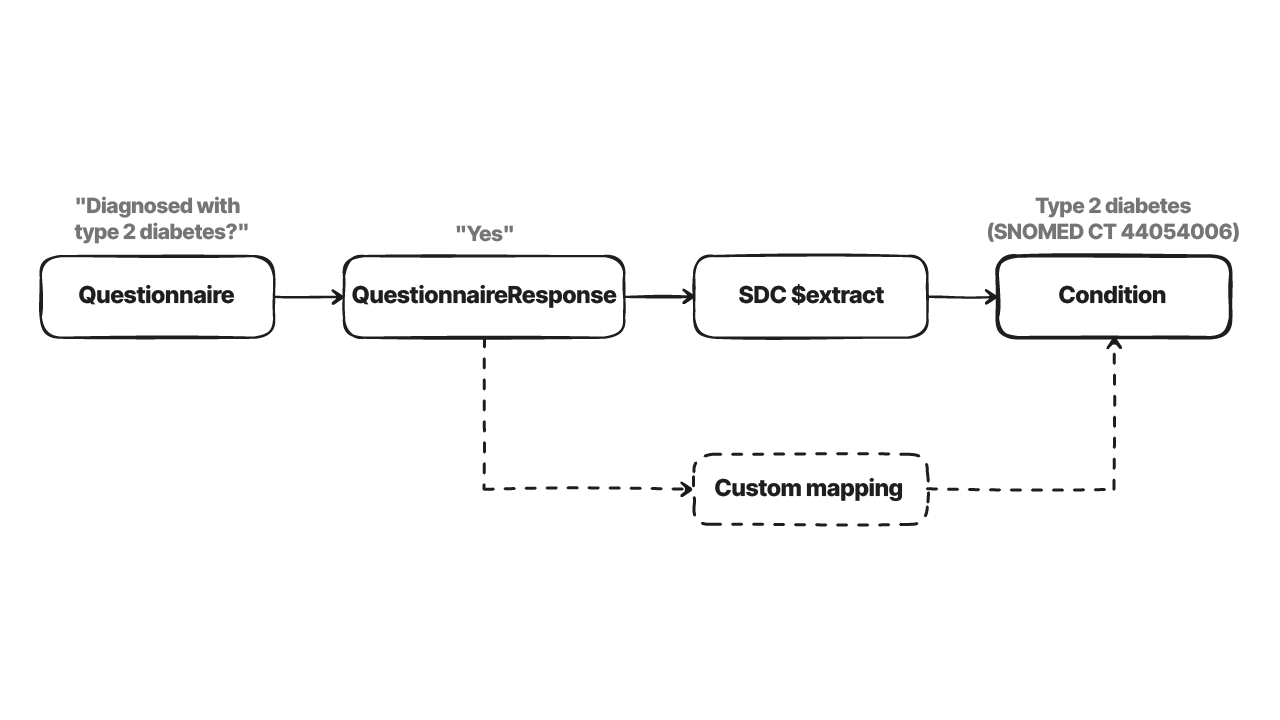
In FHIR, forms map to two resources. A Questionnaire defines the form: its items, their question types, value set bindings and conditional logic through enableWhen. A QuestionnaireResponse holds one set of answers and points back to the Questionnaire it answers.
That gives you a standard way to store form content, but a QuestionnaireResponse only records what was asked and answered. A Condition, Observation or MedicationStatement is what clinical logic expects to query, and a “yes” to “Have you been diagnosed with type 2 diabetes?” won’t turn into a coded Condition on its own.
The Structured Data Capture (SDC) implementation guide defines how that conversion, called extraction, can work. A form filler can call the $extract operation on a form manager or run extraction locally. The current version, SDC STU 4, describes four methods: observation-based, definition-based, StructureMap-based and template-based. Each one needs extra metadata on the Questionnaire, so a form has to be designed to be extractable. If your forms don’t follow SDC, you’ll write custom mapping code instead.
Two terms get mixed up often. HL7 is the standards organization, and FHIR is one of the standards it publishes. FHIR gives you a resource model to represent forms and answers, and the form design is still up to you.
Even a well-built form, with validated fields, FHIR-native structure and reliable identity matching, only records what the patient reported at one point in time. That leaves gaps in five places.
This is easy to miss because the forms look complete. Every required field is filled, validation passes and the UI shows a green check, while the record behind it can still be missing most of the patient’s history.
Anything built on that data inherits the gaps. A drug interaction check that only sees self-reported medications will miss interactions with drugs the patient didn’t list. A risk model that never sees prior diagnoses or lab trends scores the patient on a partial history. Without matching against EHR and payer data, forms create new patient identities instead of adding to existing ones. And care teams end up asking patients again for information that already sits in another system.
Forms are still the main channel for what only the patient knows, such as symptoms, preferences, consent. To reduce issues, forms should be considered just one data source among several.
A longitudinal record reflects a patient’s history over time and across providers. Form data is one input. The others usually include:
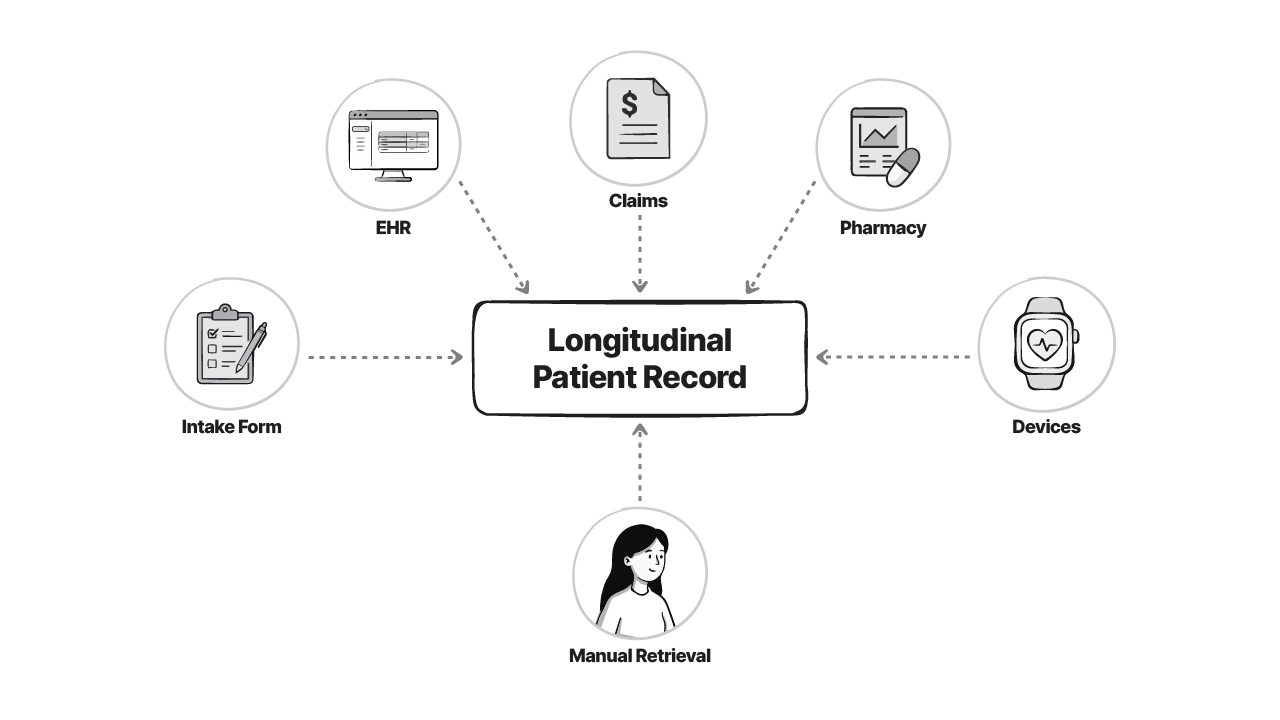
Combining these takes more than connecting APIs. You need identity resolution across systems that don’t share a patient identifier, a way to see what’s still missing after integration, and a manual route for records that have no digital access point. Sidharth’s guide to getting a patient’s health record in 2026 walks through which route fits which kind of organization.
This is the layer Medblocks works in. It connects your app to EHRs, HIE networks and patient-facing sources such as portals and payers through one integration, so form data can sit next to records from the systems where the patient’s care actually happened.
Forms will stay one of your inputs, so it’s worth building them to merge cleanly with everything else.
If you’re building a product that needs more of the patient’s history than an intake form can collect, talk to the Medblocks team.
A digital medical form collects patient, clinical, administrative or consent information online, through a web app, mobile app or patient portal, for a specific purpose such as registration, medical history or treatment consent. In digital health products, it's usually the first point where patient data is captured in a structured way.
Common types include patient registration and intake forms, medical history forms, consent and HIPAA authorization forms, patient-reported outcome and screening questionnaires, and specialty forms such as pre-surgical questionnaires.
A medical form captures specific information at one point in time. A medical record is the ongoing history of a patient's care, including diagnoses, medications, results and clinical notes, often spread across several systems. A form can add to the record, but it isn't the record.
FHIR uses two resources. Questionnaire defines the form's items, answer types, value sets and conditional logic. QuestionnaireResponse holds one set of answers and points back to the Questionnaire. The Structured Data Capture (SDC) implementation guide adds rules for pre-populating forms and extracting answers into other resources.
No. A QuestionnaireResponse only records the answers. To create Condition, Observation or similar resources, you need an extraction step, either through the SDC $extract operation with an extractable Questionnaire or through your own mapping code.
Form data only reflects what the patient remembers and reports at one moment. It misses care recorded in other providers' EHRs, pharmacy fills, claims, lab results the patient didn't mention and device data, and it goes out of date as the patient's care changes.
What a Continuity of Care Document (CCD) contains, how it relates to CDA and C-CDA, how it moves between EHRs, and how it maps to FHIR.
What USCDI requires, how its data classes map to US Core FHIR profiles, which version certification needs (v3), and what changed through USCDI v7.
What OpenMRS is, how the concept dictionary and OpenMRS 3 work, what the FHIR2 module does and doesn’t cover, how to implement it, and when to pick OpenEMR instead.