
Karolinska Tip2Toe: Structured Rare-Disease Phenotyping with SMART on openEHR
This project breakdown looks at how we built Tip2Toe, a rare disease phenotyping application for Karolinska University Hospital.
July 3, 2026
Most electronic health records are something you end up paying for while OpenEMR is a system that you own as soon as you install it. This is what makes it the world’s most popular open-source electronic health record (EHR) whose presence is almost everywhere from individual clinics to national health systems.
OpenEMR is a free, open-source and most popular EHR and medical practice management system that gives clinics full access to the code, the data model, and the deployment stack. It is widely used as it combines charting, billing, scheduling, interoperability, and customization in one platform, while still supporting ONC-certified workflows and modern API access, including FHIR and SMART on FHIR.
OpenEMR was originally developed by Synitech and version 1.0 was released in June 2001 as MedicalPractice Professional (MP Pro). The source code was not compliant with the Health Insurance Portability and Accountability Act (HIPAA). Hence to improve the overall security and make it HIPAA compliant, the product was reintroduced as OpenEMR version 1.3 the next year, in July 2002. The same year on 13 August 2002, OpenEMR was made public under the GNU General Public License (GPL) on SourceForge.
As the code is open source, the OpenEMR community consists of volunteers, clinicians, developers and vendors that continuously evolves the code to meet the changing demands of modern clinical workflows. This makes OpenEMR a highly accessible, cost-effective, and customizable choice for healthcare providers worldwide. It also supports cross-platform compatibility, including Windows, Linux, and macOS.
OpenEMR has consistently stayed current with ONC certification requirements. The latest certification updates and release information are available on the official site OpenEMR wiki. The current release documentation also notes that ONC certification for OpenEMR 7 was retired on February 27, 2026, and that OpenEMR 8 should be used for ONC certification. As the certification is version-specific, organizations should verify the certification status of the release they plan to deploy.
OpenEMR is used across many countries and many care settings because it is easy to adapt, localize, and host in different ways. It has gained its popularity due to its multilingual support, cross-platform deployment and ease to fit hospitals, clinics etc. OpenEMR is a good fit where teams need a reliable EHR without per-seat license pressure.
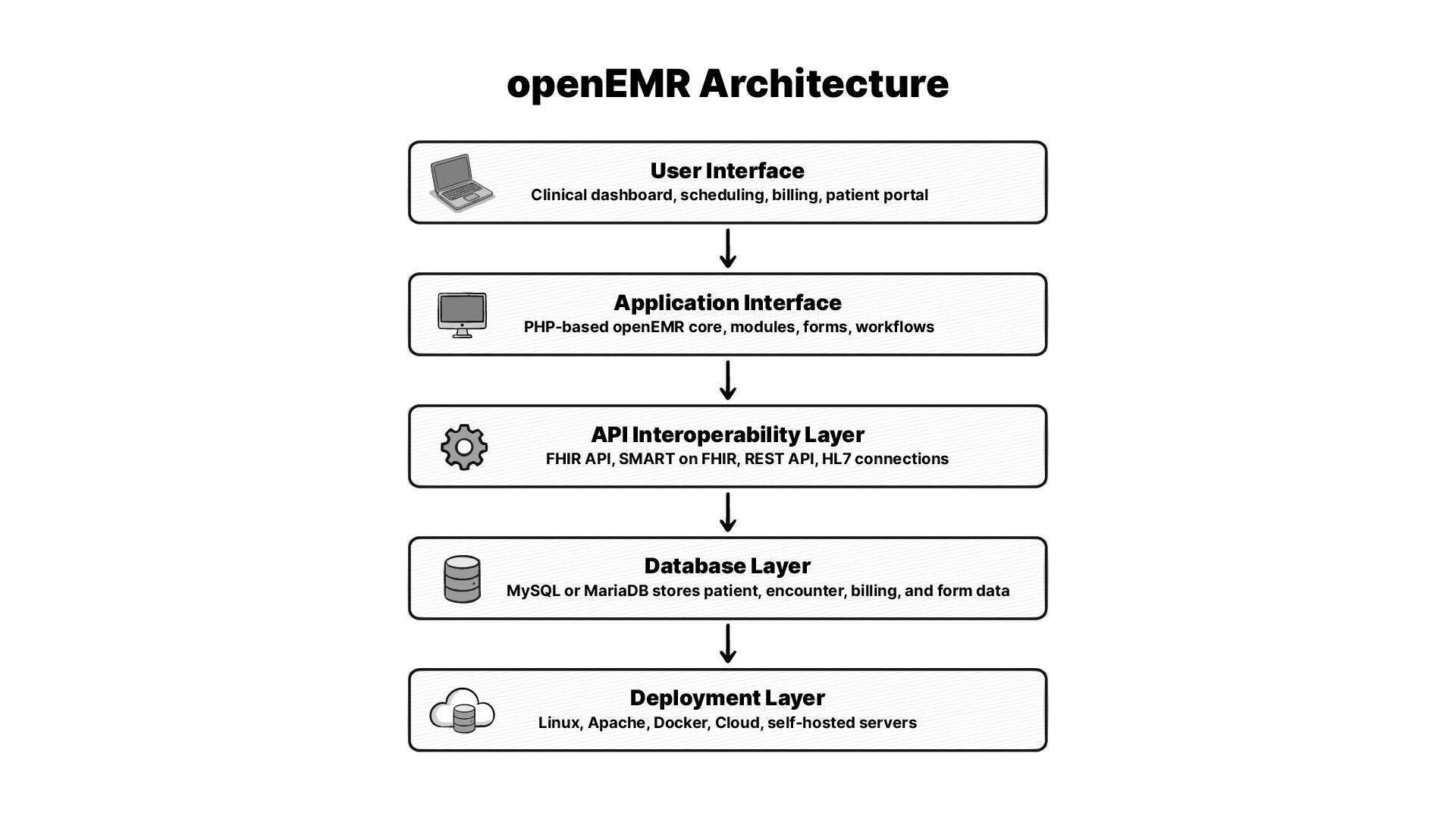
OpenEMR is built on a classic web stack with the core app being PHP-based, the database layer uses MySQL or MariaDB, and the deployment model can run on standard web servers. The devops repo shows the number of ways the project can be deployed.
For health IT teams, it matters. A web app on common infrastructure is far easier to support than a system that needs custom hardware, special agents, or narrow vendor tooling. It also means OpenEMR can be shaped for local needs without ripping out the core product.
OpenEMR is closely associated with the LAMP style of deployment, meaning Linux, Apache, MySQL, and PHP. While the Github repo shows that it supports cross-platform compatibility like Windows, Linux, and macOS, the devops repo shows support across Ubuntu, AWS, Kubernetes, and Raspberry Pi.
The data model is built around patient records, encounters, billing, scheduling, documents, and clinical forms. OpenEMR stores and exposes many clinical and admin objects in a way that can be queried, reported on, and extended. This structure makes the custom reporting and integration possible.
The OpenEMR codebase, API docs, FHIR docs, and Docker docs tell that the system is built for extension. The release pages also show active support for modules such as telehealth, fax and SMS, claims, payment processing, and prior authorization.
For many teams, Docker is the easiest way to deploy OpenEMR. The official devops repo provides the source for Docker tooling, production testing for images, flex development images, Ubuntu install support, Kubernetes paths, AWS packages, and Raspberry Pi support.
FHIR is now one of the biggest reasons technical buyers look at OpenEMR. The official wiki shows FHIR support for ONC US Core IG 4.0.0, with SMART on FHIR included (source). The release notes also show newer work such as SMART on FHIR v2.2.0 and Bulk FHIR export 2.0.
OpenEMR is not FHIR-shaped as an afterthought. It has real API docs, Swagger-based testing, and release-level support pages for current and past versions. That is enough to build integrations, but you still need to test each workflow carefully because coverage can vary by resource and release.
OpenEMR’s wiki provides API docs and Swagger instructions for testing endpoints that makes setup easier for teams. You need the right base URL, the right auth setup, and the right instance settings before an external app can talk to it cleanly.
OpenEMR has strong FHIR evolution. But still, some of the workflows depend on legacy APIs, custom forms, or release-specific behavior. That is normal in open-source health software. The community is helping to move towards a richer FHIR, better export paths, and stronger API docs.
If you are trying to install OpenEMR, the most practical answer is to start with Docker. The official Devops material covers modern deployment paths, and the project’s docs point to current stable builds, prior releases, and setup support.
At a basic level, you need a supported host, a web stack, a database, and careful network handling. In real life, that means planning for backups, TLS, user roles, and patching before you go live. The project embraces Docker and Devops repo makes it clear that OpenEMR is flexible, but that flexibility comes with setup responsibility.
A simple Docker-based installation have these steps:
Install Docker Desktop, launch it, wait for the Docker engine to start.
In resources under settings, allocate it ≥ 4 GB RAM.
Open a terminal in your system and paste docker --version && docker compose version to confirm the installation.
You will see an output something like this (version may vary):
Docker version 29.6.1, build 8900f1d
Docker Compose version v5.3.0
Create a project folder and move to the project directory.
mkdir -p ~/openemr-docker && cd ~/openemr-docker
Paste the below docker yml file into terminal:
(don’t forget to update OE_PASS (openemr section -> environment) before pasting it.)
       cat > docker-compose.yml << 'EOF'
       services:
         mysql:
           image: mariadb:11.4.4
           restart: always
           command:
             - mariadbd
             - --character-set-server=utf8mb4
           environment:
             MYSQL_ROOT_PASSWORD: root
           volumes:
             - databasevolume:/var/lib/mysql
           healthcheck:
             test: ["CMD", "healthcheck.sh", "--connect", "--innodb_initialized"]
             interval: 10s
             timeout: 5s
             retries: 15
             start_period: 45s

         openemr:
           image: openemr/openemr:8.0.0
           restart: always
           depends_on:
             mysql:
               condition: service_healthy
           ports:
             - "8080:80"
             - "8443:443"
           environment:
             MYSQL_HOST: mysql
             MYSQL_ROOT_PASS: root
             MYSQL_USER: openemr
             MYSQL_PASS: openemr
             OE_USER: admin
             OE_PASS: replace_with_your_password
           volumes:
             - sitevolume:/var/www/localhost/htdocs/openemr/sites

       volumes:
         databasevolume:
         sitevolume:
       EOF
Get started:
docker compose up -d
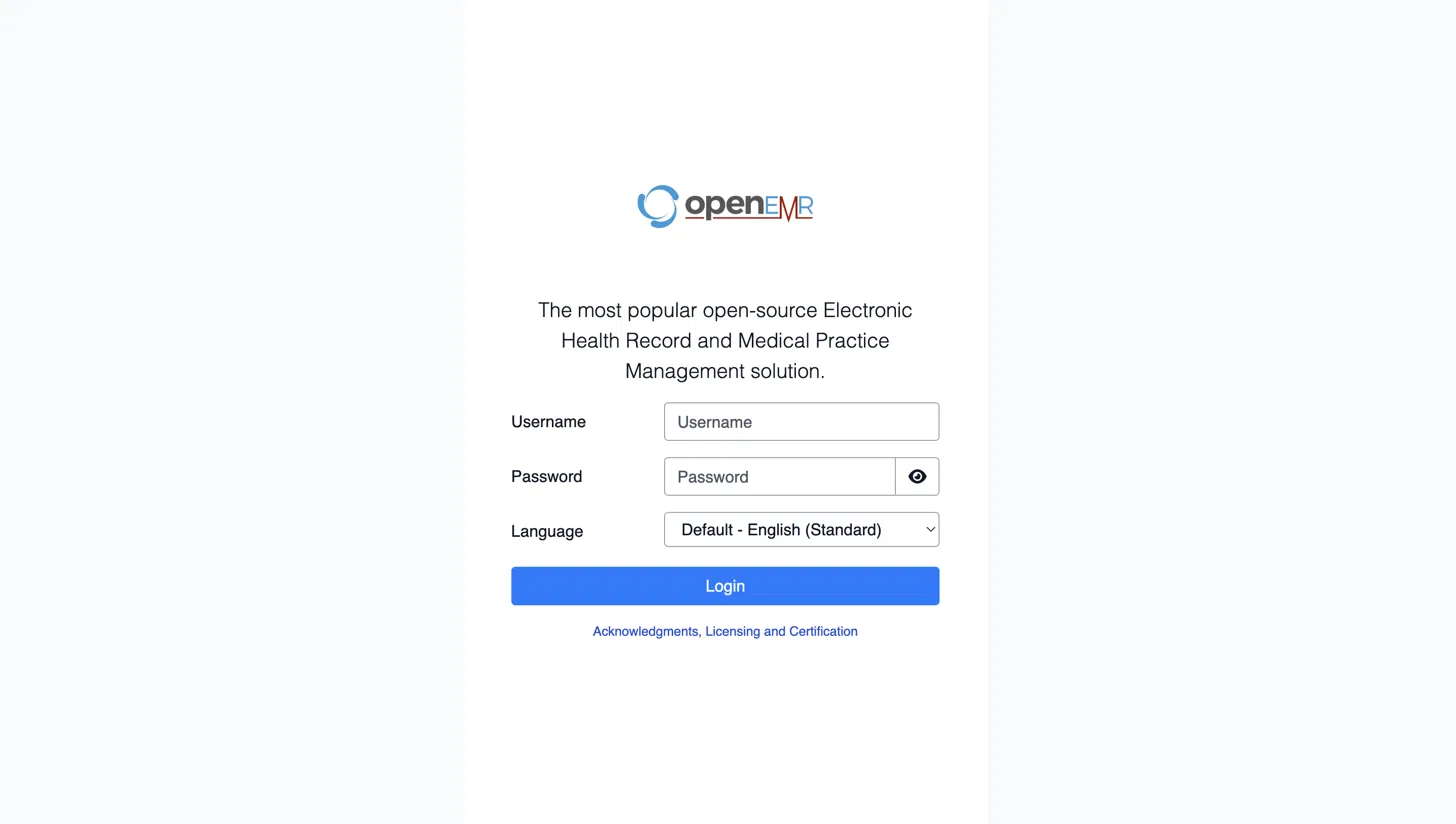
Open https://localhost:8443 on your system’s browser.
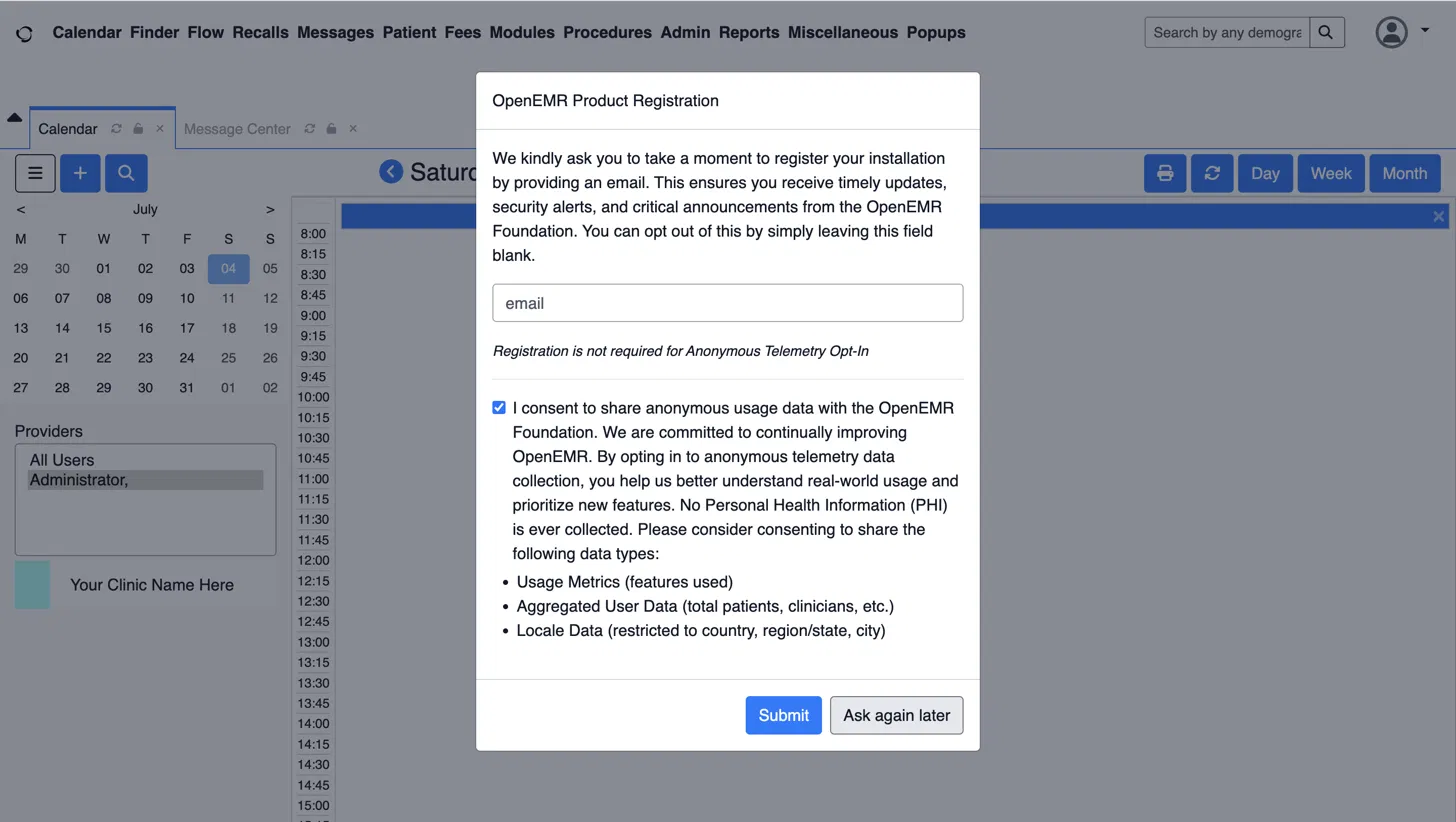
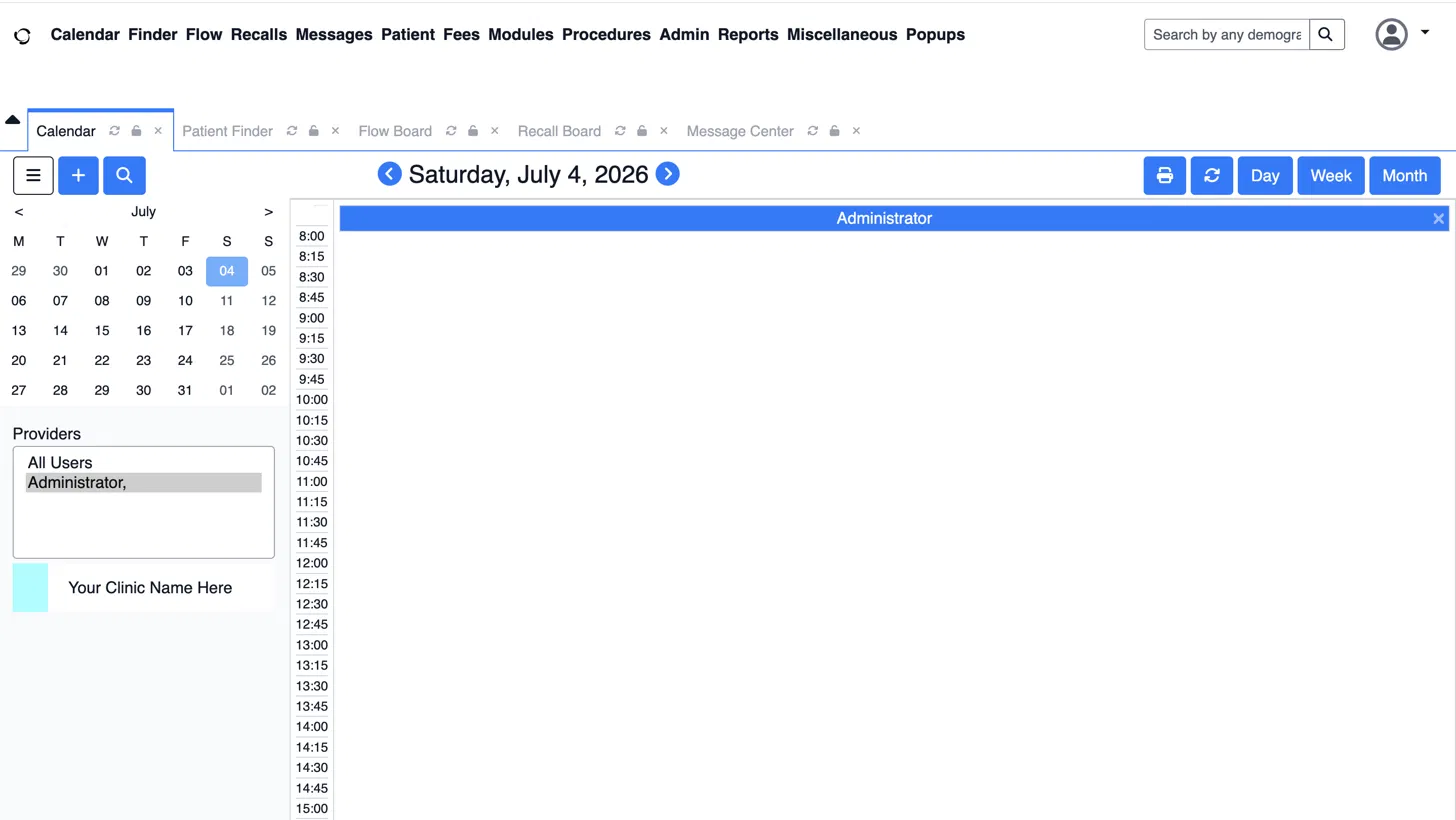
OpenEMR opens Calendar by default. A quick overview of the dashboard:
The top menu bar is used to navigate across multiple sections of the application:
Calendar tab is used for scheduling.
Finder / Patient tab is used to find or open patient records.
Fees tab is used for billing and charges.
Modules tab is used to add-on features.
Procedures tab is used to get lab/procedure orders.
Admin tab is used for system configuration: users, facilities, globals, layouts.
Reports tab is used to get clinical and financial reporting.
Once OpenEMR is running, the first thing to be done is to set up access control. You need practices, facilities, user roles, and permissions set before staff touch live data. The official docs and community pages both point to access controls, support workflows, and configuration work as core parts of a good rollout.
OpenEMR is built to connect outward. That includes FHIR apps, HL7 links, telehealth tools, patient portals, and third-party services. The repo and release pages show active support for integrations and newer features around APIs, SMART on FHIR, and module-based expansion.
OpenEMR lets you shape workflows instead of forcing every team into one fixed layout. The official project shows a system that keeps growing through modules, forms, APIs, and community add-ons.
The layout form system is one of the most useful parts of OpenEMR. It gives teams a way to capture the exact data they want without rebuilding the app from scratch. That makes it a strong fit for specialty practices that need different intake logic, note flow, or visit forms.
OpenEMR’s form and template setup lets teams build repeatable charting paths for common visits, which cuts down on manual work and lowers the chance of missed data.
OpenEMR’s module model is one of its biggest strengths. The release pages show support for telehealth, fax and SMS, claims, payment, and prior auth modules, which is a good signal that the platform is expected to grow with the clinic.
The official repo points directly to API_README and FHIR_README docs, and the wiki gives Swagger-based doc support. That means you can build against OpenEMR with a real path for testing.
The right comparison is not only OpenEMR vs Epic, It is OpenEMR vs your real use case. A huge hospital network, a small clinic, a public health group, and a dev team building a new app all need different things from an EHR. OpenEMR can be a great fit for some of them and the wrong fit for others.
Epic is built for very large, heavily governed health systems with deep budgets and large internal teams. OpenEMR is built for control, flexibility, and lower license cost. The real difference is the operating model. If you need a vendor-led enterprise platform, go with Epic.
OpenMRS is strong in different settings, especially global health and research-led deployments. OpenEMR is more practice-management, with billing and clinic ops built in. OpenMRS is often chosen for medical record projects whereas OpenEMR is chosen for active clinical practice and office workflow.
OpenEMR is a strong choice when you:
It is also a good fit when you have a technical team, a reliable and trusted implementation partner, or a product team that can help to bridge the gap between clinic needs and modern interoperability work.
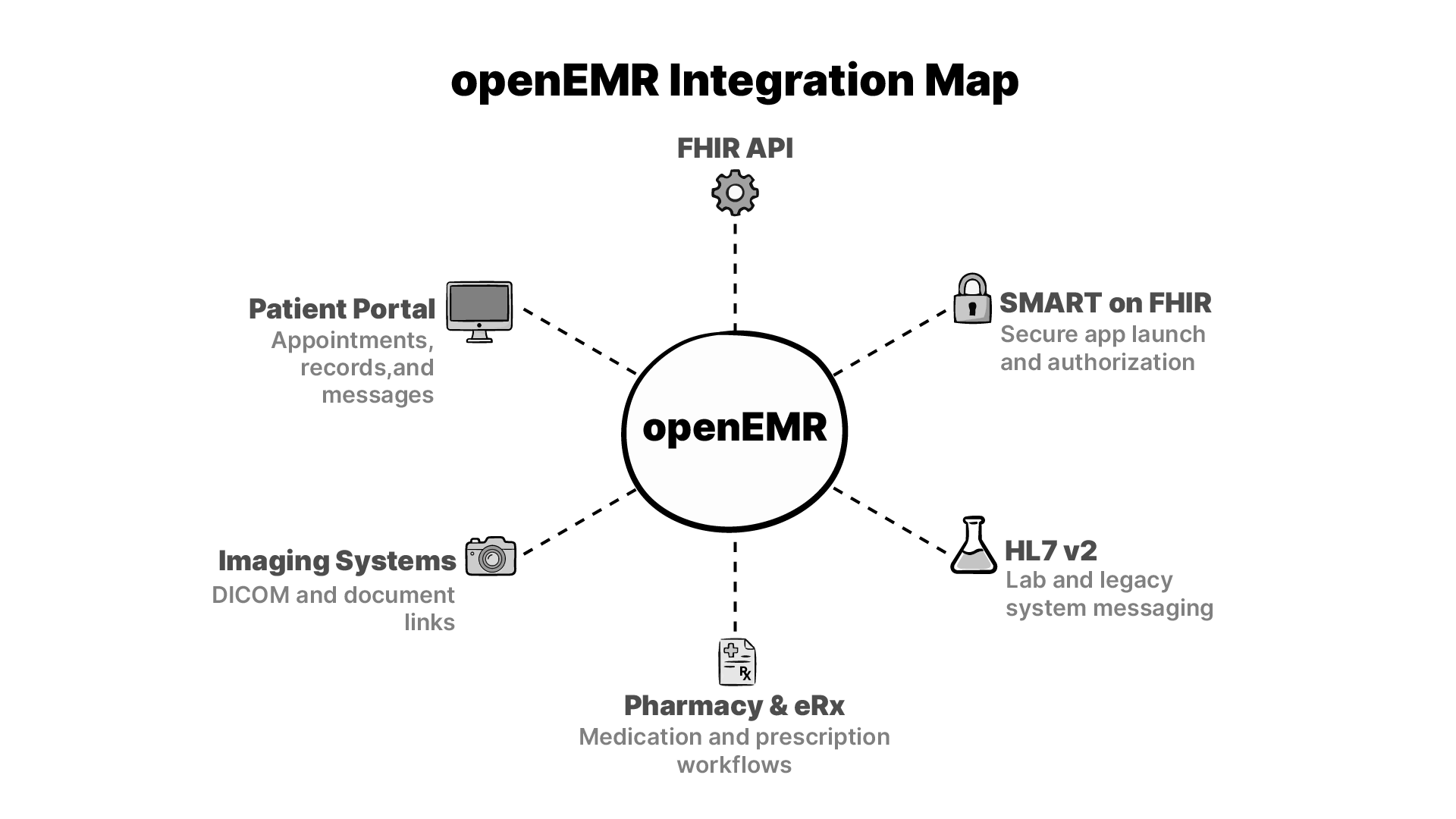 OpenEMR becomes much more useful once it is part of a wider network. The official docs and release notes show a platform that is built for real exchanges that includes APIs, FHIR, SMART on FHIR, and older healthcare messaging paths that still matter in live practice.
HL7 v2 is still a major part of lab data flow in healthcare, and OpenEMR has long supported integration patterns around data exchange. For many clinics, this is the difference between a usable EHR and one that forces double entry.
The release pages show continued work on ePrescribing and related modules, including WENO Exchange in recent notes. It matters because medication work is one of the first places where workflow pain shows up if an EHR is weak.
Imaging matters in many specialties, and OpenEMR’s flexibility makes it possible to link studies, docs, and patient records through external systems. The platform is not a PACS by itself, but it can sit next to one in a practical setup.
HIE work is where OpenEMR’s standards support is worthwhile. FHIR, SMART on FHIR, CCDA, and older exchange paths all help the system to bind well with others. According to the official wiki and release notes, this feature is a primary objective rather than a secondary consideration.
In the real world most OpenEMR failures happen for reasons like quick deployments. This is one of the main reasons the community documentation places so much emphasis on security settings, role-based access, support contracts, and methodical configuration.
Your team should give special attention to:
OpenEMR isn’t a subscription service which you just turn on and forget about. It only becomes a powerful asset when you treat it like a piece of infrastructure that you fully own and operate.
Yes. The official site and GitHub repo describe OpenEMR as free and open-source software. You do not pay license fees to use the code. Your main costs are hosting, setup, support, and any custom work you choose to add.
OpenEMR has a long ONC certification track, but certification is release-specific. The official wiki says version 7 certification was retired on 2/27/2026 and that version 8 is now the path to use for ONC certification. So the right answer is yes, but you still need to check the exact version you plan to run.
OpenEMR is built around MySQL or MariaDB in modern deployments. That makes it a good fit for standard web hosting and container-based setups.
It can, but that depends on the hospital’s size, scope, and support model. OpenEMR is strongest in small and mid-size practices, global health work, and teams that want control over the stack. Large hospital systems often need a different operating model, deeper vendor support, and broader enterprise tooling.
Yes. The official wiki says OpenEMR supports FHIR for ONC US Core IG 4.0.0, and SMART on FHIR is included. The release notes also show newer work on SMART on FHIR and Bulk FHIR export.
OpenEMR leans more toward practice management, billing, scheduling, and day-to-day clinic flow. OpenMRS is often used in medical record and global health settings where the record layer is the main goal. They overlap, but they are not aimed at the same default use case.
The safest path is a staged migration. Map your source fields, clean the data, test imports in a staging site, and validate key records before you switch live. Because OpenEMR is open source and API-friendly, migration can be done well, but it still needs careful planning and a real test plan.
Yes, The release notes show active support for telehealth-related modules and integrations. That makes OpenEMR a solid base for practices that want remote visits tied to the same chart and workflow system.
It is easier to customize than most closed EHRs, but it still takes skill. The gain is real control over forms, modules, APIs, and workflows. The cost is that you need technical people who can work cleanly inside an open-source system.
The project offers community support, forums, docs, demos, and a professional support directory. That mix is useful because it gives small teams a place to start and larger teams a path to paid help when they need it.
This project breakdown looks at how we built Tip2Toe, a rare disease phenotyping application for Karolinska University Hospital.
Why openEHR works better as a silver layer in your data warehouse than as a CDR, and what that means for clinical data at scale.

I make the case that SQL could be the solution to simplifying the layers of complexity in health data architecture. This is a written version of my talk at EHRCON 25.
No comments yet. Be the first to comment!