How CDS Hooks works, and how Da Vinci CRD uses it
In the previous lesson, we learned that CRD (Coverage Requirements Discovery) is the first step in the CMS-0057-F prior authorization flow: while the clinician is placing an order, the health plan answers whether it is covered and whether it needs prior authorization.
Before we go deeper into CRD, there is one thing we need to learn first, and that is CDS Hooks, because it sits at the core of that whole process.
What is CDS Hooks?
CDS Hooks (clinical decision support) is an HL7 specification that lets a service outside the EHR respond inside the clinician’s workflow.
A clinician performs an action in the EHR, and that action triggers a hook, which makes the EHR make an API request to a CDS service.
The service responds with actions. An action could be an information card shown to the clinician. It could be a suggestion. It could even be an automatic change to a resource in the EHR’s context, so that the EHR knows more about that resource.
CRD is one specific use of this, where the CDS service belongs to the health plan.
We can build CRD, DTR and PAS for you
We already do this for health plans and their vendors. Reach out if you want help with the build, or just want to talk through your setup
Book a CallHow CDS Hooks works
The flow has three steps, and this diagram is the easiest way to see them.
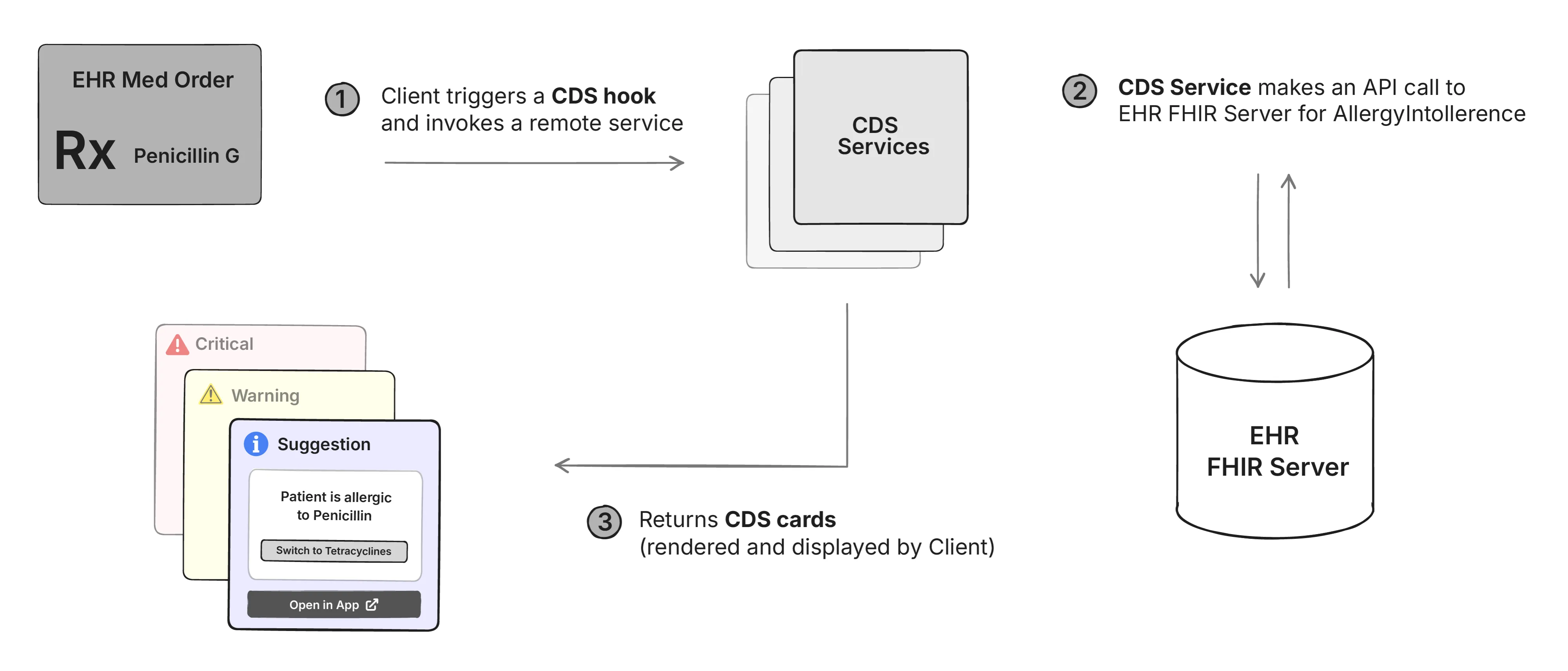
1. Something happens in the EHR, and it triggers a hook.
A clinician does something in their workflow and the hook fires in real time: patient-view when a patient record is opened, order-select when one or more orders are selected, order-sign just before an order is signed. In the diagram it’s a medication order, Toprol XL 50 mg daily.
The EHR (called the CDS Client in this setup) then notifies every CDS service registered for that hook. The request carries basic details about where the clinician is in the workflow, in a field called context, plus whatever extra data the service asked for in advance, through a prefetch template. Both get their own sections below.
2. The service runs its own rules, pulling FHIR data as it needs.
The CDS service has access to the EHR’s FHIR server. It can decide on the context alone, or it can go back to the EHR and fetch more about the patient before it answers. It can also tell the EHR upfront what to include with the request, so the round trip is avoided. That’s the two-way arrow on the right of the diagram.
3. The service returns cards, and the EHR renders them.
A service can return any number of cards, of three kinds.
- An information card is text for the clinician to read; in the diagram, the drug costs $45 a month and the patient pays $7.
- A suggestion card proposes a specific change, and the EHR renders it as a button; here, switch to HCTZ as first-line because the patient is 71 and if you click on that button, the suggested action is performed, basically switching to HCTZ.
- An app link card links out, often to a SMART app, when the decision needs more interaction than a card can hold.
A service can also return system actions, which change a resource in the EHR directly without showing the clinician a card.
Which hooks exist
In the diagram, the clinician placing the Toprol XL order is the action that sets everything off. That moment in the workflow is called a hook.
The CDS Hooks specification defines every hook an EHR can trigger, each tied to a specific point in the clinician’s workflow. The EHR doesn’t invent them, and neither does the service. Both sides agree on the list up front, which is what lets one service work against many EHRs.
The list lives on the hooks page of the specification. [LINK: cds-hooks.hl7.org/hooks]
Open it and you’ll see allergyintolerance-create, appointment-book, encounter-start, encounter-discharge, medication-refill, order-dispatch, order-select, order-sign, patient-view and problem-list-item-create.
Each one carries a maturity rating, a number from 0 to 5 that tracks how far the hook has gone through definition, testing, production use and balloting. patient-view and order-sign sit at 5, order-select at 4. Most of the rest are at 1, and order-dispatch is at 0.
patient-view is the simplest to picture: it fires when you click on a patient’s chart and open it.
order-select is the one mentioned in the diagram. It fires after the clinician has selected an order and before they sign it. That’s a very specific point in the workflow. The clinician picks the order out of a set of dropdowns, and once they’ve picked it, they sign it. In between those two steps the EHR triggers the hook, calls the service, gets the result back, and shows it to the clinician.
Discovery
Before any hook fires, the EHR has to find out which services exist and what they can do. That step is called discovery.
The EHR needs the base URL of your CDS service, say https://payer1.com/cds-services. That has to be registered on the EHR side first: this organisation has this endpoint. The EHR also knows which patients that service applies to. Take a patient with two coverages, payer 1 and payer 2. The EHR decides payer 1 is primary, so payer 1’s endpoint is the one it calls first.
Discovery is a GET request to that base URL. It’s authenticated, and the EHR presents a JWT bearer token to prove who it is. We cover how to validate that token later in the course.
The response is the service telling the EHR what it supports. Every hook it can respond to, and an id for each:
json
{
  "services": [
    {
      "hook": "order-select",
      "title": "Payer 1 coverage requirements",
      "description": "Checks coverage and prior auth requirements when an order is selected",
      "id": "order-echo"
    },
    {
      "hook": "order-sign",
      "title": "Payer 1 coverage requirements at signing",
      "description": "Re-checks coverage requirements when the order is signed",
      "id": "order-sign-check"
    }
  ]
}
The EHR reads this and registers it. Payer 1 supports order-select and order-sign, nothing else. So when a clinician picks an order from a dropdown for a payer 1 patient, the EHR knows which service to call.
The EHR takes the base URL and appends it to the id of the hook: https://payer1.com/cds-services/order-echo.
That’s the endpoint the hook itself is sent to, as a POST request.
If payer 1 had said it supports patient-view too, the EHR would have a third URL for that, and would call it whenever a payer 1 patient’s chart was opened.
Discovery doesn’t have to happen at the moment the hook fires. The EHR can run it ahead of time and cache the result, refreshing every couple of hours or on whatever schedule it chooses. By the time the clinician is in the order screen, the EHR already knows which services exist and where to send the request.
Prefetch and the request body
Discovery told the EHR which hooks a service supports. A service can also use discovery to ask for data in advance. That is called prefetch.
The idea is simple. When a hook fires, the request already includes some context about what the clinician is doing. If the service needs more than that to make a decision, it can list the extra queries it wants in its discovery response, and the EHR will run those queries and include the results with every request for that hook.
The spec’s own example is the easiest one to read. Here is a discovery entry for a patient-view service with one prefetch query attached:
json
{
  "hook": "patient-view",
  "title": "Static CDS Service Example",
  "description": "An example of a CDS Service that returns a static set of cards",
  "id": "static-patient-greeter",
  "prefetch": {
    "patientToGreet": "Patient/{{context.patientId}}"
  }
}
patientToGreet is a key that the service chooses. It could be patient or patient1 or anything else. It is only there so the service can find the result later. The value is a FHIR query, written the same way as a GET request against the EHR’s FHIR server. Patient/{{context.patientId}} means fetch the Patient resource whose id matches the patientId in the hook’s context. The double braces are URL templating, and the next section covers where context.patientId comes from.
When the hook fires, the EHR sends a POST request to the base URL plus the service id, in this case /cds-services/static-patient-greeter. The body looks like this:
json
{
  "hookInstance": "d1577c69-dfbe-44ad-ba6d-3e05e953b2ea",
  "fhirServer": "https://fhir.example.com",
  "hook": "patient-view",
  "fhirAuthorization": {
    "access_token": "some-opaque-fhir-access-token",
    "token_type": "Bearer",
    "expires_in": 300,
    "scope": "user/Patient.read user/Observation.read",
    "subject": "cds-service4"
  },
  "context": {
    "userId": "Practitioner/example",
    "patientId": "1288992",
    "encounterId": "89284"
  },
  "prefetch": {
    "patientToGreet": {
      "resourceType": "Patient",
      "id": "1288992",
      "...": "..."
    }
  }
}
hookInstance is a random UUID that the EHR generates for this one request, so it can be tracked later.
fhirServer is the URL of the EHR’s FHIR server, and fhirAuthorization is a bearer token the service can use to call it. This is what gives the service a way to go back to the EHR and query for more data during the request.
We don’t recommend doing that as a general rule. A CDS Hooks service needs to respond quickly, and each call back to the EHR’s FHIR server adds time to the response. If prefetch can get you the data, use prefetch.
That is what happened in this example. The service asked for patientToGreet in its discovery response, so the prefetch field in the request already contains the full Patient resource, which is exactly what the GET request would have returned. The service has the data it needs as soon as the request arrives.
The last field is context. It is where {{context.patientId}} was filled in from, and the next section explains who decides what goes in it.
Context comes from the hook definition
Each hook has a definition page in the specification, and that page lists what the EHR will send in context when the hook fires. [LINK: cds-hooks.hl7.org/hooks]
For patient-view, that is the current user, the patient whose chart was opened, and the encounter if one is open. Those are the three fields in the request body above, and {{context.patientId}} in the prefetch template points at one of them. A prefetch template can only reference fields that the hook’s definition lists.
order-select sends the same three fields plus two more. draftOrders is a Bundle containing every order the clinician has open and unsigned, and selections lists the ones they just picked. In the Mrs Jones scenario, this is where the CT order arrives.
This is also why a service declares its prefetch per hook. draftOrders doesn’t exist in patient-view, because nobody is placing an order when a chart opens, so asking for it there makes no sense. What you can ask for depends on what the hook gives you.
How CRD uses CDS Hooks
CRD is a CDS Hooks service run by the health plan, and the EHR being used by the clinician is the CDS Client.
The hook fires while the clinician is placing an order in the EHR, and the cards that come back say whether the order is covered and whether it needs prior authorization.
The cards have to reach the clinician while they’re still in the workflow, so a good rule is to respond within 5 seconds. In the ideal case, with the response cached, you can do it within a second. At Medblocks, we’ve seen it respond within a second when the response is cached
The CRD implementation guide lists a few example scenarios. Let’s go through one of them from the guide [Da Vinci CRD IG 2.2.1, Use Cases, CC0.].
Mrs. Jones is a 35-year-old, previously healthy female who is seen by Dr. Good for a new onset headache that began abruptly 2 weeks prior to her visit. Her headaches are severe at times, last several hours, have been occurring with increasing frequency, and are now occurring daily. Her physical, including neurologic exam, is normal. Dr. Good is concerned about an intracranial process.
Dr. Good wants to order a head CT to check for any masses. Dr. Good begins filling out the order for the CT in their EHR. In the background, the EHR initiates a call to the CRD server used by Mrs. Jones’ payer providing information about the patient, her coverage and the CT order. The CRD server returns information within a few seconds identifying that a prior authorization request must be completed and submitted, as well as a list of the additional clinical documentation required (e.g., Progress Note or prior studies). It also provides a link to the required form. Dr. Good launches an app to complete the necessary paperwork to initiate a prior authorization and sends the relevant supporting information to the imaging center as part of the referral.
Note: An app may also provide Dr. Good with additional useful information, such as a list of nearby imaging centers that are on Mrs. Jones’ plan.
The first paragraph is the clinical context. The second paragraph is the CDS Hooks flow we just walked through, with a health plan in the service’s seat.
Dr Good starts filling out the CT order. That is the hook, most likely order-select. The EHR calls the CRD server it found through discovery, and the request carries the patient and the draft CT order in its context. Her coverage is the kind of thing the CRD server would have asked for through prefetch, so that arrives with the request too.
The CRD server decides and answers. Prior auth is required, here are the documents the payer wants, here is a link to the form. Those are the cards.
This all happens within a few seconds. Dr Good hasn’t left the order screen, she already knows the CT needs prior auth and what the payer wants to see, and she can start on the form.
There are three more scenarios on the same page, worth reading for the range of situations CRD is meant to cover.
Which hooks CRD needs
For CRD, order-sign and order-select are the ones that matter most, and appointment-book comes next. Between order-sign, order-select, order-dispatch and appointment-book, you’re pretty much covered. CRD also defines behaviour for encounter-start and encounter-discharge, and we walk through all six in lesson 4.3.
The Mrs Jones scenario ran on order-select. Dr Good had picked the CT order and hadn’t signed it yet, which is exactly the window that hook covers, and it is the hook we’ll keep coming back to in this course.
What the payer sends back
The scenario showed one response. In general, a CRD server is answering two questions. Is this covered by the patient’s plan? And does it need prior authorization?
If prior authorization is needed, the response can also include what the payer wants in order to process it: links to documentation requirements, and the questionnaire the EHR has to fill in. That questionnaire is what DTR works with, and PAS is what sends the completed request to the payer.
A CRD response can carry more than that. It can suggest an alternative therapy, or an additional one. If the EHR’s record of the patient’s coverage is out of date, the response can update it. If the EHR is missing a questionnaire the payer needs, the response can supply it.