Every CRD hook, and unsolicited determination
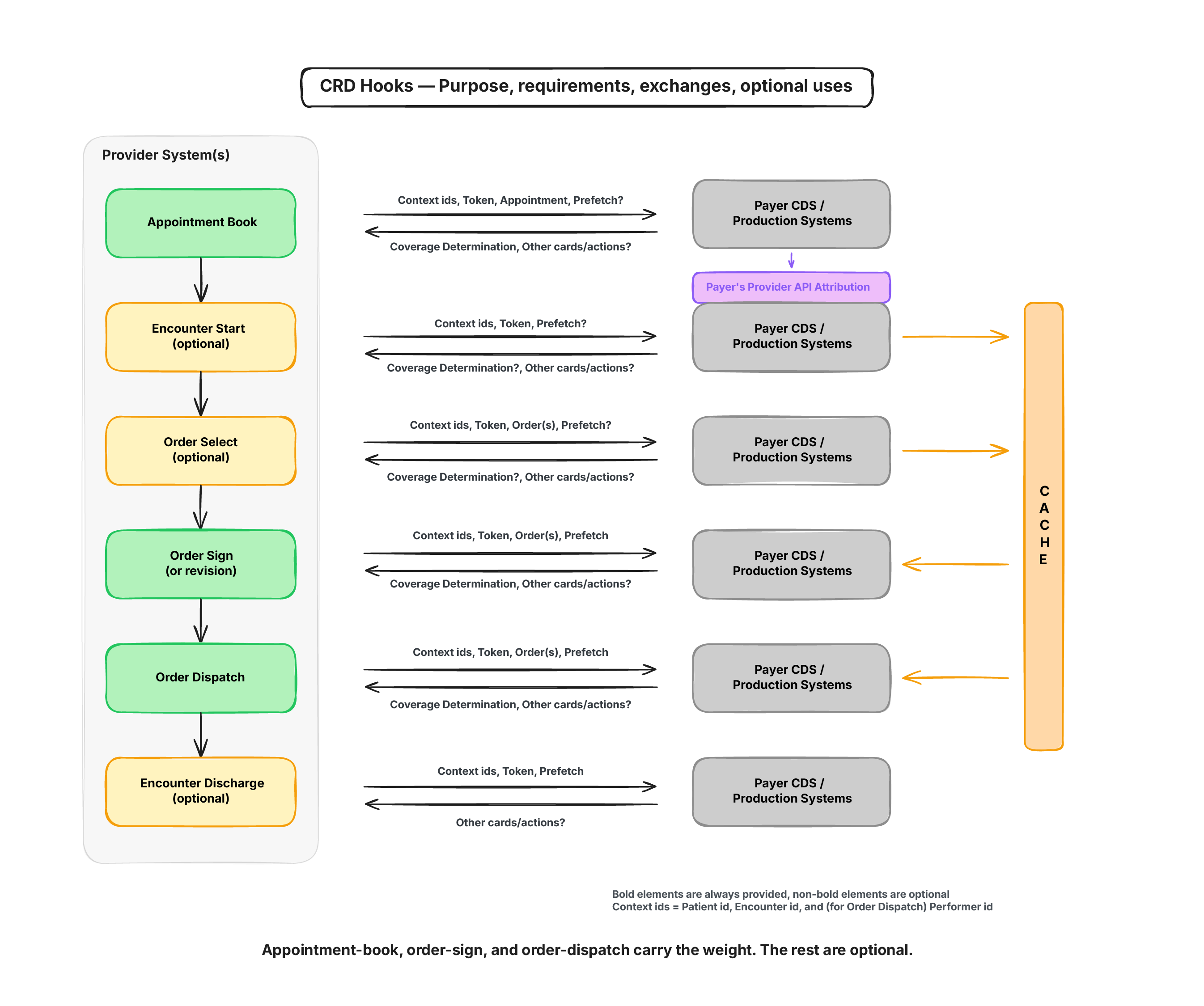
In this lesson, we’ll discuss all the CRD hooks and what’s different in the context each one sends.
appointment-book
We already went through the appointment-book hook in detail across Lessons 6 and 7, so this is a quick recap rather than a full section.
The hook fires only once an appointment is actually booked in the EHR, and it can fire for more than one appointment booked together in the same session. This lets a CRD server attach a coverage assertion straight to the Appointment resource: the appointment already exists by the time the hook runs, so there’s something to update. If the assertion comes back saying an appointment isn’t covered, the EHR can just cancel it.
We can build CRD, DTR and PAS for you
We already do this for health plans and their vendors. Reach out if you want help with the build, or just want to talk through your setup
Book a Callencounter-start
encounter-start fires when a patient is admitted, arrives for an outpatient visit, or the provider first engages with them during that encounter. It’s the same idea as appointment-book but one step later: and the encounter-start hook is used to know whether the encounter itself is covered before it gets underway.
The context this hook sends is userId, patientId, and encounterId. More detail is available through prefetch, but the base context doesn’t carry anything beyond those three fields.
encounter-discharge
encounter-discharge fires while a patient is being discharged, typically from an inpatient encounter. The exact timing is up to the EHR. It can fire at the start of the discharge process, at the end, or anywhere in between. What the hook is checking is the coverage status of that encounter as it wraps up.
The context is identical to encounter-start: userId, patientId, encounterId.
order-dispatch
order-dispatch is new to CRD. In the CDS Hooks catalogue it currently sits at maturity level 0, which is the lowest rating on the scale.
The hook exists for a scenario when the performer of a service isn’t chosen when the order is written, only later, and often by someone other than the practitioner who wrote it. Knowing who’s actually going to perform the service matters for coverage and prior authorization, since a network determination depends on the performer and not just the order itself. This is also where a CRD server can suggest an alternate in-network provider, once the performer is finally known.
Because of that, order-dispatch can fire well after order-sign. A provider might sign an order a week before it’s actually dispatched.
The resource types relevant here are CommunicationRequest, DeviceRequest, MedicationRequest, ServiceRequest, NutritionOrder, and VisionPrescription, each with its own profile.
This hook’s context is shaped differently from the others. Instead of a flat set of IDs, it carries a collection of FHIR references to the request resources awaiting fulfillment, alongside a Task resource for each one describing that fulfillment. So a service request, a medication request, or any of the other types listed above can show up here, tied to the task that’s about to carry it out.
order-select
order-select fires while the clinician is still working through an order, before anything is signed. Picture the medication module of an EHR: the clinician opens the CPOE, picks a product, sets the route, frequency, and duration, and only then signs it. order-select fires throughout that process, not just once.
Context here adds selections on top of the usual userId, patientId, and encounterId: a bundle of draft FHIR requests, with draft status, representing what’s been picked in the current ordering session but not yet signed.
This hook refires constantly. Every field the clinician changes, the drug, the dose, the date, triggers a new request. The resource types it covers are the same set as order-dispatch: CommunicationRequest, MedicationRequest, ServiceRequest, NutritionOrder, and VisionPrescription. It’s up to the responding CRD server to tag whatever comes back with coverage information and return it as a system action.
order-sign
order-sign is basically the next step after order-select. It fires once, when the clinician is ready to sign, not after they have signed.
The context shape is the same as order-select: userId, patientId, encounterId, and the draft orders about to be committed. The difference between order-select and order-sign is what’s on screen. order-select shows the selection happening in real time; order-sign shows the finished set of drafts on one page. If the clinician doesn’t like what comes back, they can still go back and change the draft orders before signing.
Hook-level configuration and the what-if check
Hooks can also carry configuration options, set by the client at the point of invoking the hook, through the davinci-crd.configuration extension. Depending on the hook, this might set a maximum number of cards to return, or turn a flag like appropriate-use on or off. It draws on the same value set introduced in Lesson 5 for davinci-crd.configuration-options, just applied to a live hook call instead of advertised at discovery.
One of the options in that value set is unsolicited determination, the what-if flag deferred back in Lesson 3. Setting it to true tells the server this call is hypothetical: the clinician isn’t placing this order for real, they’re checking what would happen if they did. The response doesn’t need an authorization number, and it shouldn’t make any change to a resource. It’s just an answer to a question.
This is also where the CRD implementation guide’s conformance section becomes relevant. It lays out separate requirements depending on whether you’re a CRD client or a CRD server, an EHR vendor is usually a client, a health plan is usually a server.
One more thing to note is that a lot of what’s listed there isn’t covered by any test in the Inferno suite. CMS isn’t enforcing any of it yet either, that starts in 2027. Passing every Inferno test is a good sign, but it isn’t the same thing as being fully conformant with the implementation guide.
Wrapping up
appointment-book, encounter-start, encounter-discharge, order-dispatch, order-select, and order-sign each give a CRD server a different point in the clinician’s workflow to answer the same two questions: is this covered, and does it need prior authorization.
A health plan that gets this right can put a lot more in front of the clinician at the point of care than a phone call or a fax could: what’s covered, what alternatives exist, what documentation is needed, all of it available on the same screen within the same workflow.
If you’re someone who’s struggling or dealing with this implementation, you can book a call with us and we’d be happy to help you out with your CMS-0057-F implementation.