Da Vinci CRD extensions: version negotiation and configuration options
In the previous lesson, we got our discovery endpoint running, configured authentication and ran tests on it. Although the third check was still failing, and that was the appointment-book service definition, which was missing a required extension field.
CRD’s CDS Hooks are different from standard CDS Hooks
The first thing to note is that the CDS Hooks used in CRD is different from the standard CDS Hooks specification.
Since CDS Hooks natively does not cover all requirements for CRD, they added a few extensions on top of CDS Hooks, and these extensions cover everything from which version of the spec you’re running, to what kind of configuration a client can set on you. A client calling your service, whether that’s the EHR or another payer downstream, needs these data points before it can make sense of anything you send back.
We can build CRD, DTR and PAS for you
We already do this for health plans and their vendors. Reach out if you want help with the build, or just want to talk through your setup
Book a CallThe version extension
You’ll find these extensions in the CRD implementation guide’s deviations and enhancements page.
The first one we’ll cover is the version extension. In your /cds-services response, each service gets an extension field, and inside that, a key that names the version or versions you support:
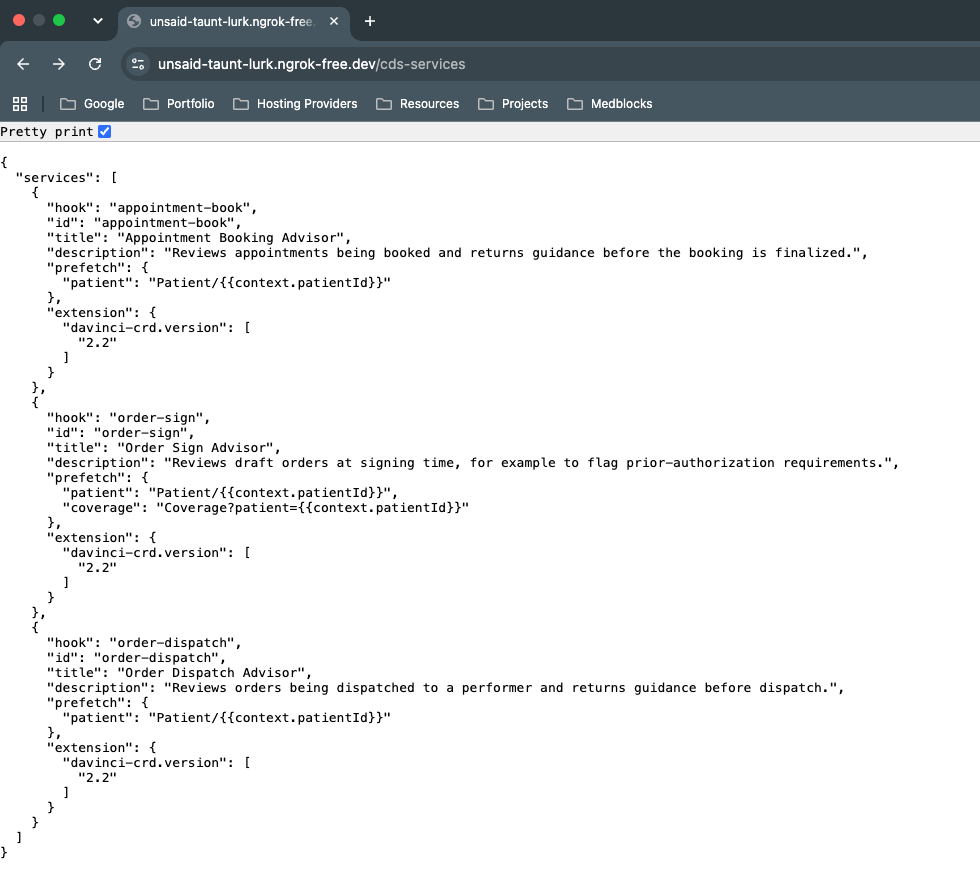
There’s a second extension that looks similar and might confuse people: davinci-crd.requestedVersion. The difference is basically in which direction it travels.
davinci-crd.version is you, the server, advertising what versions you support.
davinci-crd.requestedVersion comes from the client telling you which version it’s actually invoking you with. You’ll only see that one once you’re handling live hook calls, which we haven’t gotten to yet.
On the actual version number, we already touched on this in the vendor architecture lesson: CMS enforces 2.0.1 as the floor, but doesn’t tell you that’s what to build. What it says is to have something live by 2027 that doesn’t block access to this information. Given that, the recommendation is to implement 2.2, and if you have a specific dependency that needs 2.1, support that as well. The version extension is exactly what lets you do that safely: a client can tell you which version it’s requesting, and you can route it to different logic depending on the answer.
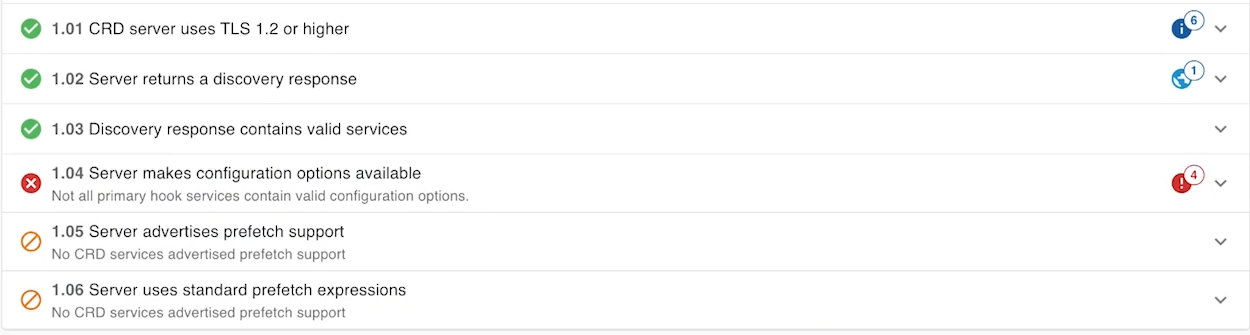
Add that extension to every hook in your discovery response, not just appointment-book, and rerun the Inferno test.
Configuration options
With the version extension in place, three more tests would still be failing. We’ll resolve the one saying the primary hook services don’t contain valid configuration options.
This is the second extension: davinci-crd.configuration-options, and it’s a way for you to tell the client what kinds of behavior it can turn on or off when it calls you. It’s been made generic enough that it can represent options that don’t exist yet.
Open that same extension on the deviations page and click through to the binding, the CRD response type value set. That’s where every available option is listed: whether you return coverage information, whether you support an unsolicited hook call (one that isn’t tied to a specific triggering event), whether you return claim information, network information, cost information, and how many cards you’ll return at most.
Out of that whole list, the only one that’s actually mandated is coverage information. Everything else is something you can choose to support. So for now, that’s the only one we’re adding:
"extension": {
  "davinci-crd.version": ["2.2"],
  "davinci-crd.configuration-options": [
    {
      "code": "coverage-information",
      "type": "boolean",
      "display": "Coverage information",
      "description": "Whether the server returns coverage and prior authorization information"
    }
  ]
}
Add that alongside the version extension on all three hooks, and run the test again.
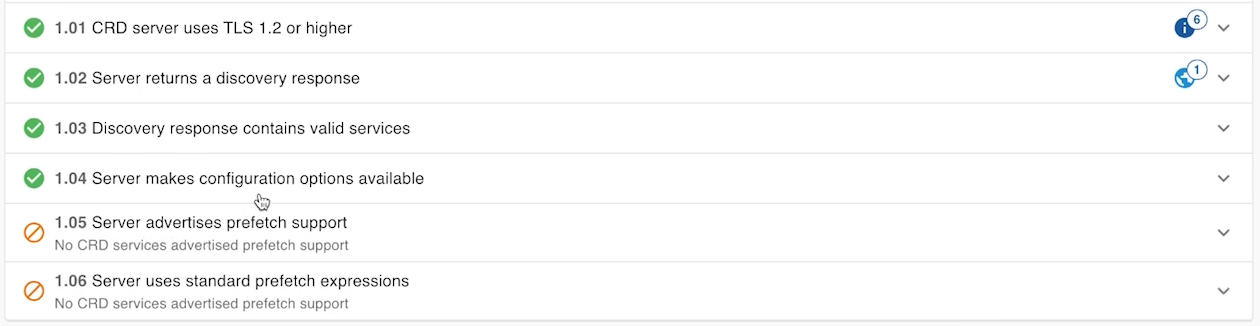
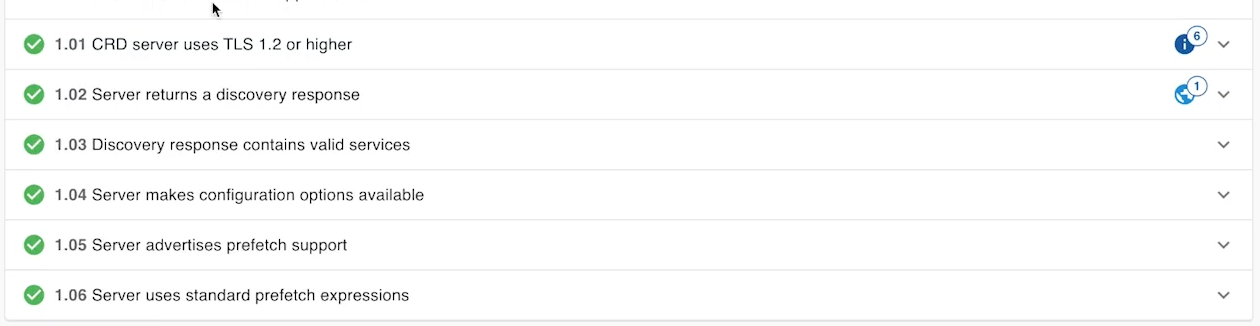
That one passes now. Two tests left, and they’re both about prefetch.
Prefetch support
The remaining failure says the server needs to advertise prefetch support. We touched on prefetch back in the CDS Hooks lesson, where a service lists FHIR queries it wants to run automatically before the hook fires, so the data shows up already attached to the request instead of the service having to go fetch it mid-call.
CRD’s foundational requirements page has standard prefetch templates ready to go for each hook. You don’t need to write these yourself. The EHR side is going to interpret them the same way regardless of who wrote them, so copying the templates as they’re published is the right move, even though some of them run fairly long.
Add the appointment-book template to that service, then do the same for order-sign and order-dispatch, each pulling its own template off that page. Once all three have a prefetch field, rerun the test.
order-select, order-sign, and order-dispatch
While we’re on hooks, this is a good point to cover a question that comes up constantly: what’s actually different between order-select, order-sign, and order-dispatch.
order-select fires while the clinician still has the order open and before anything is finalized. Think of a dropdown they’re working through.
order-sign fires once that order is actually signed, the moment it moves from draft to committed.
order-dispatch is when the order is being carried out.
Out of the three, only order-sign and order-dispatch are mandated. order-select isn’t, but it’s worth supporting because it lets you show coverage requirements the moment the clinician starts selecting the order, before they’ve committed to it. It’s close enough to order-sign that you can reuse most of what you already built, same prefetch template, same extensions, just a different description for what’s being selected rather than signed. Add it in, and rerun the full suite.
Wrapping up discovery
That clears every test in the discovery group. To sum it up: discovery is the server telling the EHR what it is, before either side has exchanged a single real hook call. What version you’re on, what configuration a client can set, what data you want prefetched. Coverage information is the one thing you’re required to return, and we’ll get into exactly what that response looks like next.
That’s also where we’re headed in the next lesson: what the server actually sends back once a hook is invoked for real, the different response types, and the difference between a card and a system action.