Cards and system actions: the CRD response types
This lesson describes how a CRD server responds after a hook occurs. A CRD server has two response mechanisms: cards and system actions. This lesson describes both response mechanisms.
The CRD implementation guide also defines a set of response types. A response type is a specific kind of response. Each response type uses either a card or a system action. This lesson also covers the response types.
Response rules
The CRD implementation guide has a page for response rules. This page is the CDS Hooks response profiles page. The rules on this page apply to all hooks. Examples of hooks are appointment-book and order-sign.

We can build CRD, DTR and PAS for you
We already do this for health plans and their vendors. Reach out if you want help with the build, or just want to talk through your setup
Book a CallCards and system actions
The CDS Hooks specification defines the two response mechanisms: cards and system actions. The CRD implementation guide adds rules for these two response mechanisms.
A card is a message that appears on the screen of the practitioner. The practitioner must read the card, and then if the card allows the practitioner can choose to perform any given action.
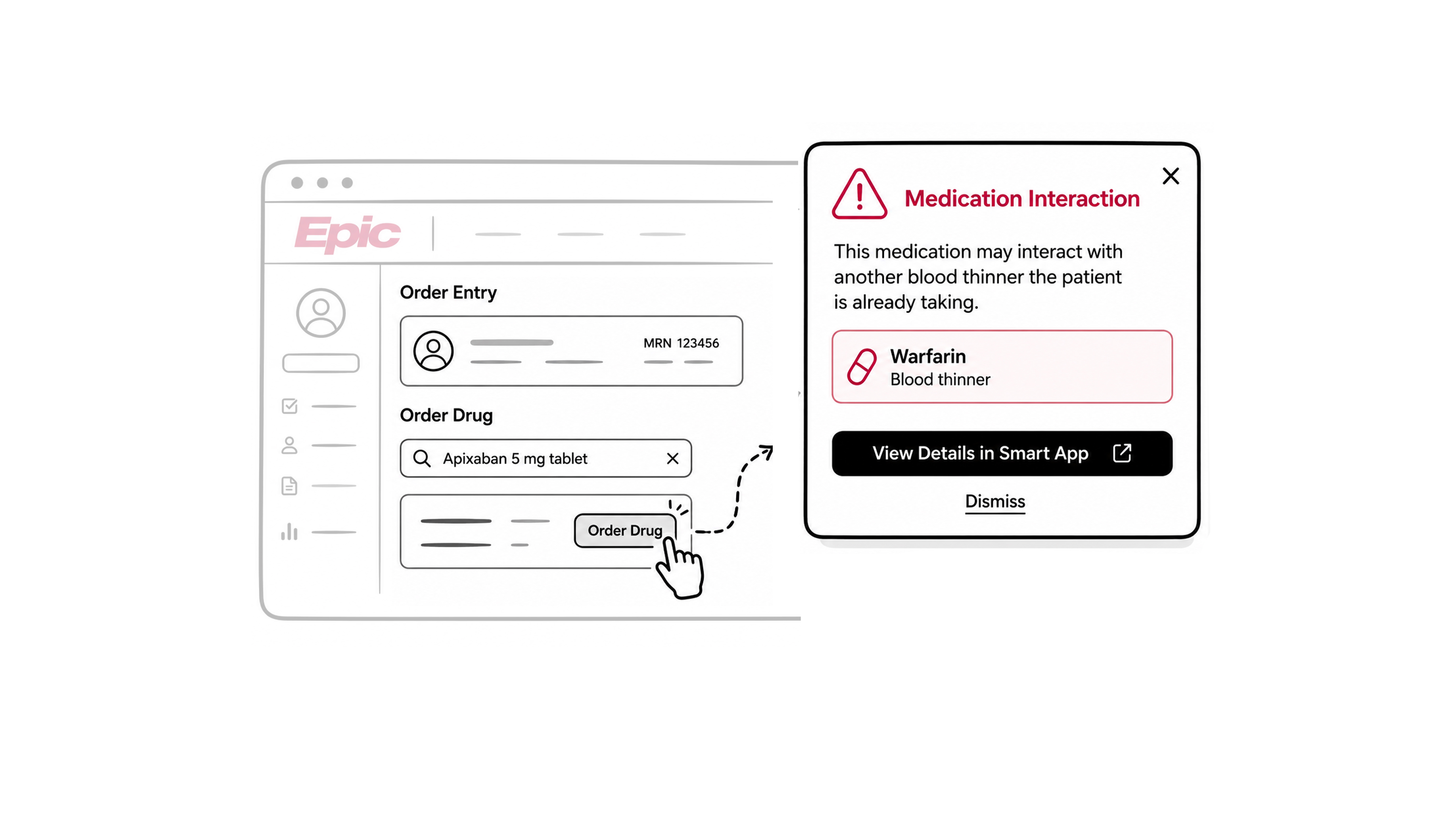
A system action is different from a card. A system action does not appear on the screen. The CRD client performs the system action automatically without requiring any approval from the practitioner.
Data in a card
A CDS Hooks card has several fields. Each field gives specific information to the CRD client.
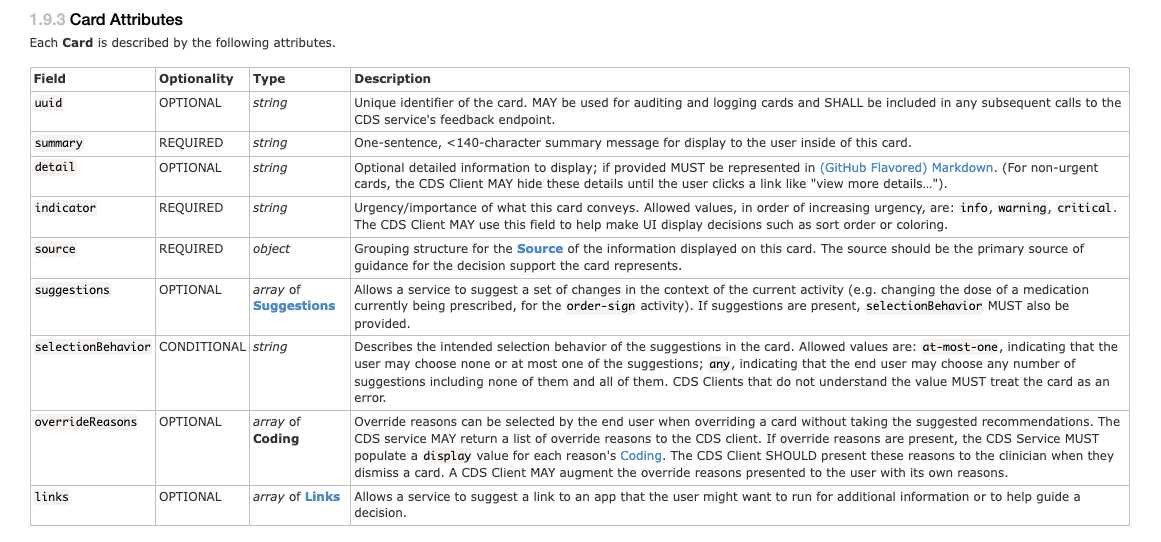
indicator: shows the urgency of the card, with three possible values:info,warning, andcritical. A CRD server must select the indicator from the perspective of the practitioner, not from the perspective of the payer. A missed prior authorization is a critical problem for a payer. But a missed prior authorization is not a critical problem for patient care. For this reason, most cards from a CRD server use theinfoindicator.source: identifies the payer that sent the card. It has a label which must show the name of the insurer. The practitioner must recognize this name from the patient’s insurance card.summary: a short text. A summary must fit in 140 characters and give actionable information. Example: “Prior authorization required” is a good summary. “Coverage alert” is not a good summary, because it does not tell the practitioner what to do.detail: gives more information than the summary. A CRD server should use the detail field only when the summary is not enough space.links: one or more links. A link points to an external resource. Examples of an external resource are a web page or a PDF document.suggestions: a list of suggestions. A suggestion can tell the CRD client to do one of these actions:createa resource.updatea resource.deletea resource.
- Example: a suggestion can tell the CRD client to create a medication request for acetaminophen 250 mg. Each suggestion must have a unique identifier, the
uuid, which the CRD client uses to track the suggestion.
The practitioner must read the card before the CRD client does the suggested action. The practitioner must then select the suggestion. The CRD client does not do the action automatically.
Data in a system action
A system action has fewer fields than a card. This is because a system action does not display information to the practitioner. A system action makes a change directly.

type: shows the kind of change to be performed. The type field has three possible values:create,update, anddelete.resource: contains the FHIR resource for the change. For acreatetype, the resource field contains the new resource. For anupdatetype, the resource field contains the complete resource with the new content. For adeletetype, the resource field contains only the identifier of the resource to delete.
Example: a system action can have the update type. The resource field can contain a ServiceRequest. The service request can have a new extension which shows coverage information for the service request.
A CRD server must not use a system action to change unrelated data. Example: a CRD server updates a service request to add an extension. The CRD server must not change other fields on the service request and change only the fields that are relevant to the response type.
A CRD server should not send a card with the same information as a system action. Example: a CRD server sends a system action to update coverage information on a resource. The CRD server should not also send a card that shows this same coverage information. It is responsible for showing the result of the system action to the practitioner, through its own interface.
The list of response types
The CRD implementation guide defines eight response types. Each response type has a specific purpose. The response types section of the response profiles page lists these response types in a specific order. The order goes from least complex to most complex.
The eight response types are:
- External Reference
- Instructions
- Coverage Information
- Propose Alternate Request
- Identify Additional Orders
- Request Form Completion
- Update Coverage Records
- Launch SMART Application
A CRD server must support the Coverage Information response type, which is mandatory. The other response types are not mandatory, but the CRD implementation guide recommends them.
A single response can contain more than one response type. Example: a CRD server can send one card with an external reference and one system action with coverage information, in the same response.
This lesson describes each response type in the order shown above.
External Reference response type
The External Reference response type gives the practitioner a link to more information. This response type uses a card. The card contains one or more links. A link can point to a web page or a PDF document.
A CRD server must include at least one link in the card. The link type must be absolute, meaning it should point directly to an external resource.
Example: a practitioner places an order for home oxygen therapy. The CRD server returns a card with the summary “CMS Home Oxygen Therapy Coverage Requirements.” The card includes a link. The link points to a page about oxygen therapy coverage rules. The practitioner can read this page to learn the criteria for the order.
The External Reference response type does not state whether the order is covered. This response type only points to information. A CRD server must use the Coverage Information response type to state whether an order is covered.
A CRD server must not use the External Reference response type to send a practitioner to a portal. A portal is a payer’s own web application. A CRD server must not use this response type to start a prior authorization process in a portal, or to check coverage in a portal. The CRD server must use the Coverage Information response type for these purposes instead.
Instructions response type
The Instructions response type gives text guidance to the practitioner. This response type uses a card which contains a message. The message can describe a clinical guideline or a rule about prior authorization.
Example: a practitioner opens the chart of a patient. The CRD server returns a card with the summary “Patient is overdue for a PAP smear.” The card detail states the date of the last PAP test on record. The card detail also states the recommended interval for the test. The indicator on this card is info, because this is a reminder, not an urgent problem.
This response type is useful to a payer for more than the immediate order. Example: a missed PAP smear can lower a payer’s HEDIS score. A HEDIS score measures the quality of care that a health plan provides. A payer can use the Instructions response type to remind a practitioner about a preventive test. This reminder can help the payer maintain a good HEDIS score.
Coverage Information response type
The Coverage Information response type states whether an order is covered under a patient’s plan. This response type also states whether the order needs prior authorization. This response type is the only mandatory response type.
This response type must use a system action.
The Coverage Information response type uses a FHIR extension. The name of this extension is coverage-information. A CRD server adds this extension to the resource that triggered the hook. Example: an appointment-book hook fires for an appointment. The CRD server adds the coverage-information extension to that appointment.
The coverage-information extension can go on several resource types:
AppointmentCommunicationRequestEncounterDeviceRequestMedicationRequestNutritionOrderQuestionnaireResponseServiceRequestVisionPrescription
The coverage-information extension has several fields. Each field gives specific information about coverage.
coverage: a reference to aCoverageresource. TheCoverageresource describes the patient’s insurance. A CRD server usually gets theCoverageresource through prefetch, not through a separate FHIR query.covered: states whether the order is covered. This field has four possible values:covered,not-covered,conditional, andindeterminate. A CRD server uses theindeterminatevalue when a technical problem prevents a decision. A CRD server uses theconditionalvalue when coverage depends on information the CRD server does not have yet.pa-needed: states whether the order needs prior authorization. This field has several possible values, includingauth-neededandsatisfied.doc-needed: states whether the payer needs more documentation. When thedoc-neededfield has a positive value, the extension should also reference aQuestionnaire. TheQuestionnairelists the specific information the payer needs.billingCode: lists the billing codes that thecoverage-informationextension applies to.date: the date the CRD server made this coverage assertion.coverage-assertion-id: an optional identifier for this specific assertion. A CRD client can reference this identifier later, for example if a payer’s decision needs to be checked, since the same assertion should produce the same identifier if asked for again.
A CRD server must support the Coverage Information response type for three hooks: order-sign, order-dispatch, and appointment-book. A CRD server may support this response type for other hooks. A CRD server must not send a system action for this response type unless something has changed since the last response.
The Coverage Information response type requires the most work of all eight response types. A CRD server needs a database of patient coverage. A CRD server needs logic to check plan limits and benefit rules. For this reason, this response type is usually most of the implementation work for a CRD server.
Propose Alternate Request response type
The Propose Alternate Request response type suggests a change to a proposed order. This response type uses a card.
A payer can use this response type for several purposes. A payer can suggest a different drug. A payer can suggest a different dose. A payer can suggest a different frequency for a therapy.
A suggestion in this response type uses one of two patterns:
- A single
updateaction, which changes the existing order. - A
deleteaction and acreateaction together, which removes the existing order and adds a new order.
A CRD server should use the update pattern for a small change. Example: a small change is a change to the dose of a drug. A CRD server should use the delete and create pattern for a large change. Example: a large change is a switch to a completely different drug.
Example: a practitioner places an order for a brand-name drug. The brand-name drug is not covered under the patient’s plan. The CRD server returns a card with a suggestion. The suggestion has a delete action for the brand-name medication request. The suggestion also has a create action for a new medication request. The new medication request is for a lower-cost drug that is covered.
The Propose Alternate Request response type does not require a system action. The practitioner must review the suggestion and select it before the CRD client makes the change.
Identify Additional Orders response type
The Identify Additional Orders response type suggests a new order in addition to the current order. This response type uses a card.
A suggestion in this response type uses a create action and does not use a delete action. The suggestion does not remove or replace the original order, it only adds a new order alongside the original order.
Example: a practitioner places an order for a medication. The medication can affect liver function. The CRD server returns a card with a suggestion. The suggestion has a create action for a lab test. The lab test checks liver function. The card recommends this test on a monthly basis for the first three months of the therapy.
This response type is useful to a payer beyond the immediate order. Example: a payer with a capitation model receives a fixed payment for a patient’s care. A side effect from a medication can require a hospital admission. A hospital admission costs the payer money. A payer can use the Identify Additional Orders response type to recommend a monitoring test. This test can help the payer avoid the cost of a later complication.
The Identify Additional Orders response type does not require a system action. The practitioner must review the suggestion and select it before the CRD client creates the additional order.
Request Form Completion response type
The Request Form Completion response type creates a task for the practitioner. This response type uses a card. The card contains a suggestion to create action for a Task resource.
The Task resource points to a Questionnaire that lists the information the payer needs. The practitioner, or another staff member, completes the Questionnaire as a task in the CRD client. The task can be reassigned to a different staff member.
A CRD server may use a system action instead of a card for this response type. A CRD client that supports this response type must support both the card and the system action.
The CRD implementation guide states three conditions. A CRD server must not use the Request Form Completion response type when all three conditions are true:
- DTR applies to the use case.
- The CRD client supports DTR.
- DTR is available from the payer.
DTR is the preferred method for collecting documentation as it reduces the amount of manual data entry for the practitioner. For this reason, the Request Form Completion response type exists mainly for legacy cases, where DTR is not available.
Most EHR systems that support CRD also support DTR, because the same certification rule covers both. For this reason, this response type applies to very few cases. A CRD server does not need to prioritize this response type.
Update Coverage Records response type
The Update Coverage Records response type corrects information in a patient’s coverage record. This response type uses a card. The card contains a suggestion to perform an update action for a Coverage resource.
A CRD server may use a system action instead of a card for this response type. A CRD client that supports this response type must support both the card and the system action.
Example: a CRD server receives a hook request. The CRD server finds that the coverage period on record is out of date. The CRD server returns a suggestion. The suggestion has the label “Update coverage information to be current.” The suggestion updates the Coverage resource with the correct period.
A CRD server should not send this response type as a card for a clinical hook. Examples of a clinical hook are order-select and order-sign. A CRD server can send this response type as a card for an administrative hook. Examples of an administrative hook are encounter-start and appointment-book.
This response type is not a replacement for the X12 270 and 271 transactions. The X12 270 and 271 transactions are the standard method for checking and updating coverage information. A CRD server must not use the Update Coverage Records response type in place of the X12 270 and 271 transactions, when a regulation requires those transactions.
Launch SMART Application response type
The Launch SMART Application response type opens a SMART application for the practitioner. This response type uses a card. The card is similar to an External Reference card, but the link type is different. The link type for this response type is smart, not absolute.
A SMART application can do more than display information. A SMART application can access patient data, with permission. A SMART application can guide a practitioner through a complex task.
Example: a payer wants to check whether a patient needs an opioid risk assessment. The CRD server returns a card with the summary “Launch opioid XYZ-assessment.” The card includes a link with the smart link type. The practitioner selects the link. The CRD client launches the SMART application. The application guides the practitioner through the assessment.
A CRD server must not use this response type to launch a DTR application. The Coverage Information response type handles the DTR process instead. A CRD server can use this response type for other purposes. Examples of other purposes are a risk assessment or a supplemental clinical tool.
A CRD server must not use this response type to collect information about the original order. A CRD server must use the Coverage Information response type and DTR for that purpose instead.
Conclusion
The next lesson takes all eight and runs them live against Inferno, using appointment-book as the hook throughout. You’ll see a no-prior-needed response, a prior-needed response with a warning card, an info card, a link into a DTR questionnaire, a suggestion to update coverage records, and a SMART app launch, each demonstrated on its own first, then all of them returned together in a single response.