Clinical Decision Support Tools and Examples: A Builder's Guide
What clinical decision support tools exist, how they work in Epic, Oracle Health and OpenEMR, why alert fatigue happens, and how to build CDS with CDS Hooks, FHIR and CQL.
July 2, 2026
A clinician opens a patient chart in Epic. Without switching screens, logging into a second system, or copy-pasting a single value, a clinical decision support tool appears right inside the EHR. It already knows the patient’s context. It reads the labs, surfaces a recommendation, and the clinician acts on it and moves on.
That workflow is what SMART on FHIR was built to enable.
For a long time, connecting a third-party app to an EHR meant months of vendor negotiation, proprietary APIs, and custom interfaces; and every new EHR meant starting over. SMART on FHIR changed that by giving developers a single, standardized way to build apps that launch inside any compliant EHR.
This guide is for the developer who wants to understand the spec from the inside out, the health IT architect weighing an app marketplace strategy, and the digital health team trying to get a product into clinical workflows. By the end, you’ll know how SMART on FHIR works, how to build with it, and what it looks like in the environments where clinicians work.
SMART stands for Substitutable Medical Applications and Reusable Technologies. “Substitutable” is the key idea: a SMART app is built to be swapped in and out across different EHRs without being rebuilt from scratch. The same app that runs in Epic should, in principle, also run in Cerner or Meditech.
The concept came out of Boston Children’s Hospital and Harvard Medical School, and was later standardized through HL7 International. The goal was to do for healthcare apps what HTML did for web pages, give developers a common platform to build on, regardless of the underlying system.
Definition: SMART on FHIR is an open standard that lets third-party healthcare applications securely access and launch within EHR systems using FHIR APIs and OAuth2 authorization. It defines how apps request access, how the EHR grants it, and how apps retrieve patient data consistently across compliant health systems.
FHIR (Fast Healthcare Interoperability Resources) defines the data model and the API structure. It tells you how patient records, observations, medications, and conditions are formatted, and how to query for them. What FHIR doesn’t define on its own is how to secure access to that data, or how an app gets launched with the right patient context already loaded.
That’s the gap SMART fills. It’s a layer on top of FHIR that handles authorization: who gets access, to what data, under what conditions, and at what permission level. Without it, every FHIR server would need its own custom security model. With it, there’s one consistent framework any app can follow.
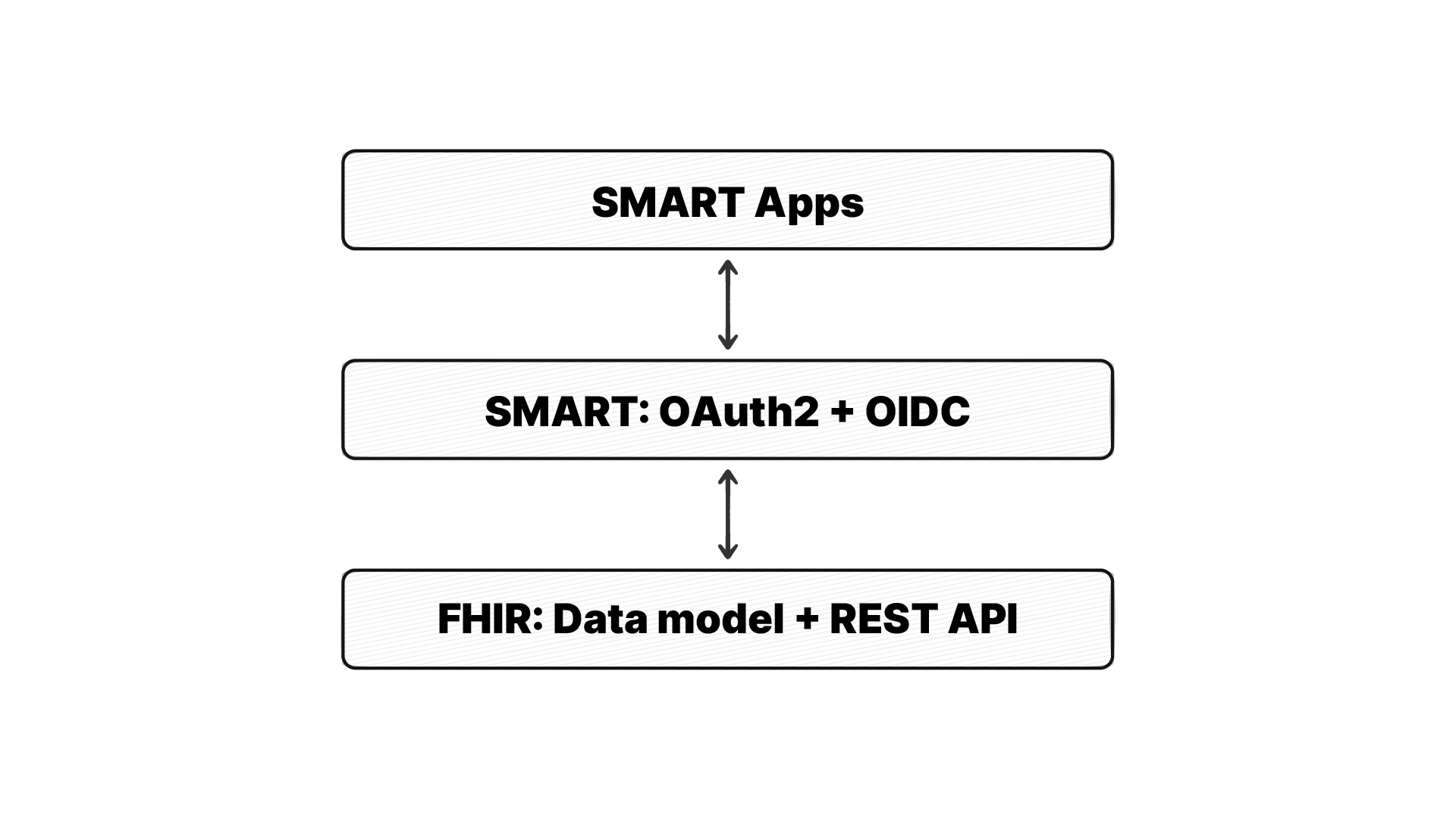
SMART builds this on web standards you may already know: OAuth2 and OpenID Connect (OIDC), the same protocols behind login flows for Google, GitHub, and most modern web apps. OAuth2 handles authorization: it determines what data an app can reach and issues an access token to prove that permission. OpenID Connect sits on top and handles identity: it verifies who the user is and can pass along claims like user role, practitioner ID, or patient ID.
So where a plain FHIR server just stores and exposes data, a SMART on FHIR server adds an OAuth2/OIDC authorization layer and an app launch framework on top. That combination is what makes the seamless, single-context launch experience possible.
There are two ways a SMART app can start up.
In SMART’s EHR launch flow, a user has established an EHR session and then decides to launch an app. This could be a single-patient app that runs in the context of a patient record, or a user-level app like an appointment manager or a population dashboard. The EHR initiates a launch sequence by opening a new browser instance or iframe pointing to the app’s registered launch URL and passing some context.
In standalone launch, a user selects an app from outside the EHR, for example by tapping an app icon on a mobile phone home screen. There is no explicit request associated with this step of the SMART App Launch process. The app then asks the user to select their FHIR server and authenticate themselves directly.
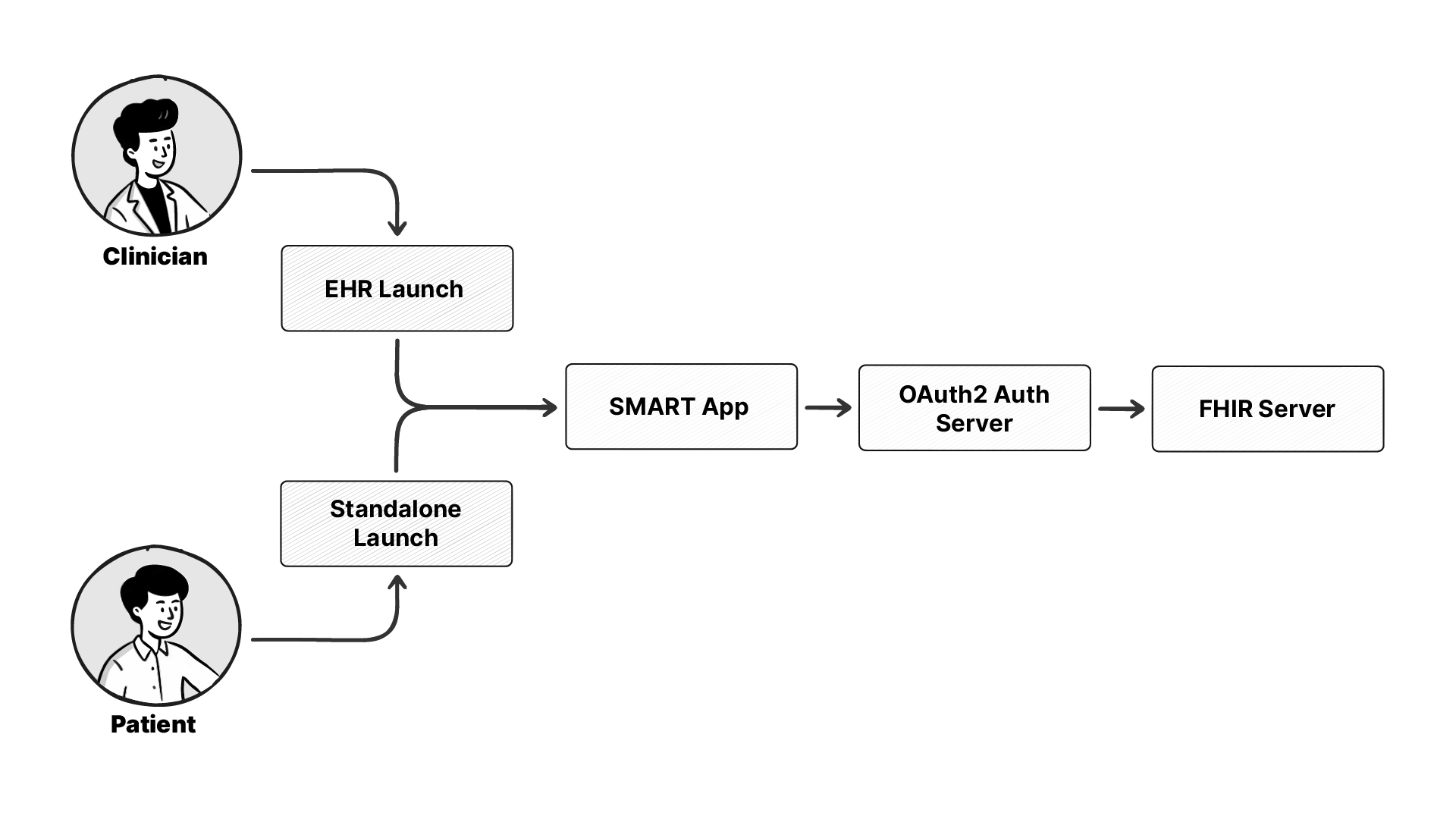
Both flows use the same OAuth2 authorization code pattern underneath. The difference is whether the EHR or the user kicks things off.
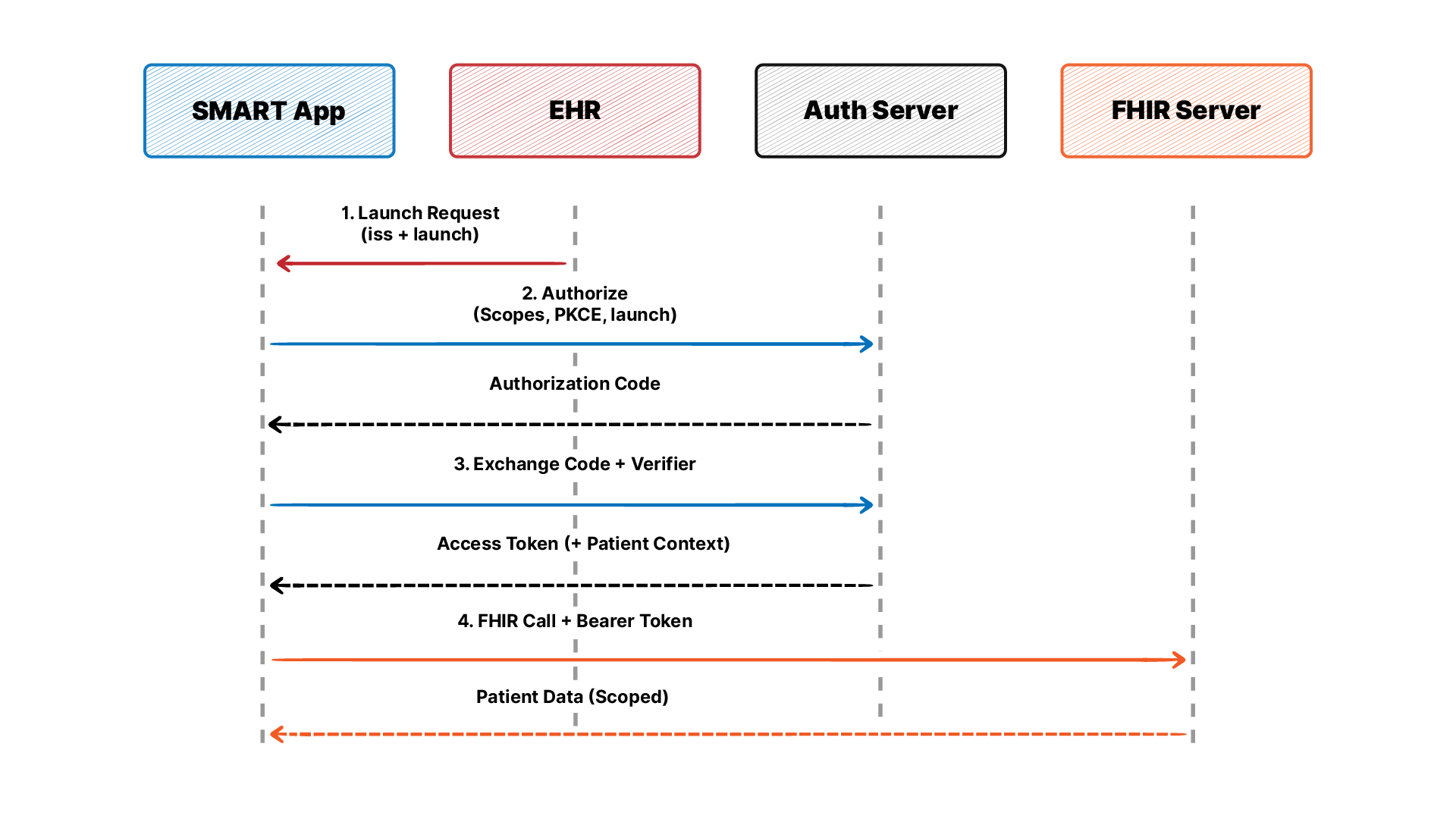
Here is how the full launch sequence works in an EHR Launch scenario.
Before a SMART app can run against an EHR, the app must be registered with that EHR’s authorization service. At registration time, every SMART app must register zero or more fixed, fully-specified launch URLs and one or more fixed, fully-specified redirect URIs with the EHR’s authorization server.
This is a one-time setup step. The EHR issues the app a client_id, which it will use in every future authorization request. Confidential clients (server-side apps) also register a secret or a public key for asymmetric authentication.
When a clinician clicks to launch the app from within the EHR, the EHR sends an HTTP request to the app’s registered launch URL. This request includes two critical parameters:
iss: The base URL of the FHIR server. The app uses this to discover the authorization endpoints.launch: A short-lived, opaque token that encodes the current EHR context, including the patient ID and encounter ID.The app must treat both of these as untrusted inputs and validate them before proceeding. The launch token on its own is meaningless to the app at this stage. Its value is that it gets exchanged during authorization for real context parameters.
The app uses the iss value to fetch the EHR’s SMART configuration document at /.well-known/smart-configuration. This document lists the authorization endpoint and the token endpoint URLs the app needs for the next steps.
The app then redirects the browser to the authorization endpoint with: response_type=code, client_id, redirect_uri, scope (the SMART scopes needed, plus launch and openid if required), launch (the token from Step 2), state (CSRF protection), and — for public clients — a PKCE code_challenge and code_challenge_method. Based on its rules and possibly end-user authorization, the server returns an authorization code or denies the request.
The app receives the authorization code at its redirect URI, then makes a back-channel POST to the token endpoint to exchange it for an access token. Public clients include the PKCE code_verifier in this request. The token response includes:
access_token: the short-lived bearer token for FHIR calls
token_type: always Bearer
expires_in: seconds until expiry
patient: the patient ID from launch context
encounter: the encounter ID, if available
id_token: signed JWT with user identity claims, if OpenID Connect was requested
refresh_token: if online_access or offline_access was granted
If a refresh token is returned, the app can use it to request a new access token with the same scope once the old one expires.
Now the app has everything it needs. Every FHIR call includes the token:
GET /fhir/r4/Patient/[id]
Authorization: Bearer [access_token]
The FHIR server validates the token and returns only the data the scopes permit.
SMART uses a language of “scopes” to define specific access permissions that can be delegated to a client application. These scopes draw on FHIR API definitions for interactions, resource types, and search parameters to describe a permissions model.
The scope syntax follows a clear pattern:
[context]/[ResourceType].[interaction]Context is one of:
patient/ — resources for the in-context patientuser/ — resources the logged-in user can seesystem/ — server-to-server access with no user context (SMART v2)ResourceType is any valid FHIR resource — Patient, Observation, MedicationRequest — or * as a wildcard.
Interaction is read (or r in v2), write (or w in v2), or * for both.
Some practical examples:
patient/Observation.read — read the current patient’s observationsuser/MedicationRequest.write — write medication orders on behalf of the logged-in userpatient/*.read — read all resource types for the current patientsystem/Patient.read — server-to-server read of all patient resources (v2 backend)Always request the minimum set of scopes your app needs. Over-scoping is both a security risk and a common reason apps get flagged in Epic’s review process.
Epic is the largest EHR vendor in the U.S. — by most counts it runs at roughly half of U.S. acute care hospital beds. If you’re building a SMART app for clinical settings, there’s a good chance it needs to work with Epic. Here’s what that looks like in practice.
If you’ve read older guides, you’ll see Epic’s app program called App Orchard. That name is retired. Epic shut App Orchard down in late 2022 and replaced it in early 2024 with a different structure, so it’s worth getting the current terms straight:
You’ll still see “App Orchard” used informally in forums and even some vendor docs, mentally translate it to Vendor Services (the developer program) and Showroom (the marketplace).
The practical path looks like this:
It’s worth being honest about timelines: Epic’s review and go-live process takes real time, commonly weeks to months, and the true bottleneck is usually landing that first live customer, which is a sales milestone as much as a technical one. Plan for it early.
None of the go-live steps block you from starting. You can register an app, build the full launch flow, and test it end to end against the Epic sandbox long before you touch a customer or a listing, the sandbox is free and open.
Epic provides a public sandbox at fhir.epic.com that anyone can use without signing an agreement. It runs on synthetic patient data and supports a broad set of FHIR R4 resources.
In the sandbox you can:
client_id immediatelyProduction is a different matter. To reach real patient data at an Epic customer site, your app has to go live through that health system, which means meeting Epic’s security and compliance requirements and having the health system activate your app in their environment.
One thing that trips teams up: sandbox credentials don’t carry over to production. You re-register for each production Epic environment.
Epic supports a wide range of SMART scopes but not every FHIR resource or interaction. Some realities to know upfront:
patient/*.read wildcard often gets flagged in review. Epic prefers explicit scope lists.Epic.User.AllUserInfo and Epic.Encounter.ReadWrite alongside standard SMART scopes for some extended capabilities.Based on what teams building in the Epic ecosystem run into most often, here are the issues worth knowing about before you start:
Redirect URI mismatches. Epic’s authorization server does an exact string match on redirect URIs. A trailing slash, an HTTP vs HTTPS mismatch, or a localhost URL in production will fail silently or with a cryptic error. Register every variation you use.
Token expiry. Epic’s access tokens are short-lived (typically 3,600 seconds). Build refresh token handling into your app from day one, not as an afterthought.
Context parameters not always present. The encounter context parameter is not guaranteed in every launch. Your app should handle the case where only the patient is present and gracefully degrade if encounter context is missing.
Missing FHIR resources. Some FHIR resources you expect to be available may not be exposed at a specific Epic customer site, depending on the version and modules they have licensed. Always handle 404 and 403 responses defensively.
If you want a structured path through the Epic integration process, the Medblocks FHIR Bootcamp covers Epic sandbox registration and SMART app development end-to-end, with hands-on exercises in the actual Epic environment.
Cerner, now operating as Oracle Health following the 2022 acquisition, is the second-largest EHR platform in the U.S. and has a strong international presence. As of 2025, Cerner (now Oracle Health) supports HL7 FHIR R4 across core resources to comply with ONC interoperability requirements.
The developer program is called Cerner Code. To get started:
client_id and client_secretOne advantage of Cerner’s sandbox compared to Epic’s is that the registration process moves faster and the sandbox access is relatively open. The path to production still requires working with a health system or going through Oracle Health’s app review process, but getting started with development is quicker.
Beyond Epic and Cerner, SMART on FHIR support is expanding across the broader EHR market.
Meditech Expanse supports FHIR R4 and SMART on FHIR for both patient-facing and clinician-facing apps. Meditech offers a FHIR sandbox and has participated in ONC testing events.
Athenahealth supports a FHIR API and SMART-based access, primarily for patient-facing use cases through its developer program. Provider-facing SMART integration in athenahealth is more limited than in Epic or Cerner.
Allscripts (now Veradigm) supports FHIR R4 APIs and SMART on FHIR through its developer portal, though the breadth of supported resources and interaction types varies by product line.
While SMART on FHIR is a standard, each EHR vendor’s implementation has variations. The spec defines what must be supported, but vendors often add their own extensions, place limits on certain scope requests, and have different requirements for app registration and review.
Here are some common variations you will encounter:
| Feature | Epic | Cerner (Oracle Health) |
|---|---|---|
| Sandbox access | Public, fhir.epic.com | Public, open.cerner.com |
| Registration process | Vendor Services portal (Showroom marketplace) | Cerner Code portal |
| FHIR version | R4 (primary) | R4 (primary) |
| Wildcard scopes | Flagged in review | Supported with restrictions |
| Write access | Limited for third parties | Limited for third parties |
| Review timeline | Weeks to months, live customer connection required to list | Varies by deployment type |
The Medblocks FHIR Bootcamp is designed to give developers hands-on experience in both Epic and Cerner sandbox environments, so you understand both the common patterns and the vendor-specific differences before you hit them in production.
SMART on FHIR enables more than decision support tools. The framework supports a broad ecosystem of apps across nearly every clinical and administrative use case.
This is the most common SMART use case. A clinical decision support (CDS) app runs inside the EHR, reads patient data, and surfaces recommendations, risk scores, or alerts in the clinician’s workflow.
Examples include:
These apps are often also paired with CDS Hooks, an adjacent standard that lets EHRs call external services at defined trigger points in the clinical workflow, like when a medication is being ordered. SMART and CDS Hooks are frequently used together for a rich embedded experience.
Patient-facing apps use standalone launch or patient-portal launch to give people direct access to their own health records.
Examples include:
This enables both patient-facing apps like Apple Health connecting via patient portals and clinician-facing apps embedded within EHR workflows to access appropriate data scopes securely.
Population health tools use SMART apps to surface aggregate views within the EHR environment. A care coordinator might open a dashboard showing all patients with HbA1c above a threshold, or a quality manager might track measures across a panel.
These apps read large sets of patient data (within authorized scopes) and present it in ways the EHR’s native interface does not always support.
As AI tools in healthcare become more capable, the challenge has shifted from building the model to getting its output in front of the right person at the right time.
SMART on FHIR solves the last-mile problem for AI in clinical settings. An AI model can run server-side, read patient data through the FHIR API, and surface its output through a SMART app that launches right inside the EHR. No separate portal, manual data entry, or context switch.
Use cases here include:
Specialty care often requires data capture and decision support that general EHRs do not handle well out of the box. SMART apps let specialty teams add the functionality they need without replacing their core EHR.
Examples:
Here is a walkthrough of the key technical steps to get a SMART app running, with the decisions and code patterns you will need to know. Check out this full React tutorial if you want to go deeper.
For development and testing, you have several options:
Epic sandbox (fhir.epic.com): Best if your target deployment is Epic
Cerner sandbox (open.cerner.com): Best for Cerner/Oracle Health targets
Medblocks Platform: A FHIR R4-compliant server with SMART on FHIR support, ideal for building and testing apps without needing vendor-specific sandbox access at the start
The Medblocks Platform is worth mentioning specifically here because it lets you develop and test your full SMART app launch flow in a clean environment before you start debugging against Epic’s or Cerner’s more complex sandbox setup. You can get the OAuth2 flow right, validate your scope handling, and iterate quickly.
Before writing a single line of code, register your app with your chosen FHIR server. At minimum you need:
client_id (assigned by the server)redirect_uri valuesFor local development, use http://localhost:[port]/callback as your redirect URI and register it explicitly. Never assume case-insensitivity or trailing-slash tolerance.
Here is a high-level walkthrough of the launch flow in JavaScript (using a simple browser-based app as the example).
Step 1: Detect the launch
const params = new URLSearchParams(window.location.search);
const iss = params.get('iss');
const launch = params.get('launch');
Step 2: Fetch the SMART configuration
const configUrl = `${iss}/.well-known/smart-configuration`;
const config = await fetch(configUrl).then(r => r.json());

const authEndpoint = config.authorization_endpoint;
const tokenEndpoint = config.token_endpoint;
Step 2b: Generate a PKCE challenge
Public clients like browser apps must use PKCE, which SMART v2 requires. Generate a code_verifier, hash it into a code_challenge, and stash the verifier for the token exchange later.
function base64url(bytes) {
  return btoa(String.fromCharCode(...bytes))
    .replace(/\+/g, '-').replace(/\//g, '_').replace(/=+$/, '');
}
const verifier = base64url(crypto.getRandomValues(new Uint8Array(32)));
const digest = await crypto.subtle.digest('SHA-256', new TextEncoder().encode(verifier));
const challenge = base64url(new Uint8Array(digest));
sessionStorage.setItem('pkce_verifier', verifier);
Step 3: Build and redirect to the authorization URL
const state = crypto.randomUUID();
sessionStorage.setItem('oauth_state', state);

const authUrl = new URL(authEndpoint);
authUrl.searchParams.set('response_type', 'code');
authUrl.searchParams.set('client_id', 'your-client-id');
authUrl.searchParams.set('redirect_uri', 'http://localhost:3000/callback');
authUrl.searchParams.set('scope', 'launch openid fhirUser patient/Patient.read patient/Observation.read');
authUrl.searchParams.set('launch', launch);
authUrl.searchParams.set('state', state);
authUrl.searchParams.set('aud', iss);
authUrl.searchParams.set('code_challenge', challenge);
authUrl.searchParams.set('code_challenge_method', 'S256');

window.location.href = authUrl.toString();
Step 4: Handle the callback and exchange the code
const code = new URLSearchParams(window.location.search).get('code');

const tokenResponse = await fetch(tokenEndpoint, {
  method: 'POST',
  headers: { 'Content-Type': 'application/x-www-form-urlencoded' },
  body: new URLSearchParams({
    grant_type: 'authorization_code',
    code,
    redirect_uri: 'http://localhost:3000/callback',
    client_id: 'your-client-id',
    code_verifier: sessionStorage.getItem('pkce_verifier')
  })
}).then(r => r.json());

const { access_token, patient } = tokenResponse;
A Python equivalent (using requests) at the token exchange step:
import requests

token_response = requests.post(token_endpoint, data={
    'grant_type': 'authorization_code',
    'code': code,
    'redirect_uri': 'http://localhost:5000/callback',
    'client_id': 'your-client-id',
    'code_verifier': verifier
})

token_data = token_response.json()
access_token = token_data['access_token']
patient_id = token_data.get('patient')Once you have the access token and the patient ID from the token response, making FHIR API calls is straightforward:
const patientData = await fetch(`${iss}/Patient/${patient}`, {
  headers: {
    'Authorization': `Bearer ${access_token}`,
    'Accept': 'application/fhir+json'
  }
}).then(r => r.json());
For observations:
const observations = await fetch(
  `${iss}/Observation?patient=${patient}&category=laboratory&_sort=-date&_count=20`,
  {
    headers: { 'Authorization': `Bearer ${access_token}` }
  }
).then(r => r.json());
Always handle 401 responses (token expired), 403 responses (scope not granted), and 404 responses (resource not found) explicitly.
The Medblocks Platform provides a SMART-compatible FHIR server that you can use as your backend during development. You can register your app, configure scopes, and run through full EHR launch and standalone launch flows without needing live Epic or Cerner credentials. This is particularly useful for teams that want to build the core app logic before taking on the complexity of vendor-specific sandbox registration.
Once your app works cleanly against the Medblocks sandbox, the transition to Epic or Cerner is mostly a matter of updating the iss and re-registering your client credentials.
If you built a SMART app before 2021, you built it on SMART v1. The spec has moved on. SMART v2, now at version 2.2.0, brings meaningful changes that affect how you build and secure apps.
This is the biggest addition in SMART v2. Backend services authorization lets a server-side app access FHIR data without a user being present at runtime. There is no browser redirect, no user login prompt. Instead, the client authenticates using an asymmetric key pair.
SMART v2 authorizes headless or automated client applications (“Backend Service”) to connect to a FHIR Server. This pattern allows for backend services to connect and interact with an EHR when there is no user directly involved in the launch process, or in other circumstances where permissions are assigned to the client out-of-band.
Use cases for backend services:
An analytics platform or data warehouse that periodically performs a bulk data import from an EHR for analysis of a population of patients
A lab monitoring service that determines which patients are currently admitted to the hospital, reviews incoming laboratory results, and generates clinical alerts when specific trigger conditions are met
A data integration service that periodically queries the EHR for newly registered patients and synchronizes these with an external database
The authentication flow for backend services uses a JWT assertion signed with a private key. This specification describes requirements for requesting an access token through the use of an OAuth 2.0 client credentials flow, with a JWT assertion as the client’s authentication mechanism.
The Medblocks team has published a detailed walkthrough of backend services authentication using SMART on FHIR on the Medblocks blog, covering the full JWT construction and token request process.
SMART v1 used coarse-grained scopes like patient/\*.read. SMART v2 introduces the ability to filter by resource parameters within a scope.
For example, in v2 you can request: user/Observation.rs?category=laboratory
This limits the app’s access to only lab result observations, not vital signs or other observation categories. The scope syntax has changed since SMART v1.
The new format uses short letters:
r for readw for writes for searchc for createu for updated for deleteSo patient/MedicationRequest.cruds means the app can create, read, update, delete, and search medication requests for the current patient.
SMART defines a Token Introspection API allowing resource servers or software components to understand the scopes, users, patients, and other context associated with access tokens. This is particularly useful in microservice architectures where a downstream service receives a token and needs to validate it.
SMART v2 formalizes the token introspection endpoint, which was optional and inconsistent in v1. EHR implementers are encouraged to use the OAuth 2.0 Token Introspection Protocol to provide an introspection endpoint that clients can use to examine the validity and meaning of tokens.
For app developers, this means you can validate a token’s current state, check which scopes it carries, and confirm the associated patient and user context without parsing the JWT yourself.
Enhanced security in v2 also includes:
If you have an existing SMART v1 app, here is a practical migration checklist:
Update scope syntax. Change patient/Observation.read to patient/Observation.rs and review whether v2 granular filters apply to your use case.
Add PKCE. Generate a code_verifier and code_challenge before the authorization redirect and include them in the token exchange. This is now required for public clients.
Review your client authentication. If you were using a shared client_secret, consider migrating to asymmetric key authentication, which v2 prefers.
Test your token introspection handling. If you are building on a v2-compliant server, update your token validation to use the introspection endpoint rather than relying solely on token expiry.
Re-register in target environments. Epic and Cerner both have distinct timelines for v2 support. Confirm with each vendor whether their current sandbox supports v2 features before assuming compatibility.
Any SMART app that accesses patient data in the United States is handling Protected Health Information (PHI). That means your app, your servers, and your data handling practices must comply with HIPAA’s Security Rule. Specific requirements include:
Encrypt PHI in transit (TLS 1.2 minimum, TLS 1.3 recommended)
Encrypt PHI at rest if you store any patient data
Maintain audit logs of data access
Have a signed Business Associate Agreement (BAA) in place with the health system deploying your app
Short-lived access tokens help with HIPAA compliance because they limit the window during which a compromised token can be used. Do not extend token lifetimes beyond what your use case requires.
The 21st Century Cures Act, through the ONC Final Rule, requires certified EHR systems to expose FHIR R4-based APIs to support interoperability. This regulation is what compelled Epic, Cerner, and every other certified EHR vendor to expose SMART-compatible FHIR APIs.
For developers, the regulatory mandate means you can now reach the majority of U.S. health systems through a standardized API rather than through vendor-specific negotiations.
The Cures Act also includes information blocking rules that prohibit EHR vendors and health systems from unreasonably blocking access to patient data. This creates a legal backstop that supports your right as a developer to access data through SMART on FHIR, within the bounds of what the patient or provider has authorized.
Many developers skip structured testing and go straight to submitting for vendor review. That tends to produce slow, frustrating review cycles with rounds of back-and-forth feedback. Here is a more efficient approach.
The SMART Health IT project maintains public testing tools at smarthealthit.org. These include:
A SMART App Tester that lets you validate your app’s launch flow against a reference FHIR server
Sample apps you can reference for how correct implementations look
Documentation for both SMART App Launch and Backend Services
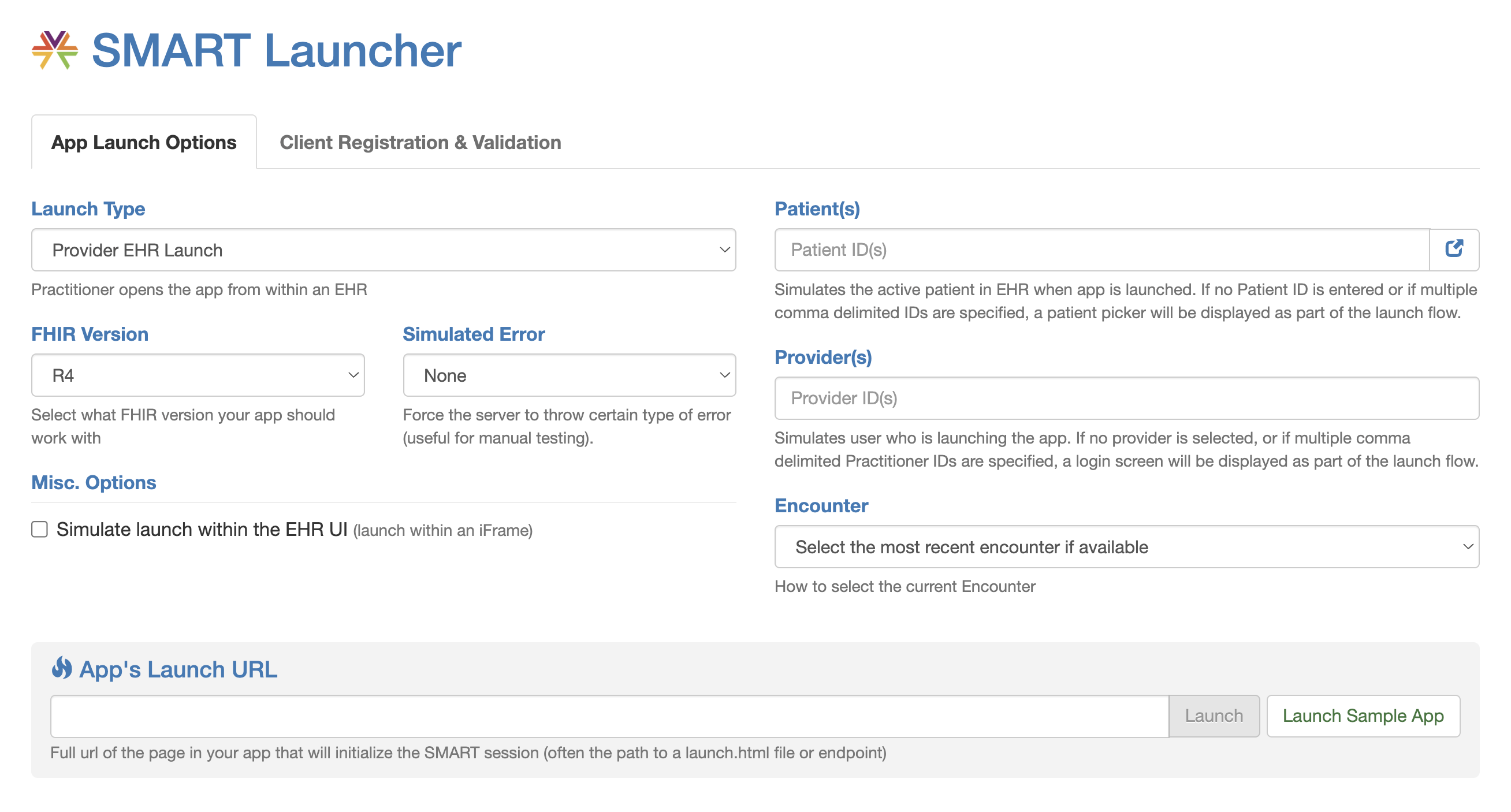
Running your app through the SMART Health IT tester before submitting to Epic or Cerner will catch the most common implementation errors.
The Medblocks Platform provides a SMART-compatible FHIR environment that is easier to iterate against than vendor sandboxes during early development. You can configure scopes, test both launch modes, and validate your token handling logic before moving to the more complex Epic or Cerner environments.
SMART on FHIR is what lets one app run across many EHRs. Without it, an app that lives inside a clinical workflow needs a separate integration, security model, and vendor negotiation for each system. With it, you build against one open framework and reach any compliant EHR.
Adoption is still climbing. In the 2025 State of FHIR survey from HL7 International and Firely, 54% of respondents expected a strong increase in FHIR adoption over the next few years, up from 39% in 2024. In outpatient settings, FHIR-based patient-access app adoption rose from 49% in 2021 to 64% in 2024, per an ASTP/ONC data brief. Regulation, vendor support, and developer tooling are moving in the same direction.
The real work is building apps that are secure, standards-compliant, and useful in a real clinical workflow.
The Medblocks FHIR Bootcamp is a 10-week, hands-on program that walks you through building SMART-on-FHIR apps from scratch. You will register apps in both Epic and Cerner sandboxes, implement the full OAuth2 launch flow, write FHIR API calls against real test data, and build the foundation for a production-ready healthcare app. Whether you are a developer new to healthcare or an experienced health IT professional learning to build for the modern FHIR ecosystem, the Bootcamp gives you the practical skills to ship.
These are the most important points to carry forward from this guide, each written to be directly useful to developers and health IT teams.
SMART on FHIR = FHIR APIs + OAuth2. FHIR defines the data model and the REST API. SMART defines how apps authorize themselves to access that data and how they launch with the right patient context already loaded.
Two launch modes, one authorization spec. EHR Launch is triggered from within the EHR and passes an iss and launch parameter to the app. Standalone Launch is triggered by the user directly. Both use the same OAuth2 authorization code flow underneath.
Scopes are your permission contract. Always request the minimum set of scopes your app needs. Overly broad scope requests will get flagged in Epic’s review and create real security risk if a token is ever compromised.
Epic and Cerner are the biggest targets but have different processes. Epic’s Vendor Services registration and security review is more rigorous and takes longer. Cerner Code registration moves faster. Start vendor registration early, not after development is done.
SMART v2 adds backend services for server-to-server use cases. If your app runs without a user present (analytics, bulk data, monitoring), you need SMART v2 backend services authorization with asymmetric key authentication.
Granular scopes in v2 give you finer control. Instead of patient/*.read, you can now write patient/Observation.rs?category=laboratory to limit access to specific resource subsets. This is better for security and smoother in vendor reviews.
Short-lived tokens are a feature, not a bug. Build refresh token handling from day one. Epic’s tokens expire in an hour. Handling this correctly is what separates apps that work reliably in production from apps that break mid-session.
The 21st Century Cures Act is on your side. Certified EHRs are legally required to expose FHIR R4 APIs. Information blocking rules protect your right to access data through those APIs. The regulatory framework supports what you are building.
Test systematically before submitting for vendor review. Validate redirect URI handling, state parameter verification, token expiry, empty bundle responses, and scope under-requesting before you submit to Epic or Cerner. One missed edge case can add weeks to your review timeline.
The Medblocks Platform and FHIR Bootcamp accelerate the path from concept to production. Use the Medblocks sandbox to get your implementation right before taking on vendor-specific environments. The Medblocks FHIR Bootcamp gives you structured guidance across the full SMART app development lifecycle.
SMART on FHIR is an open standard that enables third-party healthcare applications to securely access patient data and launch inside EHR systems like Epic and Cerner. It combines FHIR APIs for structured health data with OAuth2-based authorization so apps work across different health systems without custom integration work.
SMART stands for Substitutable Medical Applications and Reusable Technologies. The ""substitutable"" part means the same app can run across different EHR vendors that support the standard, rather than being locked into one platform.
SMART on FHIR uses the OAuth2 authorization code flow. The app registers with an EHR, then when a user launches it, the EHR passes a launch context to the app. The app redirects to the EHR's authorization server, which grants an authorization code. The app exchanges this code for an access token, then uses that token to make FHIR API calls. The token carries the scopes the app was granted, and the FHIR server enforces those scopes on every request.
Yes. Epic has supported SMART on FHIR since around 2015 and has one of the most mature implementations in the industry. Developers can register apps and test in the Epic sandbox at fhir.epic.com. Going to production means registering through Epic Vendor Services and getting a live connection at a customer site to list in Showroom (Epic retired the older App Orchard program in 2022). Epic supports EHR launch, standalone launch, and backend services.
SMART scopes are permission strings that define exactly what data an app can access. They follow the format [context]/[ResourceType].[interaction] - for example, patient/Observation.read allows the app to read observations for the current patient. Scopes are requested during the authorization flow and enforced by the FHIR server. In SMART v2, scopes can include filters, like user/Observation.rs?category=laboratory, to restrict access to specific subsets of a resource type.
SMART v1 defined the core EHR launch and standalone launch flows with basic OAuth2 scopes. SMART v2 adds backend services authorization (server-to-server access without a user), granular scopes with filter parameters, mandatory PKCE for public clients, token introspection, and asymmetric client authentication. For most user-facing apps, v1 to v2 migration is manageable. Backend service use cases require v2.
Absolutely. SMART on FHIR is a vendor-neutral open standard. It works with any FHIR server that implements the SMART App Launch Framework, including Cerner (Oracle Health), Meditech, Athenahealth, Allscripts, and independent FHIR servers like the Medblocks Platform. Epic is the most common deployment target due to its market share, but the whole point of SMART is that you build once and run across compliant systems.
Use FHIR R4. Most implementations currently rely on FHIR Release 4 (R4), the current normative version of the standard. Both Epic and Cerner have standardized on R4 for their SMART API implementations. R4B and R5 are emerging but have limited EHR support currently. Building on R4 gives you the widest reach across health systems.
It varies a lot. Technical development for a basic SMART app can take days to weeks. Getting through Epic's Vendor Services registration and security review can take weeks to months, and you need a live connection at a customer site before you can list in Showroom. Activating the app at a specific health system also involves their own IT security and procurement process. Plan for at least 3 to 6 months from the start of development to your first live deployment at a major health system, and start the vendor registration process well before your technical work is done.
SMART on FHIR and CDS Hooks are companion standards often used together. SMART on FHIR handles the app launch and authorization flow, giving your app access to patient data through the FHIR API. CDS Hooks is a separate standard that lets EHRs call external web services at specific trigger points in the clinical workflow, like when a medication is being ordered or a chart is opened. A CDS Hook can return a card with a link that launches a SMART app, combining both standards for a seamless embedded experience.
What clinical decision support tools exist, how they work in Epic, Oracle Health and OpenEMR, why alert fatigue happens, and how to build CDS with CDS Hooks, FHIR and CQL.
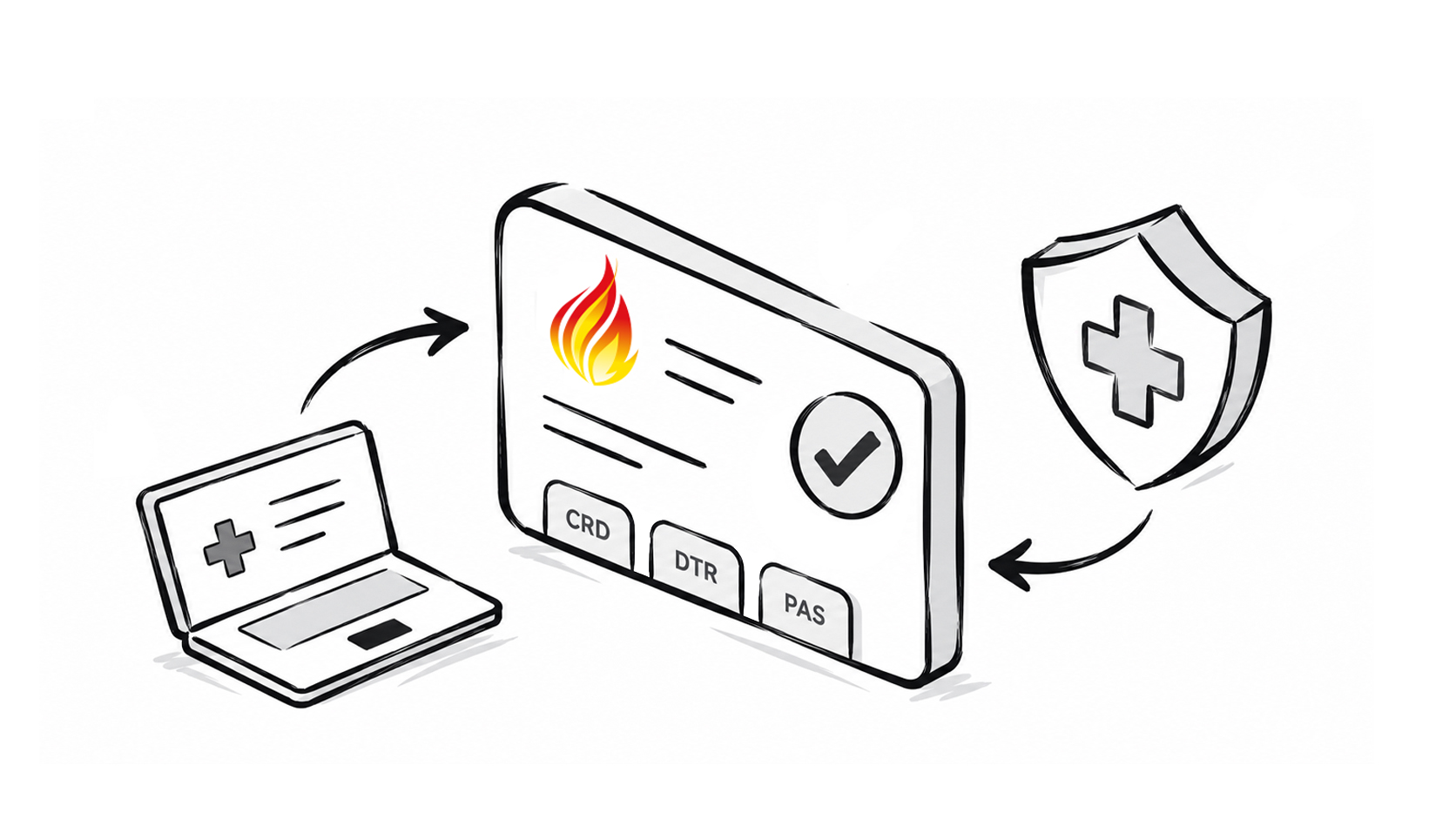
A technical reference for the FHIR prior authorization APIs. What CRD, DTR, and PAS each exchange, how one hands off to the next, and the authentication, versioning, performance, and testing rules underneath them.
Synthea generates brilliant synthetic patient data, but only in US Core. HiGHmed needed it in Germany's MII profiles. Here is how we rebuilt it. Fully open source.
No comments yet. Be the first to comment!