Couchbase x Medblocks - Building a NoSQL FHIR Server
We walk you through building a FHIR server on top of Couchbase's NoSQL database, covering challenges, technical decisions, architecture, and local setup.
October 23, 2026
Clinical decision support, or CDS, is software that gives clinicians patient-specific guidance while they work: a drug interaction warning when an order is signed, a reminder that a patient is overdue for a colonoscopy, an order set that bundles the right tests for suspected sepsis. Most of it lives inside the EHR, and most clinicians meet it as a pop-up.
That pop-up is also where CDS goes wrong. Reviews going back to 1980 find clinicians override roughly half to nearly all of the drug safety alerts they see (van der Sijs et al., 2006; Poly et al., 2020), and the Agency for Healthcare Research and Quality (AHRQ) says that most of those alerts are clinically inconsequential for the patient in front of them, so overriding is often the right call (AHRQ PSNet). The clinical content was fine. The targeting, timing and format were off.
This guide covers what CDS tools exist and what they look like in Epic, Oracle Health and OpenEMR; why alert fatigue happens and what the teams who reduced it changed; the standards for building CDS that works across EHRs (CDS Hooks, SMART on FHIR, CQL, and the terminologies underneath); and how to evaluate or build a CDS service.
AHRQ defines CDS as timely information, usually at the point of care, that helps inform decisions about a patient’s care. The software that delivers it is a clinical decision support system, or CDSS. The guidance can be as simple as a reminder or as involved as a rule that reads live patient data and suggests a next step. Either way the clinician still makes the call; CDS changes what they have in front of them when they make it.
Most CDS falls into one of five groups. Examples from a typical hospital EHR:
Passive CDS waits for the user: dashboards, patient summaries, reference links, documentation aids. Active CDS pushes guidance into the workflow by firing a rule or alert when a condition is met. Passive tools reduce search time. Active tools try to prevent misses, and they are the ones that generate alert fatigue when they fire too often.
The most used test for whether a CDS intervention will work is the CDS Five Rights, set out by Jerome Osheroff and colleagues in 2007 and since adopted by AHRQ and HIMSS. Five things have to line up: the right information, to the right person, in the right format, through the right channel, at the right time in the workflow. A rule can be clinically correct and still fail four of the five. A sepsis alert that fires on a ward nurse who cannot order antibiotics, as a modal pop-up, three hours after the labs came back, has the right information and nothing else.
CDS that holds up is built on published guidelines, national quality measures or agreed care pathways rather than local habit. The logic also has to stay current. A rule written against a 2019 guideline and never revisited is a liability by 2026, which is why governance (who owns a rule, who reviews it, when it retires) is part of the system and not an afterthought.
CDS lives inside the EHR because clinicians do not switch systems mid-encounter. Each vendor has its own native rules engine, and each has a different level of support for the CDS Hooks standard that lets an outside service plug in. (For how the EHRs themselves are built, see our guides to Epic, OpenEMR and EHR systems in general.)
Epic’s native CDS tool is the BestPractice Advisory, or BPA. A BPA is a rule that fires when preset conditions in the chart are met and displays an alert to the user. BPAs come in three levels of intrusiveness: a passive BPA turns a section header yellow and waits to be clicked, an interruptive BPA pops up and has to be acknowledged, and a hard-stop BPA blocks the user from continuing until they act. Most alert fatigue stories in the US involve interruptive BPAs.
Epic has also run CDS Hooks in production since 2018, according to its own staff on the HL7 FHIR chat, and documents the support on open.epic.com. Epic can display an external service’s informational cards, SMART app launch links, and a limited set of actionable suggestions, with the current list in its developer portal at fhir.epic.com.
Oracle Health (formerly Cerner) does alerting through Discern Expert rules inside Millennium, typically fired by specific documentation, orders or results in the chart. Discern Expert is listed as a product component on Oracle’s documentation site, and most Oracle Health shops have CCL developers who build and maintain the rules.
CDS Hooks support on Oracle Health is more restricted than on Epic. In July 2026, Oracle staff on the Oracle Health developer forum confirmed that CDS Hooks is still not generally available and would not be open for testing in the C1941 code level. Earlier threads from 2023 and January 2025 describe the implementation as gated behind a review and approval process for partners, with no public timeline for CDS Hooks 2.0 support.
OpenEMR ships a Clinical Decision Rules (CDR) engine that monitors clinical data such as vitals, history, medications, procedures and labs in real time, and surfaces results in a Clinical Reminders widget on the patient summary. The same engine drives patient reminders, Clinical Quality Measure reports and Automated Measure Calculations. For reference CDS, OpenEMR implements the HL7 Infobutton standard and links out to MedlinePlus Connect from problems, medications and lab results.
It is a useful reminder that CDS is a certification requirement for any US EHR, open source included, and that a rules engine on its own is the easy part.
Alert fatigue is what happens when clinicians see so many alerts that they stop reading them. AHRQ’s Patient Safety Network calls it a major unintended consequence of computerising healthcare and a significant safety hazard. The numbers behind that:
PSNet’s reading of the evidence is that the vast majority of CPOE alerts are clinically inconsequential, so clinicians learn to dismiss everything, including the few that matter.
Three causes show up in nearly every study:
There is also a liability problem. A 2016 commentary cited by PSNet notes that developers have been reluctant to remove low-value alerts for fear of being blamed if a patient is harmed in their absence, which means alert libraries grow and rarely shrink.
Two health systems have published what worked.
Northwestern Medicine reviewed its Epic BPAs over three years and cut interruptive alerts per hospital admission from around 35 in 2020 to 19 in 2022, then 16.58 in 2023. The single biggest win was the code status BPA, which kept firing even when the patient was unavailable for the conversation. After the team changed it to allow the order to be placed from the alert itself, firings dropped from about 26,500 a month to 3,000.
Vanderbilt University Medical Center runs a programme called Clickbusters, in which physicians, nurses, pharmacists and informaticists sign up to review a BPA each, following a ten-step process (review the logic, pull the firing and acceptance data, check the evidence, propose a change, test, release, measure). The programme has removed 71,227 alerts per week so far.
The common thread: both teams measured firing and acceptance rates per alert, treated each one as a product with an owner, and either narrowed the trigger or let the user act from inside the alert.
PSNet’s list of what reduces alert fatigue lines up with that: cut clinically inconsequential alerts, tailor alerts to patient characteristics (for example, only fire a nephrotoxic drug alert if renal function is impaired), tier alerts by severity, make only severe alerts interruptive, and apply human factors principles to format and colour. Sidharth has argued the same point for externally hosted CDS: relevance and low latency decide whether a card gets read.
Everything above runs inside one vendor’s rules engine. CDS Hooks is the HL7 standard for the other case: a CDS service that lives outside the EHR and gets called at specific points in the clinician’s workflow. The current published version is CDS Hooks 2.0.1, based on FHIR R4, with 3.0 in ballot.
The spec has three parts: a CDS Client (usually the EHR), a CDS Service, and Cards.
patient-view (chart opened), order-select, order-sign, encounter-start and encounter-discharge.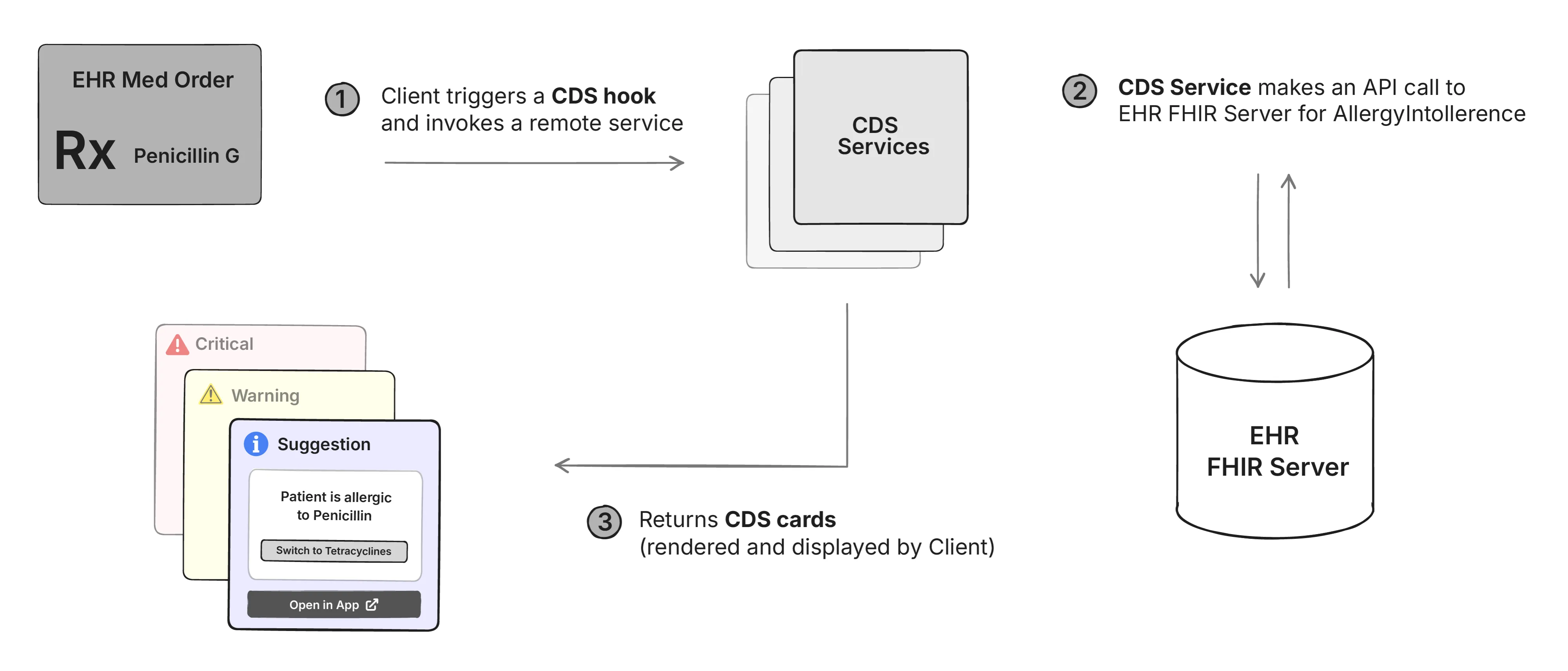
The round trip has to be fast. If the service takes two seconds on order-sign, clinicians will notice and administrators will switch it off.
We have a deeper walkthrough of the spec and a tutorial that builds a working service in Node.js, including the discovery endpoint and ngrok testing against a sandbox.
The largest live deployment of CDS Hooks in the US is prior authorization. The Da Vinci Coverage Requirements Discovery (CRD) implementation guide is a CDS Hooks service: when a clinician signs an order, the payer’s CRD service returns a card saying whether prior auth is needed and what documentation is required. CMS-0057-F makes this mandatory for most health plans by January 2027. Our guide to the FHIR prior authorization APIs covers CRD, DTR and PAS in detail.
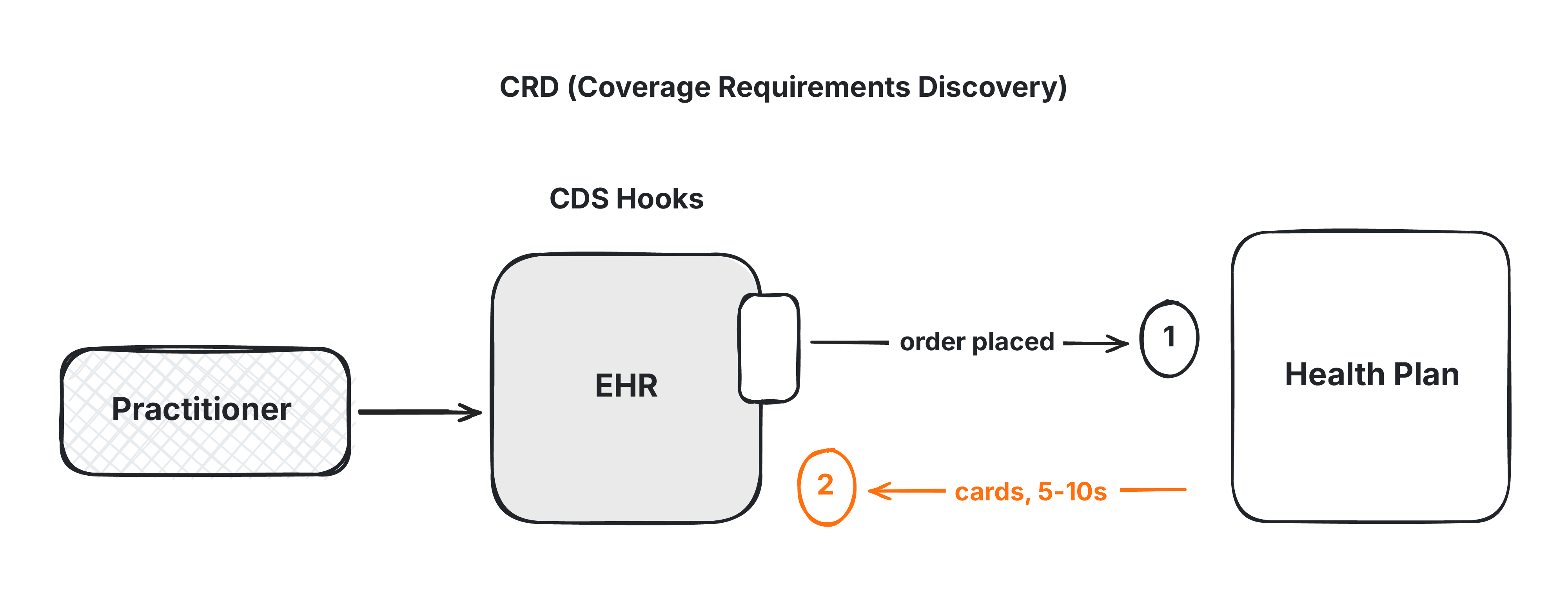
They solve different halves of the same problem. CDS Hooks is for the EHR calling out to you at a workflow event and getting back a quick answer, with no UI of your own. SMART on FHIR is for launching your own app inside (or beside) the EHR, with OAuth2 authorization and full FHIR API access, when the user needs to do more than click a suggestion. In practice they chain: a CDS Hooks card carries a SMART launch link, so a short warning can open into a full workflow when the clinician wants it.
A CDS service is inputs, logic, output, tests and monitoring. The good ones are predictable, fast and dull.
Three patterns cover most cases:
Reading Patient, Encounter, Condition, Observation, MedicationRequest and AllergyIntolerance over FHIR keeps the service portable across EHRs, and CDS Hooks hands you the same resources as context. The 12 FHIR resources every developer should know cover the ones CDS logic touches most.
A CDS rule is a query against patient data. If the data is free text, the query fails in edge cases and breaks the moment it is moved to another system. Three terminologies cover most of what CDS logic needs:
FHIR carries these as CodeableConcept fields on Condition, Observation and MedicationRequest, and a FHIR terminology server exposes the value sets and concept maps a rule needs; our guide to FHIR terminology services covers $lookup, $expand and $validate-code. For SNOMED specifically, see the SNOMED CT browser guide for writing ECL queries that pick up a concept and everything below it, and how to run your own terminology server.
The practical consequence for builders: before writing any rule, check how the source system actually codes the data you need. A surprising amount of diagnosis data in production EHRs is ICD-10 for billing with no SNOMED mapping, and medication lists are often local codes. The rule is only as portable as the codes under it.
Clinical Quality Language (CQL) is the HL7 standard for writing clinical logic that both quality measures and decision support can share. Version 1.5.3 is Normative. CQL compiles to a machine-readable form called ELM, and there are open source engines that evaluate ELM against FHIR data. The FHIR Clinical Reasoning module describes how a PlanDefinition can carry CQL logic and be surfaced through CDS Hooks.
CQL earns its keep when the logic has to be shared, published or certified (US quality measures are written in it, and AHRQ’s CDS Connect repository distributes CQL artifacts). For a single hospital’s internal rule, plain TypeScript or Python against FHIR JSON is faster to write and easier to hire for. Both are valid; pick based on who has to read the logic later.
Test each rule for false positives, false negatives, timing and edge cases against real (de-identified) patient data before it goes live. Run it in silent mode first, logging what it would have fired without showing anyone, and review a sample of those firings with a clinician. The Northwestern and Vanderbilt numbers above are what you get when this step is skipped and done retroactively.
Track per rule: firing rate, override rate, acceptance rate, time to action, and user complaints. A rule overridden 95 percent of the time is telling you it is too broad, too late or too noisy. Set a review cadence and a retirement criterion when the rule goes live, so the library has a way to shrink.
If you are buying rather than building, four questions sort the vendors quickly.
Clinical fit. Does it support the use cases you have, with logic you can read? Medication safety, preventive care gaps, sepsis and chronic disease management are the common ones. Ask to see the rule for one of yours.
Integration depth. How does it connect to your EHR, what data can it read, and how much custom interface work is on your side? CDS Hooks and SMART on FHIR support is the sign the vendor can work across EHRs. If the answer is a nightly extract, the CDS will always be a day behind.
Governance. Who can edit a rule, how are changes approved, how is an alert retired, and who owns it after go-live? A platform with no answer here is the one that produces the override rates above.
Metrics. What does the vendor measure after launch? Firing rate, override rate, acceptance rate and time to action should all be available per rule, and they should be able to show you a customer’s numbers. If they cannot say how they detect alert fatigue, they have not been looking.
What the same five tools look like in the areas where CDS is most used.
| Domain | Typical CDS | Data it needs | Where it usually goes wrong |
|---|---|---|---|
| Medication safety | Allergy, drug-drug interaction, duplicate therapy and dose-range alerts at order entry | RxNorm-coded medication list, allergies, renal function | Over-broad interaction libraries; this is where override rates are highest |
| Sepsis | Early warning score from vitals and labs, with a bundled order set | LOINC-coded vitals and labs, SNOMED problem list | Firing on every febrile patient; alerting staff who cannot order antibiotics |
| Preventive care | Reminders for screening, immunisations and overdue follow-up | Age, sex, problem list, procedure history | Usually works well because it is passive; fails when the data is incomplete and reminders fire for care already done elsewhere |
| Oncology | Screening prompts, treatment pathway support, trial eligibility | Staging, pathology, biomarkers, prior treatment | Unstructured data; most oncology detail lives in notes rather than coded fields |
| Chronic disease | Trend tracking, care gap dashboards, order sets for diabetes, hypertension, asthma | Longitudinal observations, medication adherence | Interruptive alerts for a slow-moving condition; dashboards and reminders fit better |
Two of these are worth more detail.
Sepsis is the best-documented success for active CDS. The Royal Liverpool and Broadgreen University Hospitals NHS Trust’s e-Sepsis tool combines electronic observations and lab results, screens automatically regardless of ward or time of day, and alerts the treating clinician. The trust reported severe sepsis mortality falling from 46.47 percent to 38.21 percent and septic shock mortality from 55.3 percent to 43.62 percent after introduction, and the work was turned into an NHS Global Digital Exemplar blueprint for other trusts.
Oncology is where coded data runs out. We ran into this on a project with GE HealthCare, where the problem was less the decision logic and more getting oncology data into a shape it could run on: how we normalised cancer care data for decision support.
Three shifts are under way.
From one rules engine to many services. CDS Hooks, SMART on FHIR and the FHIR Clinical Reasoning module make it possible to run decision support outside the EHR and plug it into several. Prior authorization is forcing the issue in the US: every health plan has to stand up a CDS Hooks service by 2027, and every certified EHR has to call it. That builds the plumbing other CDS can reuse.
Language models as a CDS input. LLMs are good at summarising a chart, drafting a suggestion and pulling context out of notes, which is exactly where coded data runs out (see oncology above). They are a poor fit as the decision-maker, because the output cannot be audited the way a rule can and the failure modes are hard to predict. Our own benchmarking found that AI agents fail on EHR data mainly because of missing semantic models rather than model capability, which is the same coded-data problem CDS has always had. The workable pattern is a model that proposes and a rule or a clinician that disposes, with the model’s output traceable to the source.
Ambient capture feeding CDS. Ambient scribes already turn conversation into notes. The next step is turning that output into structured data a rule can read in real time. That raises the questions you would expect about bias, consent and who signs off, and the answer is likely the same as for every other CDS tool: the clinician does, and the system has to make that easy.
If you need a CDS Hooks service or the FHIR data layer under one built, that is the kind of work Medblocks Sprint does. Book a call.
P.S. If you want to build a CDS Hooks service yourself, our free course walks through a CRD server in TypeScript, tested against the Inferno suite: start with the first lesson. There is also a shorter Node.js CDS Hooks tutorial on the blog.
Clinical decision support is any tool that gives clinicians, care teams or patients timely, patient-specific guidance to support a care decision. In an EHR that means alerts, reminders, order sets, documentation templates and reference links. The system that delivers it is called a CDSS.
CDS is the function: guidance at the point of care. A CDSS is the software that delivers it. In practice the terms are used interchangeably.
CDS Hooks is an HL7 standard that lets an EHR call an external decision support service at a defined point in the workflow (opening a chart, selecting or signing an order) and display the returned cards. Cards can carry a suggestion the user can accept, or a link that launches a SMART on FHIR app. The current version is 2.0.1.
CDS Hooks is for the EHR calling your service and getting a quick answer back, with no UI of your own. SMART on FHIR is for launching your own app inside the EHR with OAuth2 authorization and FHIR API access. A CDS Hooks card can include a SMART launch link, so the two are often used together.
Alert fatigue is when clinicians see so many alerts that they stop reading them and override everything, including the ones that matter. Reviews put drug safety alert override rates between 46 and 96 percent. It is caused by alerts that are too broad, badly timed or all presented the same way, and it is reduced by narrowing triggers, tiering by severity and making only severe alerts interruptive.
At order entry, the CDS checks the new order against the patient's allergies, current medications, dose ranges and known interactions before it is signed. RxNorm codes let the check work across systems that name drugs differently.
Clinical Quality Language is the HL7 standard for writing clinical logic that quality measures and decision support can share. It compiles to a machine-readable form called ELM. Version 1.5.3 is Normative.
No. CQL is the right choice when the logic has to be shared, published or certified. For an internal rule, plain code against FHIR resources is often faster to write and easier to maintain.
Yes. It's a CRD endpoint that routes each hook to the plan's own service or the responsible vendor, backed by a FHIR server the plan hosts. HAPI FHIR works as the base. Buying makes more sense when prior authorization is one of several FHIR APIs the plan needs across multiple versions.
SNOMED CT codes conditions and findings, LOINC codes observations and lab results, RxNorm codes medications. A rule written against those codes reads the same data in any system that uses them.
Usually one of three reasons: the rule does not fit the clinician's workflow, the data it reads is incomplete or uncoded, or it fires too often and gets ignored. The logic is rarely the problem.
Per rule: firing rate, override rate, acceptance rate and time to action, plus the clinical outcome the rule was meant to change. Review on a cadence and retire rules that are not earning their interruptions.
Yes. Epic has had CDS Hooks in production since 2018 and documents the support on open.epic.com.
We walk you through building a FHIR server on top of Couchbase's NoSQL database, covering challenges, technical decisions, architecture, and local setup.
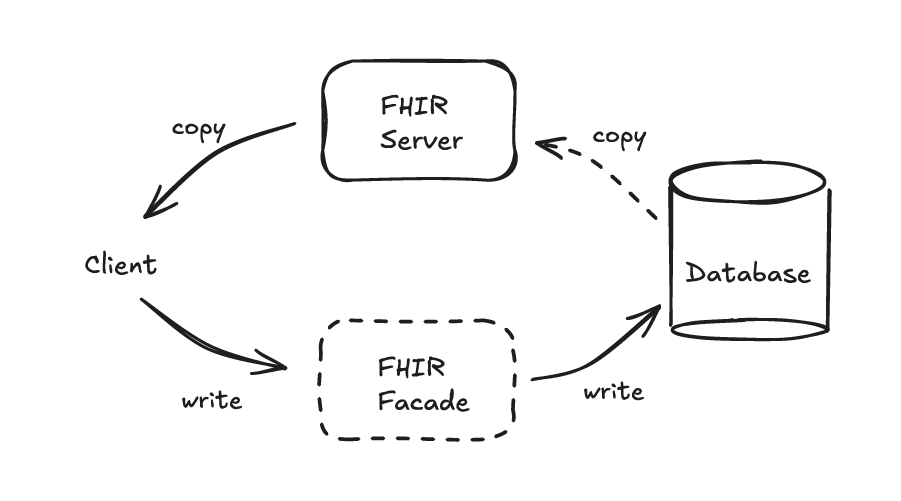
Explore three approaches to building RESTful FHIR servers: Facade, Synchronization, & Hybrid. Understand where REST APIs, Documents, and Messaging fit in FHIR.
Learn to build a Python FHIR Facade using FastAPI and PostgreSQL to expose legacy EHR data as FHIR APIs supporting read search operations and interoperability
No comments yet. Be the first to comment!