Epic Integration Methods: The Five Connection Patterns
Last lesson we looked at what Epic is and how it’s built. This lesson covers how your app plugs in.
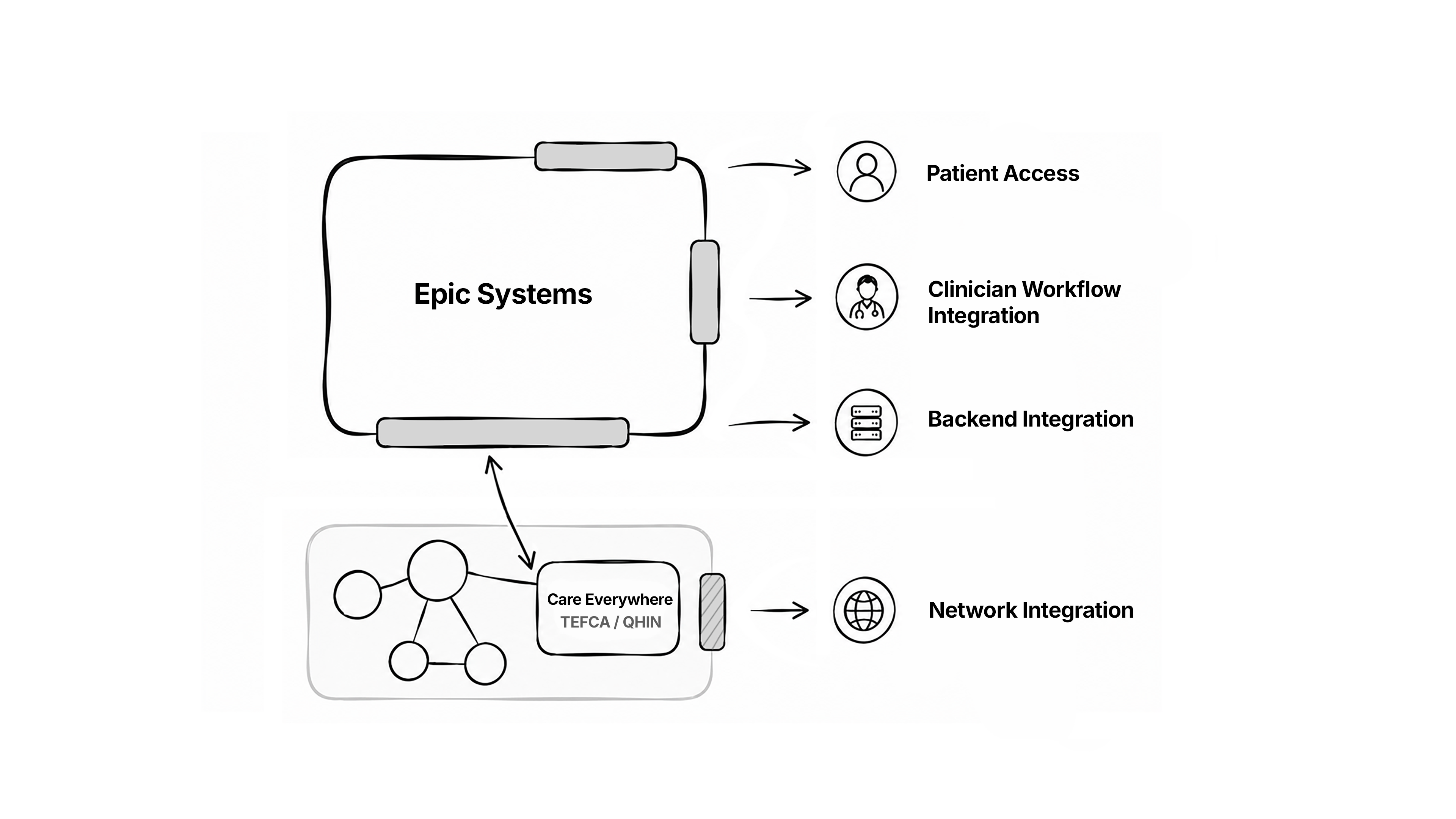
There are a few distinct ways to connect with Epic, and we’ll call them connection patterns through the rest of the course. Epic doesn’t use that label, so you won’t find it in their docs. But each pattern is a real, recognizable way in which your app can talk to Epic. We’ll name them, describe what each is good for, and tell you what kind of apps use each one.
Patient-mediated access: the easiest way in
Start with the patient side. This is usually the easiest way into Epic.
Here the patient gives your app access to their own data. They log in through MyChart and authorize your app. Under the hood that’s SMART on FHIR running an OAuth login: the patient signs in, consents, and your app gets a token to read their record. Because the patient is the one granting access, it’s called patient-mediated.
There are two ways to do this: FHIR APIs and EHI exports.
Patient-mediated Epic FHIR APIs give you structured FHIR data for that one patient: medications, labs, allergies, problems, visits.
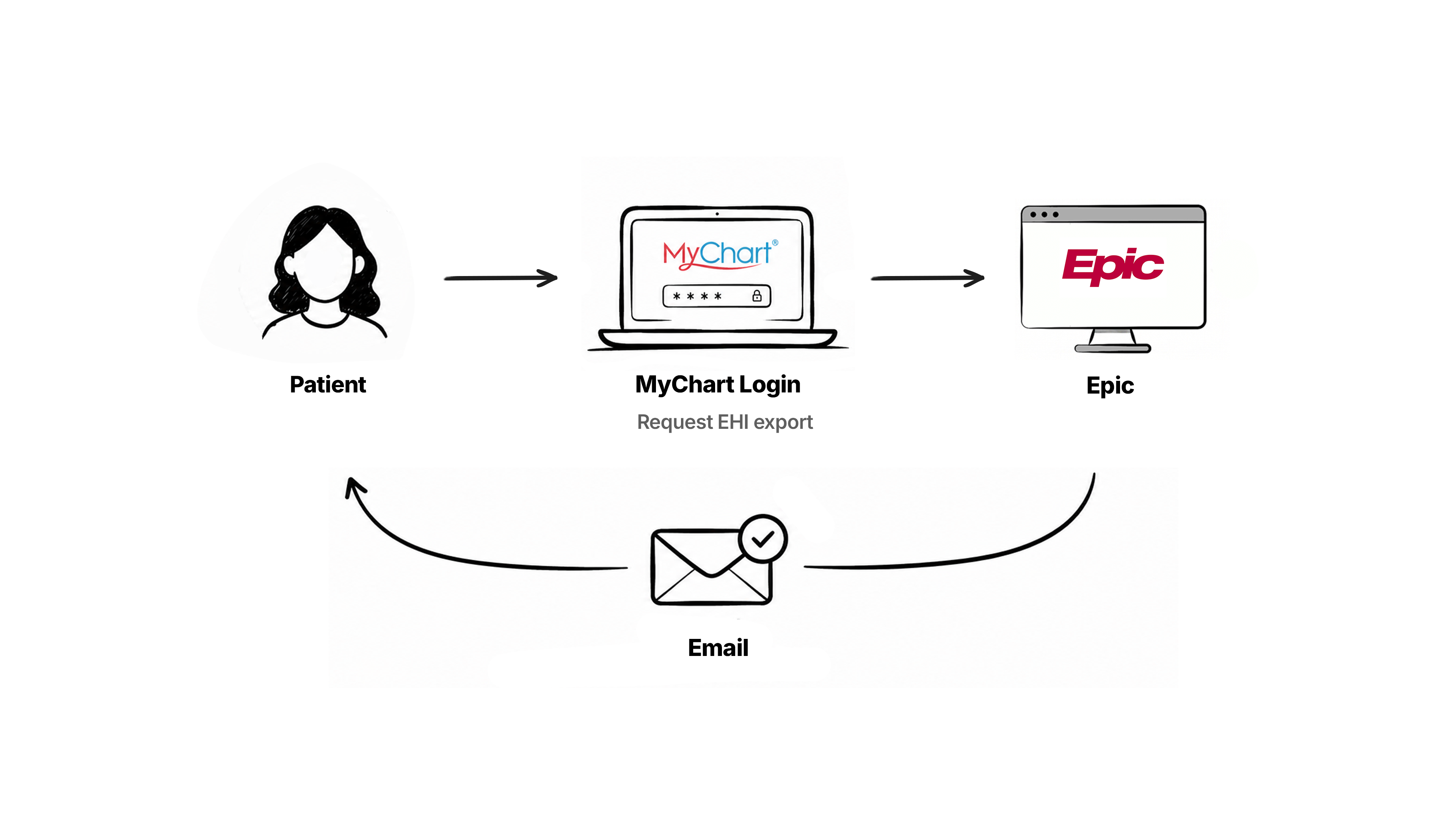
Patient EHI export is broader, a fuller export of the patient’s electronic health information that goes past the tidy FHIR resources. It’s also much harder to use. There’s no API for it. The patient requests it from inside MyChart, and a few days later Epic emails them a zip of CSV or TSV tables covering the whole record. That’s the complete picture, but it’s awkward to work with, and Epic doesn’t always approve the request. We’ve seen them rejected. So for most apps the FHIR APIs are the practical choice, and EHI export is the fallback for when you genuinely need everything.
Patient-mediated access is the easiest path because the 21st Century Cures Act requires all EHRs to give patients app access to their own data. So you’re not waiting on a hospital or an EHR vendor to set you up. Once the patient grants access, you’re in, and your app can go from registration to production in a day or two.
Apps that live here: personal health record apps like Apple Health, chronic-condition coaching apps that connect your own chart, second-opinion services, and apps that help patients gather records before a visit. AI assistants like ChatGPT have started importing records the same way, through SMART on FHIR. If your user is the patient and they’re consenting to share their own data, this is your pattern.
Build your first real FHIR app in 15 days
500+ builders have done it. Live kick-off, structured modules, Demo Day. $27.
Join the challengeClinician workflow: your app inside the visit
In this pattern your app becomes part of how the clinician works, showing up in the flow while they’re seeing patients. That makes it a powerful place to be, and more work to get into. There are a few ways to do it.
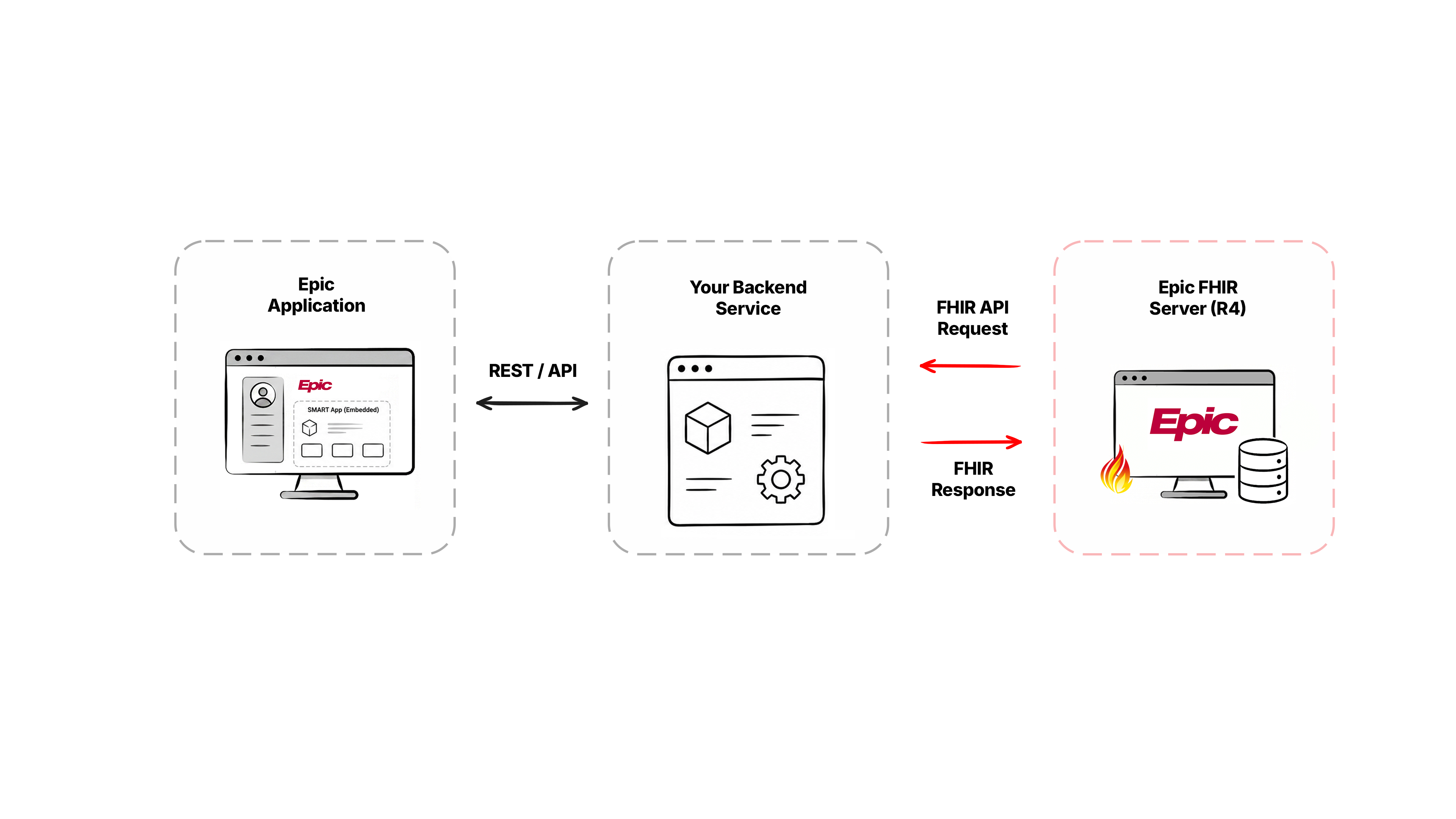
The first is a SMART embedded app. Your app opens inside Epic, already knowing which patient is on screen. The clinician is logged in and looking at a patient, clicks into your app, and it loads right there in that patient’s context. It’s still SMART on FHIR underneath, just launched from inside Epic instead of from a patient login.
Once your app is open, it reads and writes through the practitioner-scoped FHIR APIs. Your app basically acts as the doctor who’s logged in, so it can see and do exactly what that doctor can. Say you’ve built an app that pulls up recent labs and lets the doctor save a quick note back to the chart. Both the read and the write happen under that doctor’s identity. If the doctor isn’t allowed to see something, your app can’t either.
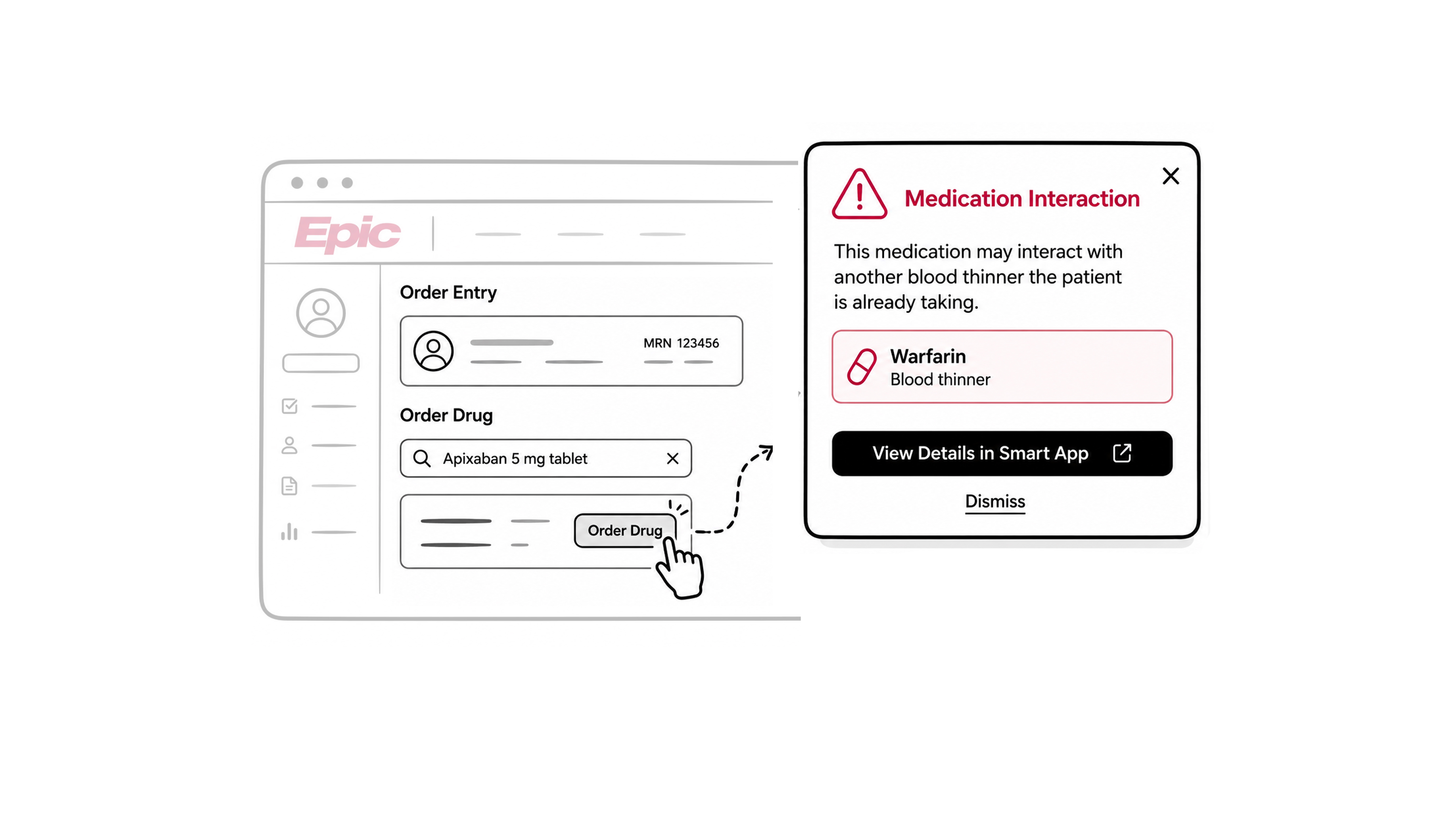
Next is CDS Hooks, which works in reverse. Instead of the doctor opening your app, Epic reaches out to your service. At certain moments, like when the doctor goes to prescribe a medication, Epic sends a request to your service in the background asking whether there’s anything it should show. Your service checks and sends back a small card. The doctor orders a drug, and your card pops up: heads up, this interacts with the blood thinner they’re already on. The doctor doesn’t need to go looking for that warning. It shows up at the exact step where it matters. CDS Hooks and embedded apps also work well together. A card can carry a button that opens your SMART app right there, so you catch the clinician at the right moment and then hand off to the full view.
The last one is FHIRcast, which keeps your app in sync with whatever the clinician is looking at. Picture a radiologist with Epic open on one screen and your imaging viewer on another. Without FHIRcast, when they move to the next patient in Epic, your viewer is stuck on the previous one. With FHIRcast, Epic announces which patient it’s on, and your app switches automatically.
The apps here are the ones used by clinicians during care. Clinical decision support, like drug-interaction or imaging checks, runs through CDS Hooks. An ambient AI scribe that listens to the visit and drafts the note is an embedded app, plus FHIRcast to stay on the right patient, plus a write-back through the practitioner-scoped APIs. Specialty calculators, genomics tools, and imaging viewers all live in this zone.
Backend workflow: server to server
This one is different from the first two, because there’s no person at a screen when the data moves. Your server connects straight to Epic’s server and pulls what it needs, either on a schedule or on demand. A lot of integration work happens this way, in the background, where nobody using the app ever sees it.
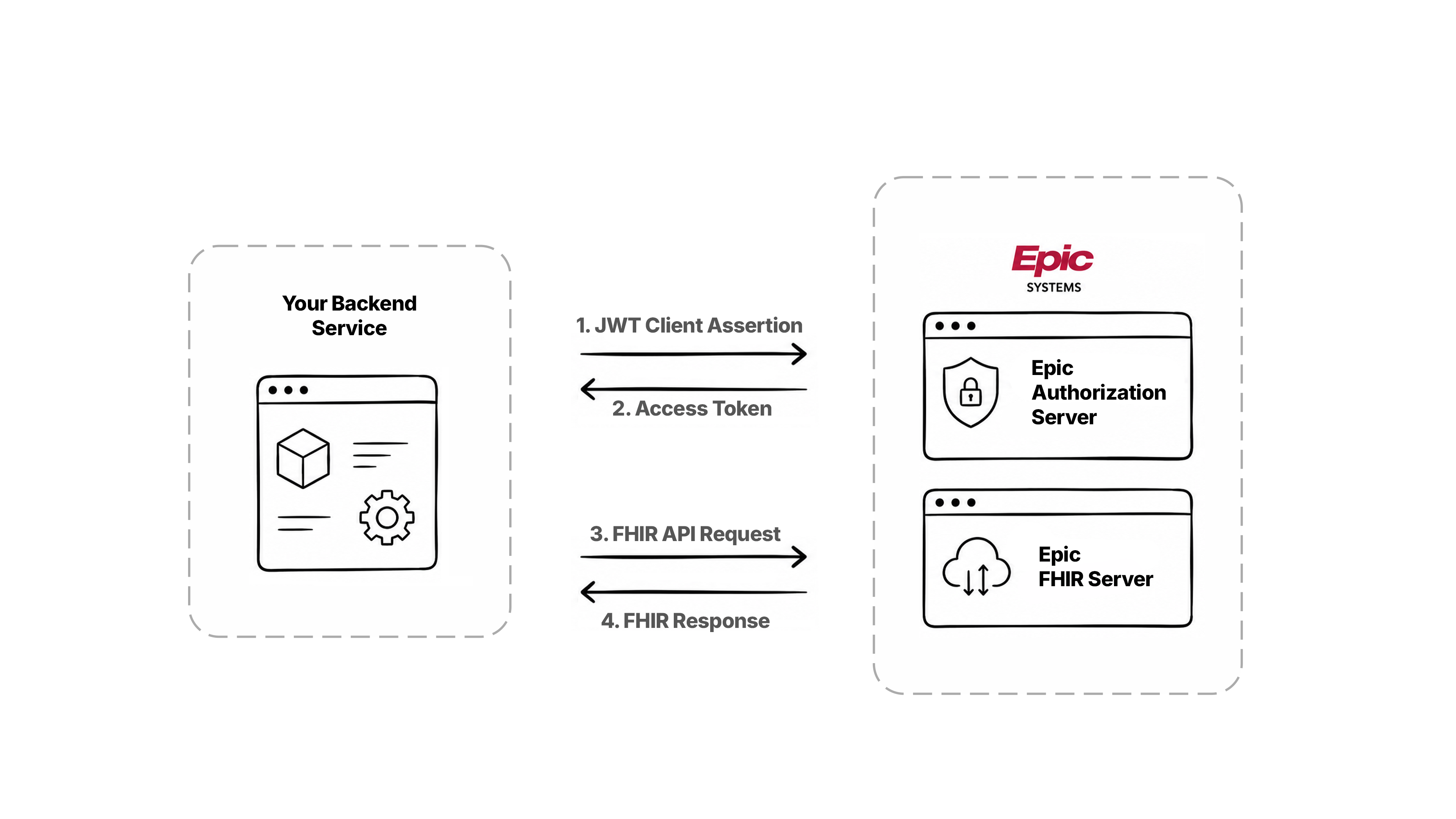
The main route is the backend Epic FHIR API. Your server proves who it is by signing its request with a private key, so no human logs in, and from there it reads data on its own. When you need records for many patients at once, you use Bulk FHIR: instead of requesting patients one at a time, you ask for a whole group and Epic returns a single large export. If you wanted to run analytics across every diabetic patient in a health system, you’d submit one job and pull them all in, rather than making fifty thousand separate calls.
Sometimes FHIR doesn’t have what you need. It covers a lot, but not every action in Epic maps to a FHIR call. Certain scheduling tasks, for example, don’t. For those, Epic exposes its own proprietary APIs, which look a lot like the backend FHIR ones and are often the only way to write certain things back.
Then there’s the older technology, which still does a surprising amount of the work in hospitals. HL7 v2 is a messaging format that’s been carrying admissions, orders, and lab results between systems for decades. Hospitals usually route these messages through an interface engine like Mirth Connect or Rhapsody, though Epic now also supports HL7 v2 over HTTP, so your app can receive feeds directly. It runs both ways: you can send HL7 v2 back to Epic to write data in. C-CDA is a standard clinical document, a structured patient summary passed from one system to another, and it’s what Epic leans on most when exporting to other systems and networks. X12 handles the money side: insurance claims, eligibility checks, billing. There’s a long-running push to move this onto FHIR, but for now X12 is still how the money moves. If you’re working in labs or billing, or wiring into interfaces a hospital already runs, you’ll deal with at least one of these.
The apps that fit the backend pattern are things like population health platforms that work across thousands of patients, billing systems, lab systems feeding results in over HL7 v2, or a pipeline that copies Epic data into a database of your own.
Data engineering: Clarity and Caboodle
This pattern takes us back to Clarity and Caboodle, the two databases from the last lesson. Both are copies of Epic’s data, kept separately and reshaped so they’re easier to report on, and both are ordinary SQL databases you query like any relational store.
What separates them is how the data is laid out. Clarity is the detailed copy, refreshed every night and spread across thousands of tables, so it holds a huge amount of granular detail, but the queries get complicated and can run slowly. The nightly dump is often called a Clarity extract. Caboodle is built on top of Clarity and reorganized to make analysis easier. It ships with ready-made data models (Epic’s Cogito analytics) for things like quality measures and patient matching. It gives up some fine detail for speed, which is why people reach for it when building dashboards or looking at trends across a whole organization.
One thing sets this pattern apart. With everything so far, you’ve been reaching into Epic from the outside through an API. This one mostly lives on the hospital’s side. You usually can’t get to Clarity or Caboodle through a public API. Instead you work with the hospital’s data team, and they either send you the extracts or give you access inside their environment. So getting in here depends heavily on the arrangement you make with each hospital.
The apps that fit in this pattern work through large amounts of historical data, where overnight-fresh is fine and real-time isn’t the point: BI and analytics tools, research datasets, quality reporting. If you do need real-time, you go back to the backend or FHIR APIs instead.
The network pattern
Up to now, every pattern except patient-mediated has been about connecting to one hospital’s Epic at a time. In the network pattern, you connect to a national network instead, and through it you can pull a patient’s records from any organization on that network without building a direct integration with each one.
Epic has its own version of this called Care Everywhere, which it has used for years to move records between organizations. Around that sit the bigger networks that link different systems together: Carequality, CommonWell, and eHealth Exchange. And then there’s TEFCA, the newer one, set up by the federal government to connect all these networks under a single set of rules. TEFCA is meant to be the single on-ramp, a network of networks that everything else plugs into.
The networks approved to operate under it are called QHINs, Qualified Health Information Networks, and Epic takes part through its own QHIN, called Epic Nexus. Carequality has lined up behind TEFCA rather than competing with it. The direction is clear enough: TEFCA is where this is going.
This pattern isn’t really Epic-specific. The same network pulls records from any EHR, not just Epic. We’re covering it here because it’s a legitimate way to get Epic data out.
The trade-off here is different from the rest. You skip the hospital-by-hospital onboarding the earlier patterns need. In its place, you qualify to join the network, which comes with its own rules and approval process. You’re swapping one kind of effort for another.
The data itself is limited here. What comes back over the network is mostly C-CDA documents and some HL7 v2. It isn’t real-time, and you query for it by matching on the patient’s demographics. Access usually requires a treating relationship with the patient, which in practice means you’re providing care and have a clinician with an NPI behind the request. So this fits organizations actually providing care.
The apps that fit here need records from across lots of systems they’ll never integrate with one by one: care coordination platforms, national telehealth services, payers pulling records. TEFCA also opens up patient access across the network, so some patient-facing apps reach records this way too.
You’ll usually combine patterns
Most real apps use several patterns together, because a single app often does more than one job.
Take an ambient AI scribe. It opens inside Epic as an embedded app, uses FHIRcast to stay on whatever patient the doctor is seeing, and writes the finished note back through the practitioner-scoped APIs. That’s three patterns in one product. A population health platform looks different: Bulk FHIR for volume, Clarity or Caboodle for deep historical analysis, and HL7 v2 feeds for live updates. A patient-facing app might start with patient-mediated access for the user’s own hospital, then use the network to bring in records from the other places they’ve been treated.
So when you’re working out how to integrate, you’re rarely picking one pattern. You’re working out which combination fits what you’re building and how your data needs to move.
Next
Once people pick a pattern, the next question is always the same: how long does this take, and what does it cost? We’ll look at that in the next lesson.