Recap of Key Concepts: Templates, Compositions, EHRs
In the previous module, we took a deep dive into the openEHR CKM and Archetypes. In this module, we’ll be learning and working in-depth with the openEHR Rest API.
This will be a very hands-on module where we’ll be setting up our own openEHR instance using EHRBase, create our own template, and work with the openEHR REST API.
But before we jump into all that technical stuff, let’s understand some basic concepts that we’ll be working with.

Build your first real FHIR app in 15 days
500+ builders have done it. Live kick-off, structured modules, Demo Day. $27.
Join the challengeLet’s start with templates
Think of a template as an empty form that’s waiting to be filled out. Whenever you visit a clinic or a hospital, you may be given medical forms to be filled out. This is an apt example of a template.
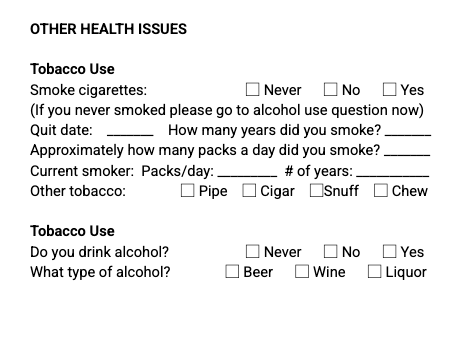
In more technical terms, a template is like a schema: it defines what information we want to capture, what’s allowed and what isn’t, and how many times certain things can appear. It’s built using archetypes and includes rules about how to use them.
Every template of the same type has the same set of fields, which ensures consistency in how information is captured.
Now let’s move on to compositions.
What is a Composition?
A composition is a filled out template. In openEHR, clinical data is recorded as compositions, in other words, as filled out templates containing actual patient values.
We learned that a template is like a medical form. What happens when you fill out that form? You get a composition.
In the clinical context, a composition is a clinical document for a specific patient. And a composition contains more than just data, it consists of timestamps (when it was created and updated), versioning (keep track of each and every change), and auditing (who made the changes).
Simply put, templates define the structure, and compositions carry the real data.
Here’s an example of a composition:
{
    "meta": {
        "href": "https://cdr.code4health.org/rest/v1/composition/e921fde4-3800-44c7-b39a-e2c8769a9c1d::a81f47c6-a757-4e34-b644-3ccc62b4a01c::1"
    },
    "compositionUid": "e921fde4-3800-44c7-b39a-e2c8769a9c1d::a81f47c6-a757-4e34-b644-3ccc62b4a01c::1",
    "format": "STRUCTURED",
    "templateId": "DHI - Urology_PROMs-v0",
    "composition": {
        "prostate_cancer_proms_report": {
            "_uid": [
                "e921fde4-3800-44c7-b39a-e2c8769a9c1d::a81f47c6-a757-4e34-b644-3ccc62b4a01c::1"
            ]
            // ..... Snipped for brevity
            "composer": [
                {
                    "|name": "John Smith"
                }
            ]
        }
    },
    "deleted": false,
    "lastVersion": true,
    "ehrId": "3e674739-950c-4b8a-976b-5aef21c618c5",
    "lifecycleState": "COMPLETE"
}
Understanding the EHR
Now let’s understand what an EHR is. In openEHR, an EHR is a patient’s record. Every patient is represented by an EHR ID, and all data points for that patient are stored under that EHR.
We’ve talked about forms (templates) and filled-out forms (compositions). Now in a Hospital’s context, they store these clinical documents inside a Patient’s file.
In the same way, think of an EHR (Electronic Health Record) as a patient’s digital folder. Just like a physical folder might hold all of a patient’s paper records, an EHR holds all the digital clinical documents over time. This includes:
- Records from hospital visits
- Lab results
- Notes about procedures
- Medication records
And much more.
Lesson summary
So to wrap this up:
- A template is your empty form
- A composition is when someone fills out that form
- An EHR is the patient’s folder where you keep all these filled-out forms
In our next lesson, we’ll start getting technical: setting up EHRBase and creating our first template. But for now, just make sure you’re comfortable with these concepts because we’ll be using them a lot!