Stored Queries
In the previous lesson, we learned AQL query parameters. At this point, a natural question is:
If I can just write the value inside the AQL, why separate it into a different query_parameters object?
This is where stored queries come in.
Stored queries let you save an AQL query on the server, give it a name and version, and then execute it later without rewriting the AQL every time.
Stored queries with parameters are practical because one team can write the queries, and another team can run them by simply entering the inputs.

Build your first real FHIR app in 15 days
500+ builders have done it. Live kick-off, structured modules, Demo Day. $27.
Join the challenge1. Create an AQL query
Before storing anything, we first confirm that the query works.
For example, we can list blood pressure observations where the systolic value is above 140. To try this, open the query folder and select Ad-hoc query (a POST request).
POST {{openehrBaseUrl}}/query/aqlIn the body use the below AQL query:
“q”: {“SELECT o/<resolve_path>/value/magnitude as systolic, e/ehr_id/value from EHR e CONTAINS OBSERVATION o [openEHR-EHR-OBSERVATION.blood_pressure.v2] WHERE o/<resolve_path>/value/magnitude > $systolic_max”,
“query_parameter”:{
“systolic_max”: 140
}
Click Send and you should see a 200 OK response that gets the observation results back containing the systolic values and the EHR IDs.
2. Store the query on the server
Once the query works, you can store it using the Store query endpoint, that’s present in the stored query folder in the postman collection.
PUT {{openehrBaseUrl}}/definition/query/{{queryName}}/{{queryVersion}}And paste the query used in the previous step in the body that is: For example:
SELECT o/<resolve_path>/value/magnitude as systolic, e/ehr_id/value from EHR e CONTAINS OBSERVATION o [openEHR-EHR-OBSERVATION.blood_pressure.v2] WHERE o/<resolve_path>/value/magnitude > $systolic_maxTo store, you need to mention the query name, query version and the AQL text.
For example:
- qualified_query_name:
com.medblocks::get_all_bp - query_version:
1.0
You need to set queryName and queryVersion in the request URL, and update their values in Postman using Environment Quick Look or the active environment settings.
Here, you must provide the complete, fully qualified name. Stored queries are referenced using that identifier (as qualified_query_name) and, if needed, a version number.
The AQL text is the query used in the Ad-hoc query. For example:
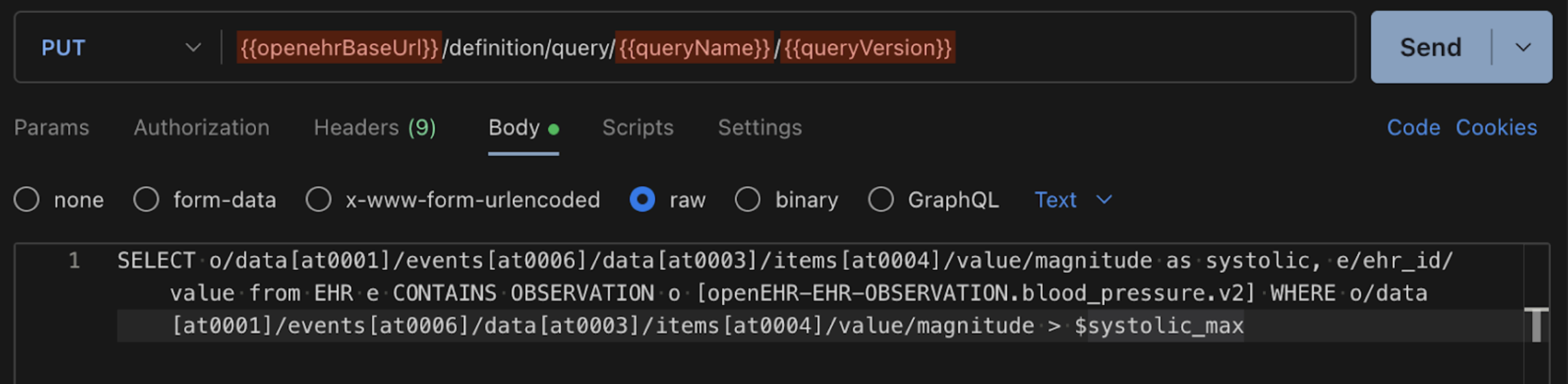
Click Send and it should return a 200 OK request. This means that the query is successfully stored.
3. Execute the stored query
After you store a query, you can run it through the GET or POST execute stored query endpoints without sending the AQL again.
The GET request is usually used for smaller queries, while the POST request is used for bigger queries.
Using the POST:
POST {{openehrBaseUrl}}/query/{{queryName}}By replacing it with the correct queryName that was used above and also in the body, mention the query parameter with the value.
{
"query parameters": {
"systolic_max": 140
}
}
The POST request is used more often and is also recommended since it avoids URL overflow.
Click Send and you should get back all the systolic blood pressure observations which are above 140.
Lesson summary
In this lesson, we covered the difference between running AQL ad-hoc versus saving it as a stored query for reuse. Ad-hoc queries are for quick testing, while stored queries save AQL on the server, so you can run it again later without writing it.
To make stored queries more practical in real scenarios, we reinforced how query parameters keep stored queries flexible, so that the same stored query can work across different archetypes, filters, or runtime values.