
Clinical Workflows
Configure Epic launch, CDS Hooks, and clinical workflow credentials.
Clinical Workflow connections are used when a provider organization wants your app available inside the EHR. For Epic, the same connection detail page brings together SMART App Launch and CDS Hooks configuration.
Open Connections in the dashboard, then choose Epic under Clinical Workflows.
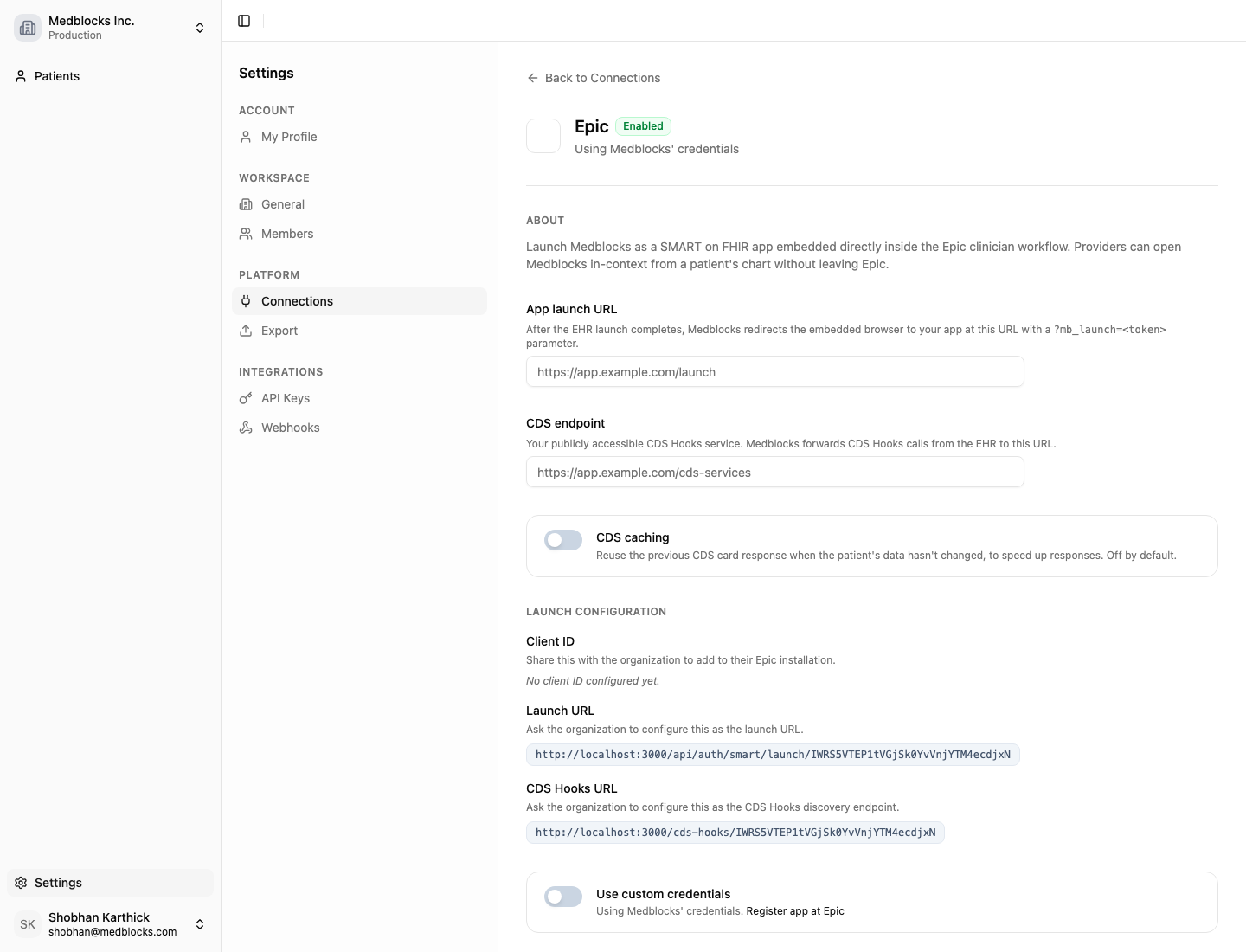
What the page shows
The app launch URL is where Medblocks sends the clinician after the EHR launch succeeds. This is usually a route in your app that accepts a Medblocks launch token and loads the clinical workflow with patient context already attached.
The CDS endpoint is your service for returning CDS Hooks cards. If your product only needs a full embedded app, you can start with SMART launch. If it also needs to show recommendations inside native EHR moments, add CDS Hooks.
The Launch URL and CDS Hooks URL are the values to share with the EHR administrator. They are generated for this workspace and provider, so keep Sandbox and Production values separate.
When the connection uses your own credentials, Medblocks shows the Redirect URI, JWKS URI, and Client ID values needed by the EHR developer setup. Medblocks still handles the server-side launch exchange, but the upstream app identity belongs to your organization.
Configure the Epic launch
- Add your app launch URL. This is where Medblocks sends the clinician after the EHR launch succeeds.
- Add your CDS endpoint if you want Medblocks to forward CDS Hooks calls to your service.
- Share the Launch URL and CDS Hooks URL with the Epic administrator.
- Turn on custom credentials if your organization owns the Epic app registration.
- Save the connection.
The launch returns to your app with a Medblocks launch token. Your backend can use that token to resolve the launch context and continue the clinician workflow.
Not sure if this fits you?
Tell us what you're building and we'll show you exactly what you can integrate.
Next steps
With the Epic launch configured, build the in-EHR experience. The Clinician workflow section walks through SMART App Launch and CDS Hooks end to end.
See also
How is this guide?